BASE STATION SETTINGS
72
1. In/Out-bound Audio Volume
Schedules
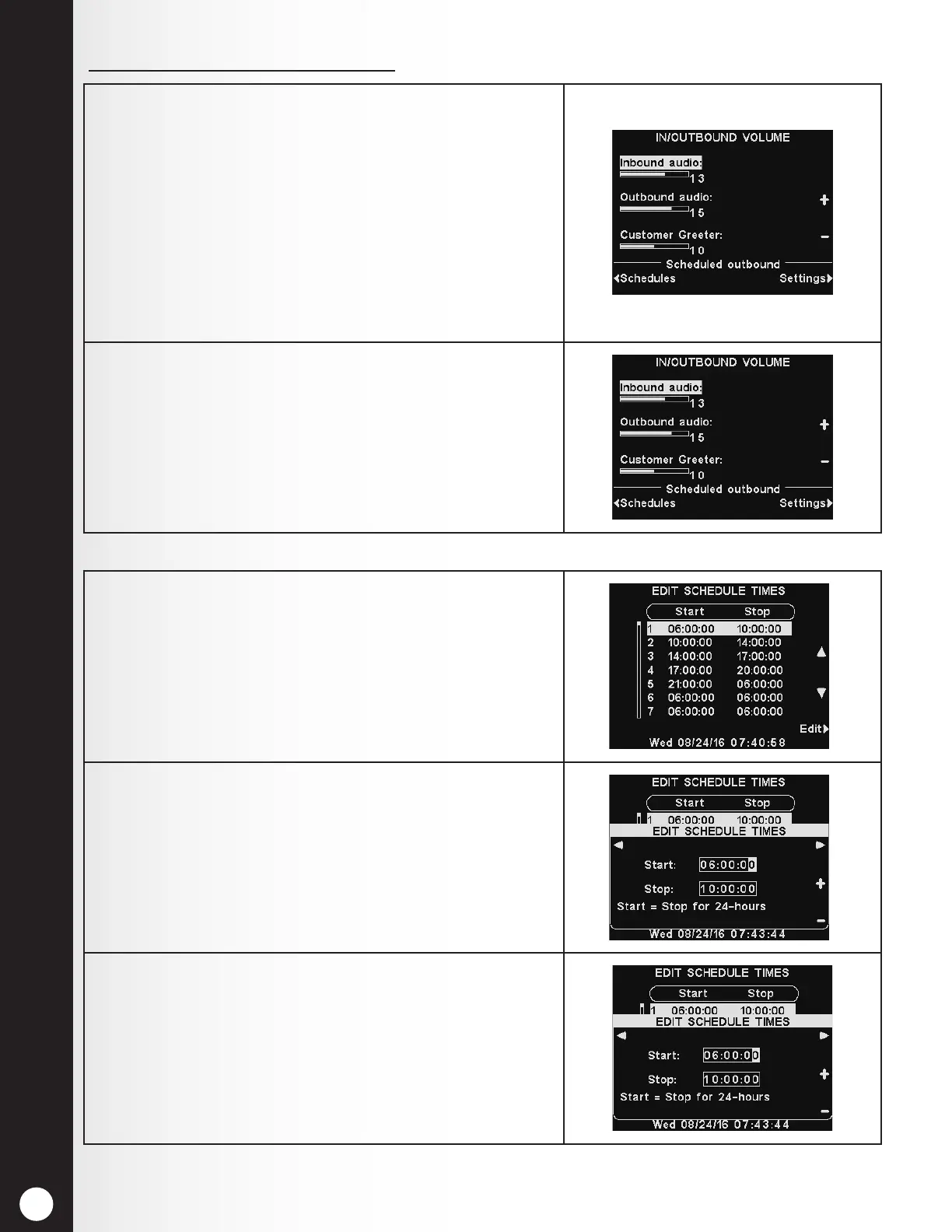
1. On the IN/OUTBOUND VOLUME display, select which
volume you would like to adjust, and then use the +
and − buttons to raise and lower the volume level.
The rst two settings adjust the audio level to and
from the outside speaker/microphone and the third
setting will set the level of the outbound Customer
Greeter message.
When a volume is set to 0, the function is turned
off. For dual-lane operations, these settings will be
available for Lane 1 and Lane 2.
2. To schedule automatic volume level changes to the
outside speaker, select Schedules and then Settings.
Note: This Outbound audio level will be active
whenever any scheduled outbound audio level is not
enabled.
1. There are 7 possible time periods. These time periods
will only apply to scheduled outbound volume level
settings. They will not affect other message schedules.
To select a time period to be edited, use the ▲(up) and
▼(down) buttons to scroll through the available time
periods. When the desired time period is highlighted,
press the Edit button.
2. On the drop-down EDIT SCHEDULE TIMES display, to
edit the Start or Stop time, use the ◄ and ► buttons
to move the highlight in the Start or Stop eld, and
use the + and − buttons to change the highlighted
numbers.
Note: Times are in 24 hour format.
3. To move from one eld to the other, repeat pressing
the ◄ or ► button until the highlight moves from one
eld to the other.
To save these settings, press the Back button.



 To Next Page