BASE STATION SETTINGS
73
Settings
Schedule
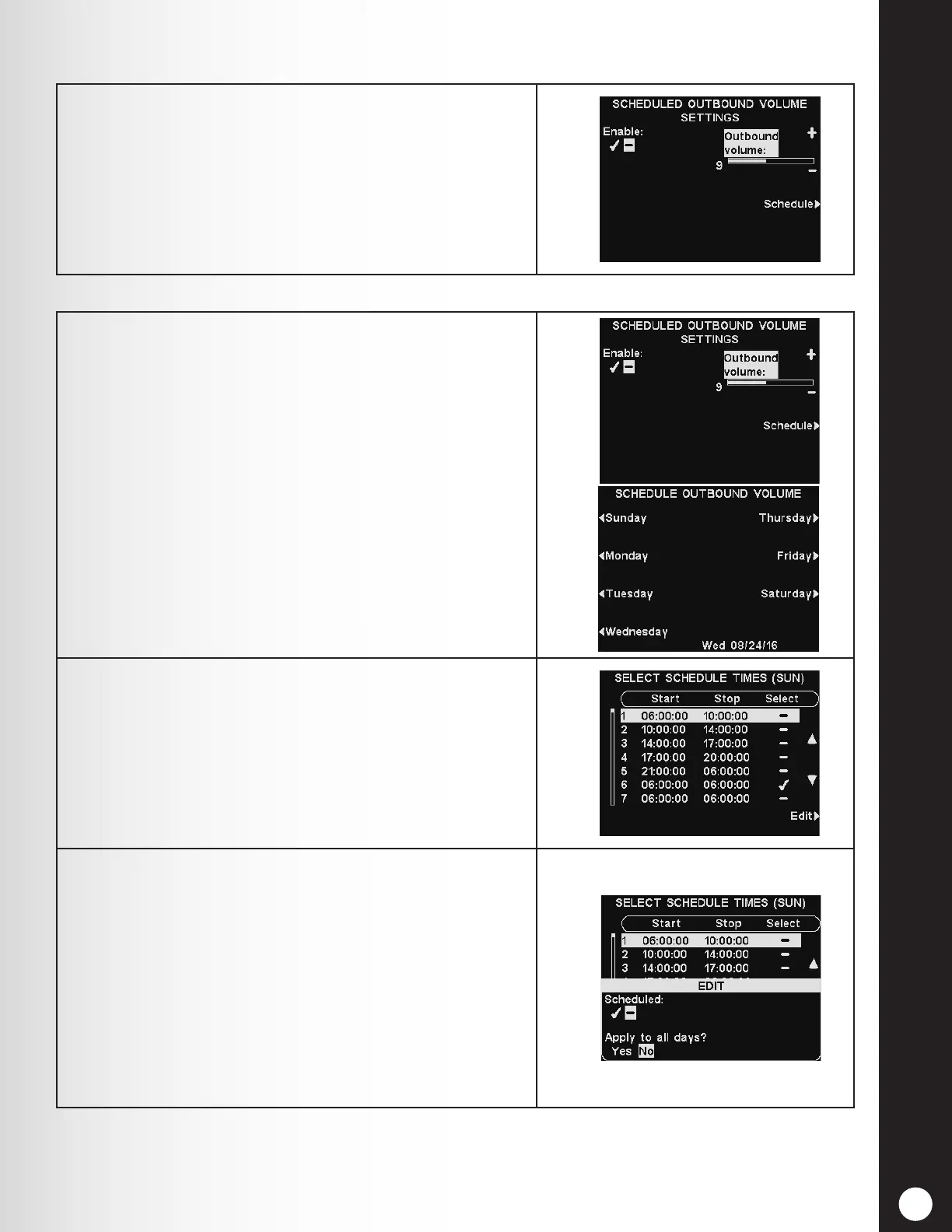
To raise or lower an outbound volume level that is active
during selected days and times, use the + and − buttons
for Outbound volume.
Note: This Outbound volume level will only be active
during scheduled days and times, and only if it is enabled.
To enable this Outbound volume level during scheduled
times, select Enable to highlight the ✔.
1. To select days when these outbound volume settings
can be enabled, on the SCHEDULED OUTBOUND
VOLUME SETTINGS display, select Schedule.
On the SCHEDULE OUTBOUND VOLUME display,
select the day you want to schedule the outbound
volume setting.
2. On the SELECT SCHEDULE TIMES display, select the
time period you want to apply to this day by pressing
the ▲ (up) and ▼(down) buttons to scroll through the
7 available time periods.
When the desired time period is highlighted, press the
Edit button.
3. On the EDIT display, press the Scheduled button to
highlight ✔ (on) or − (off) for the selected time period.
If you want the outbound volume setting to be on or
off during this time period every day, press the Apply
to all days? button to highlight Yes.
If No is highlighted, only the selected day will be
affected by this change.
If you need help, press the Help button. To save these
settings, press the Back button.



 To Next Page