Connections 8
Doc: HMSI-168-92 Rev: 3.00Netbiter EasyConnect Gateway User Manual
2.2 Netbiter EC220
2.2.1 Terminal Block (12-pin)
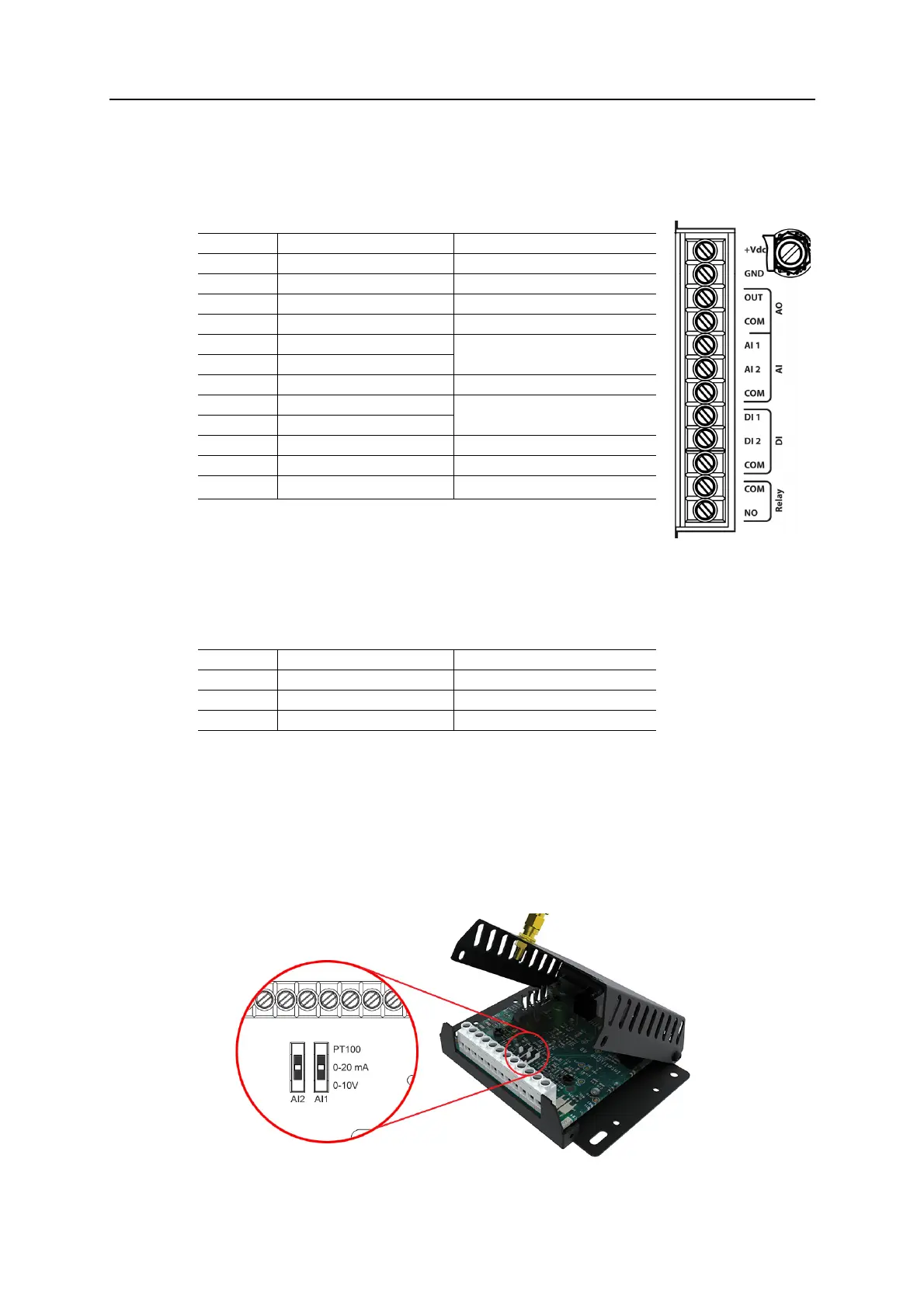
Analog Input Configuration Switches
ThefunctionofeachanaloginputcanbeselectedwithaninternalDIPswitch.Thedefault
settingisPT100(temperaturesensor).
1. Unscrewthetwotopscrews(A)usingaT10torxscrewdriver.
2. Loosenthetwolowerscrews(B)butdonotremovethem.
3. Liftthecovercarefully.Takecare
nottodamagetheantennacable.
4. Settheswitchtomatchthedesiredfu nctionfortheanaloginput.
5. Replacethecover,againtakingcarenottodamagetheantennacable.
6. Re‐tightenall4screws
.
Pin Function Note
+Vdc Power 12–24 VDC
GND PE ground
AO:OUT Analog output 0–10 VDC
AO.COM Analog output common Internally connected to GND
AI:AI 1 Analog input #1 PT100, current or voltage
(selected with internal switch)
AI:AI 2 Analog input #2
AI:COM Analog input common Internally connected to GND
DI:DI1 Digital input #1
Low = 0–1 VDC, High = 9–24 VDC
DI:DI2 Digital input #2
DI:COM Digital input common
Relay:COM Relay output common
Relay:NO Normally open connected
Rated load: 1 A @ 24 VDC
a
a. The relay output must be supplied from an isolating transformer using a secondary
listed fuse rated at maximum 3.3 A and minimum 30 VDC.
Setting Function Note
PT100 Temperature sensor -50 to +150 °C (default)
0–20 mA Current Input resistance 270
0–10 VDC Voltage Input resistance 280














 To Next Page