Local Configuration 42
Doc: HMSI-168-92 Rev: 3.00Netbiter EasyConnect Gateway User Manual
9.4.4 Proxy Servers
TCP Ports
Firstcheckthattheproxyserverissetuptouseatleastoneofthefollowingports:
•Port443
•Port80
•Port5222
Ifnot,thegatewaywillautomaticallytrytouseaportthatisopentotheInternet.
! TheportslistedabovemustbeusedtocommunicatewithNetbiterArgos.Aport on
theLANsidemighthaveanotherportdefinedfortheproxy,butstillneedstouseone
oftheaboveportsontheWANside(portforwarding).
Proxy Types
Thetypeofproxiesthatcanbeusedare:
• HTTP
•Socks4(a)
•Socks5
9.4.5 Local Proxy Setup
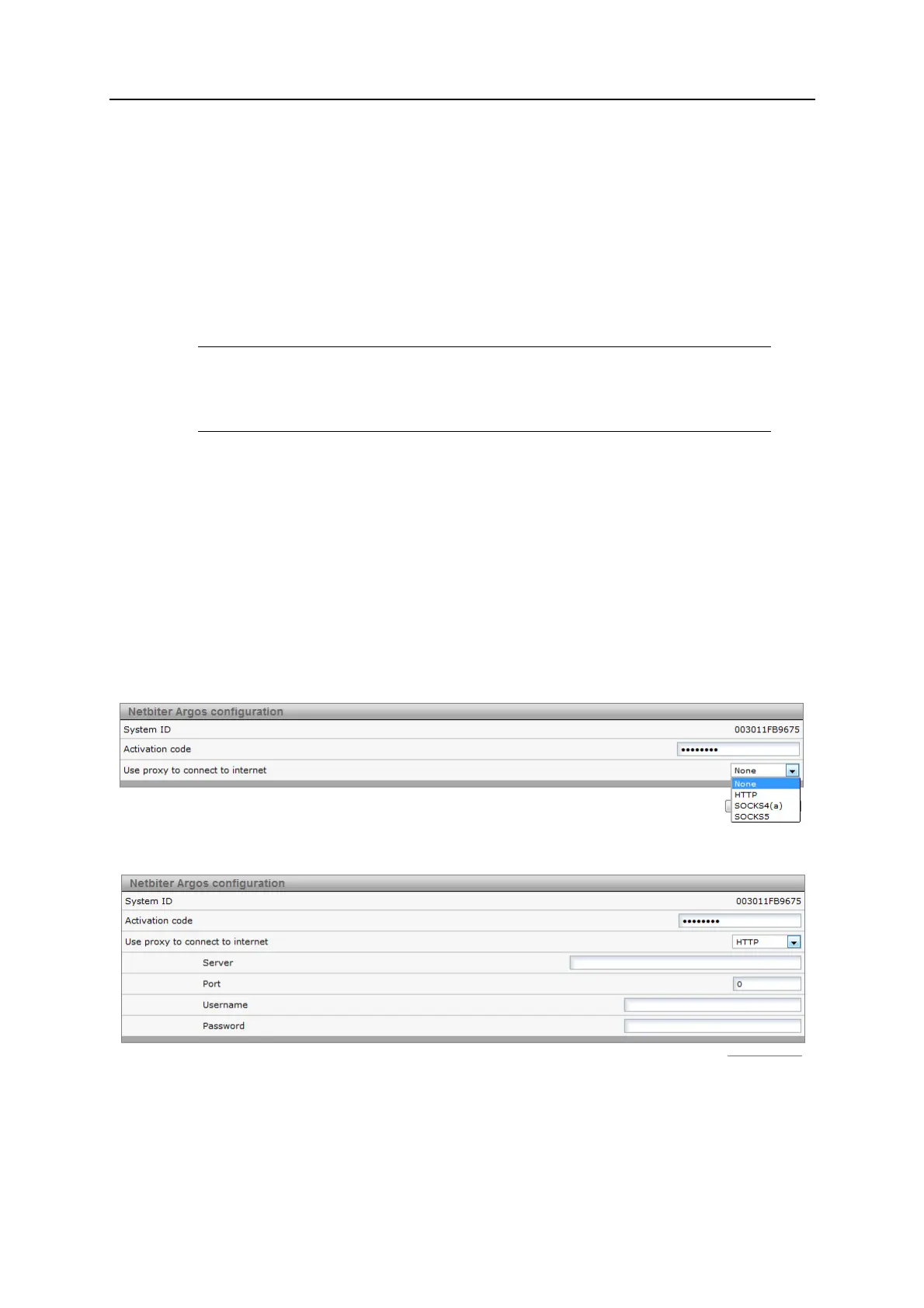
1. SelectNetbiterArgosinthelocal configurationmenu.
2. Selecttheproxytypetouse.
3. Entertheproxyserveraddress.
4. Entertheporttouse ontheLANside.Ifleftblank,thiswillbesettoport443.
5. Entertheusernameandpassword(ifrequired).
6. ClickSavesettings.














 To Next Page