MAN1032-10-EN_EXL6_UserManual
March 12, 2020 161 | 191
19.2 Settings
To use the fail – safe feature, the user needs to do the following:
1. From Cscape, create AUTOLOAD.PGM for the application program using ‘Export to
Removable Media’.
2. Place the Removable Media with AUTOLOAD.PGM in the device.
3. Set the ‘Enable AutoLoad’ option in the device to YES.
4. Set the ‘Enable AutoRun’ option to YES if the controller needs to be placed in RUN mode
automatically after automatic restore of data or AutoLoad operation.
5. Backup the current Battery-Backed RAM Register contents in On-Board Flash memory
using System Menu options.
19.3 Backup / Restore Data
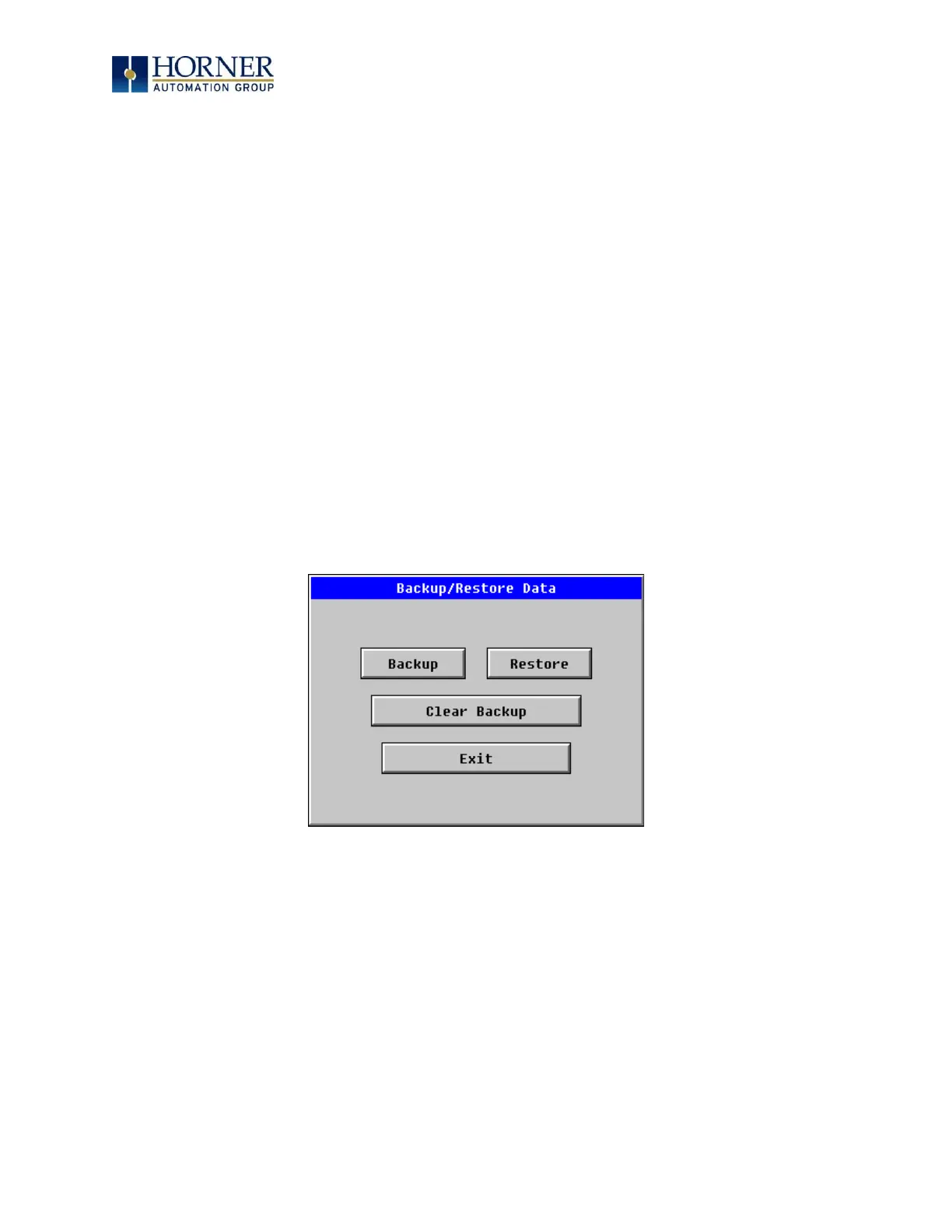
Selecting this option brings up a screen having four operations:
- Backup OCS Data.
- Restore OCS Data.
- Clear Backup Data.
- Exit
Figure 19.2 – Backup / Restore Data


 To Next Page