MAN1032-10-EN_EXL6_UserManual
March 12, 2020 45 | 191
5.18 Clone Overview
‘Clone Unit’ feature allows the user to “clone” the OCS of the exact same model. This feature
“clones” application program and unit settings stored in battery-backed RAM of an OCS into
the RM (refer Removable Media, Chapter 10, for details on using RM). It can then be used to
clone a different OCS (exact same model).
This feature can be used when:
- Replacing an OCS by another unit of the same model.
- Duplicating or “clone” units without a PC.
Clone
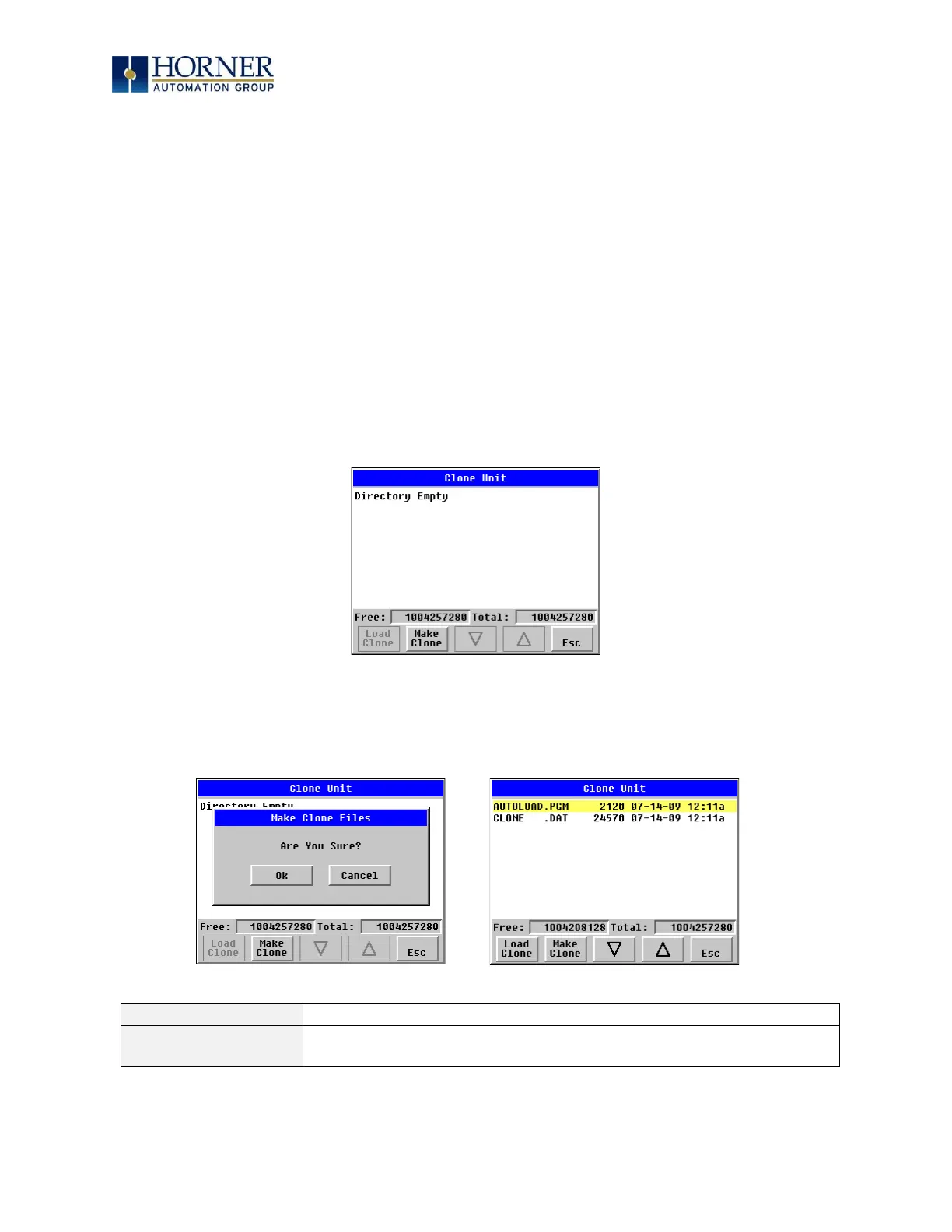
Selecting “Clone Unit” menu will open the following menu screen:
NOTE: Free/Total – displays number of free and total bytes in Removable Media.
Selecting Make Clone brings up the confirmation screen. Upon confirmation, the OCS will
create two new files in the root directory of the Removable Media Drive as shown below:


 To Next Page