MAN1032-10-EN_EXL6_UserManual
March 12, 2020 83 | 191
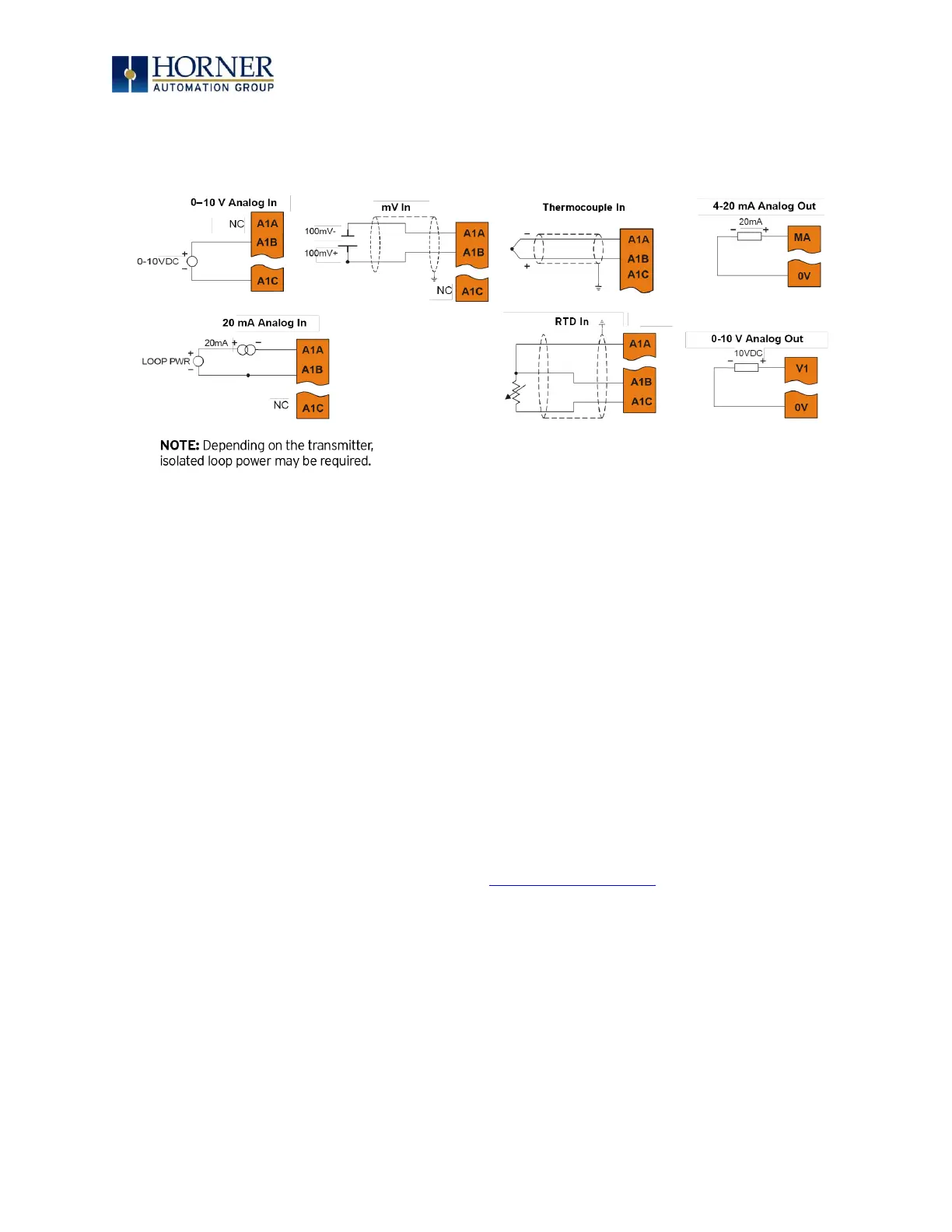
3) Ensure the proper wiring is used for each of the 3 pins A , B, and C on the Universal
Analog Inputs as seen in the reference image below
8.10 Analog Outputs
NOTE: Refer to the datasheet for EXL6 OCS model being used for details on jumper settings.
The analog outputs on EXL6 OCS devices provide high resolution voltage or current outputs.
The voltage or current selection is controlled with jumpers and configuration settings in Cscape.
NOTE: Each channel can be separately configured for voltage or current mode.
When the controller is stopped, the operation of each output is configurable. The outputs can
hold the state they were in before the controller stopped or they can go to a predetermined
value. By default, analog outputs are set to a value of zero (0).
For more information on Stop State, refer to the Cscape Configuration chapter.


 To Next Page