MAN1032-10-EN_EXL6_UserManual
March 12, 2020 48 | 191
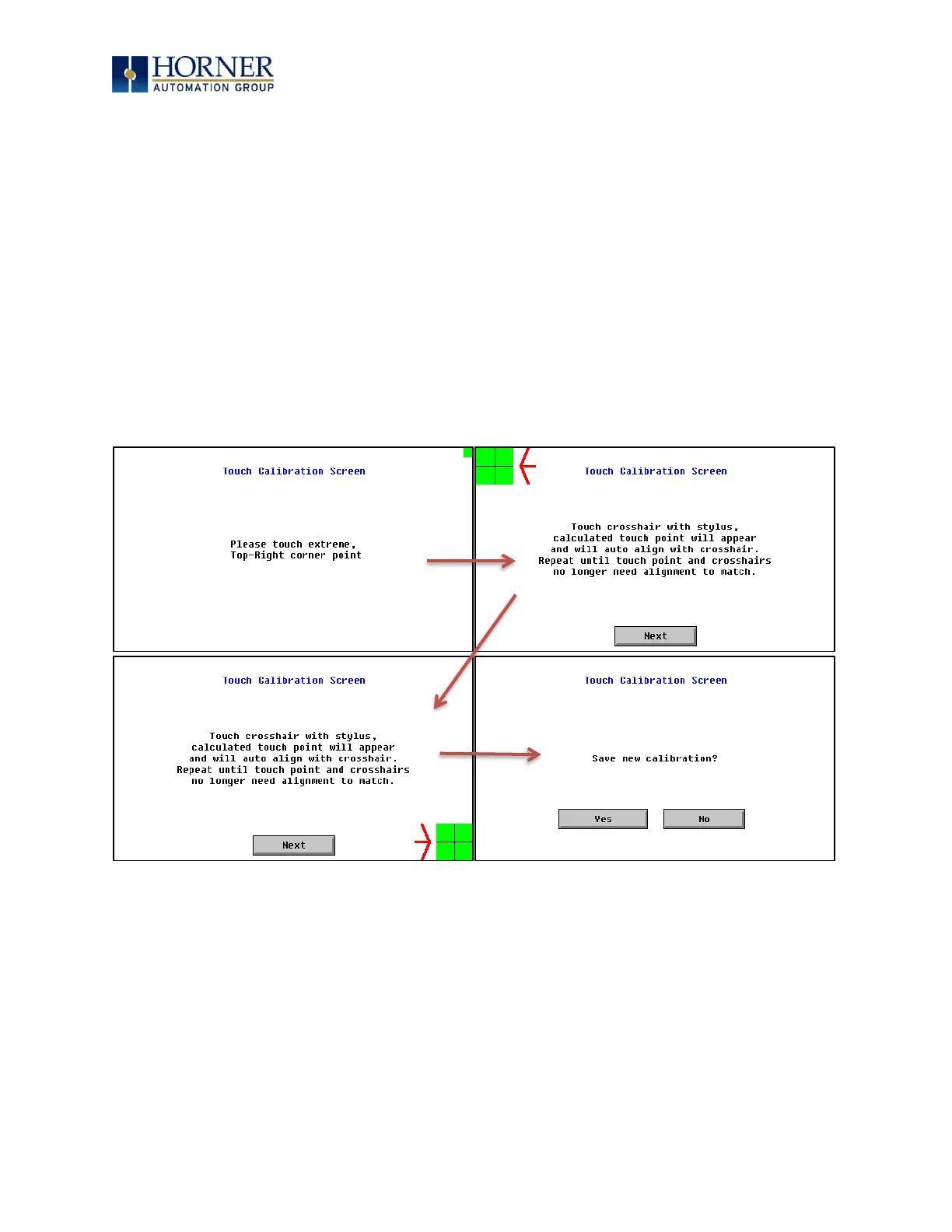
5.21 Touch Calibration Screen
The touch screen is calibrated at the factory and rarely needs modification. However, if actual
touch locations do not appear to correspond with responding objects on the display, field
adjustment is available. To access the field adjustable touch screen calibration dialog, press
the far upper right corner of the touchscreen to bring out the function keys, then press and
hold the SYSTEM key for longer than five (5) seconds and a menu with several advanced
functions will appear. Select TOUCH CALIBRATION to calibrate the touch screen.
For best results in screen calibration, use a stylus with a plastic tip. When the crosshair
appears, touch the center of the crosshair as exactly as possible and release. A small
“+” should appear and will move closer to the center of the crosshair. Once it has done
so and disappeared again, repeat the process until “+” appears in the center of the
crosshair. Then move on to the next step.
Figure 5.4—Screen Calibration


 To Next Page