MAN0964-13-EN_XL4_UM
A u g u s t 6 , 2 0 2 1 P a g e 32 | 194
5.7 View I/O Slots
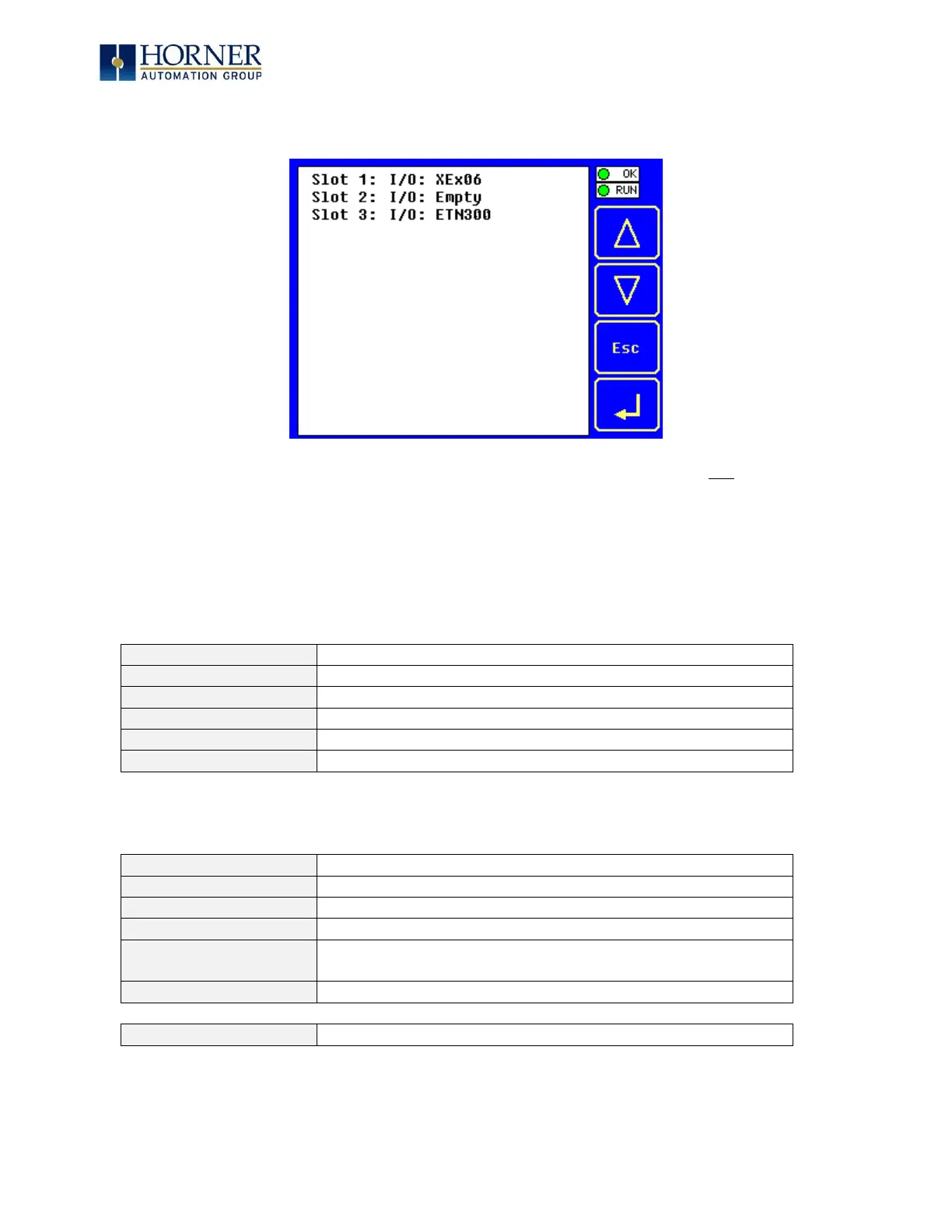
The View I/O Slots Sub-Menu displays three System Settings, all of which are not editable.
Internal to the XL4 OCS, there is a CPU board, and up to two installed modules. Model XE100
has no installed I/O or COM modules. All other models have an I/O module and can have a user-
installed COM module.
Depending on which I/O module is installed and which I/O module has been configured by
Cscape, one of the following six System Settings should appear for Slot 1:
= No I/O module installed or configured
= Unsupported I/O module installed
= No I/O module installed but an I/O module is configured
= yy I/O module installed but no I/O module configured
= yy I/O module installed but another I/O module configured
= yy I/O module installed and configured properly
Depending on the COM module that is installed and the COM module that has been configured
by Cscape, one of the following six System Settings appears for Slot 2:
= No COM module installed or configured
= Unsupported COM module installed
= No COM module installed but a COM module is configured
= z COM module installed but no COM module configured
= z COM module installed but another COM module
configured
= z COM module installed and configured properly
= ETN300 has been configured through Cscape



 To Next Page