MAN0964-13-EN_XL4_UM
A u g u s t 6 , 2 0 2 1 P a g e 84 | 194
8.8 Universal Analog Inputs
NOTE: See the Datasheet for the XL4 OCS model you are using for jumper settings and see the
appropriate pages in this manual (see Index) for details on how to use Cscape to configure the
digital filtering.
The universal analog inputs provide a high resolution and a very flexible interface for a variety
of analog inputs. These inputs include voltage, current, thermocouple, RTD, and millivolt. Each
channel can be configured separately using jumpers and configuration settings in Cscape. The
HE-XC1E6 does not require jumpers and only requires a configuration parameter in Cscape.
Like the standard analog inputs, these inputs have a digital filter that can be used to filter
electrical noise that may be unavoidable in some installations. The downside to digital filtering
is the inputs will respond more slowly to sudden changes in the actual input.
The Universal Analog Inputs on the Model 6 I/O board are unique from other Horner XL-series
input/output cards in that they are configurable through the module configuration instead of
having to change jumper settings in order to setup the input type.
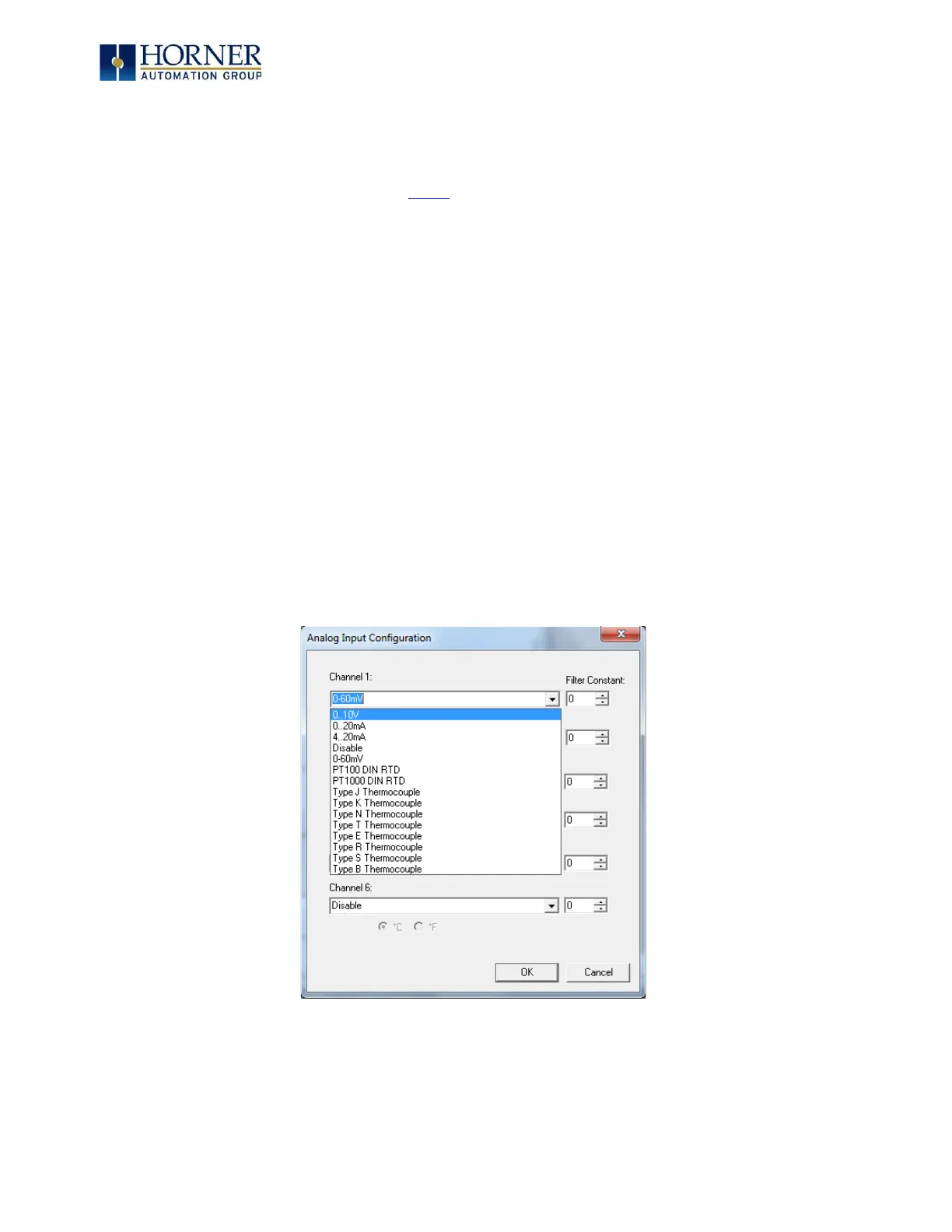
To configure the Universal Analog input type:
1) Select Analog In to access the Analog Input Configuration menu.
2) Select any of the Analog input types from the dropdowns by clicking the down arrow
beneath each corresponding Channel, as seen below:
Figure 8.8 – Analog Input Configuration Screen



 To Next Page