19
2. Mains and Internal Plug Connections
Mains Power Supply
Before connecting supply wiring, ensure supply is safely isolated.
Route supply cable to operator taking care not to damage
insulation.
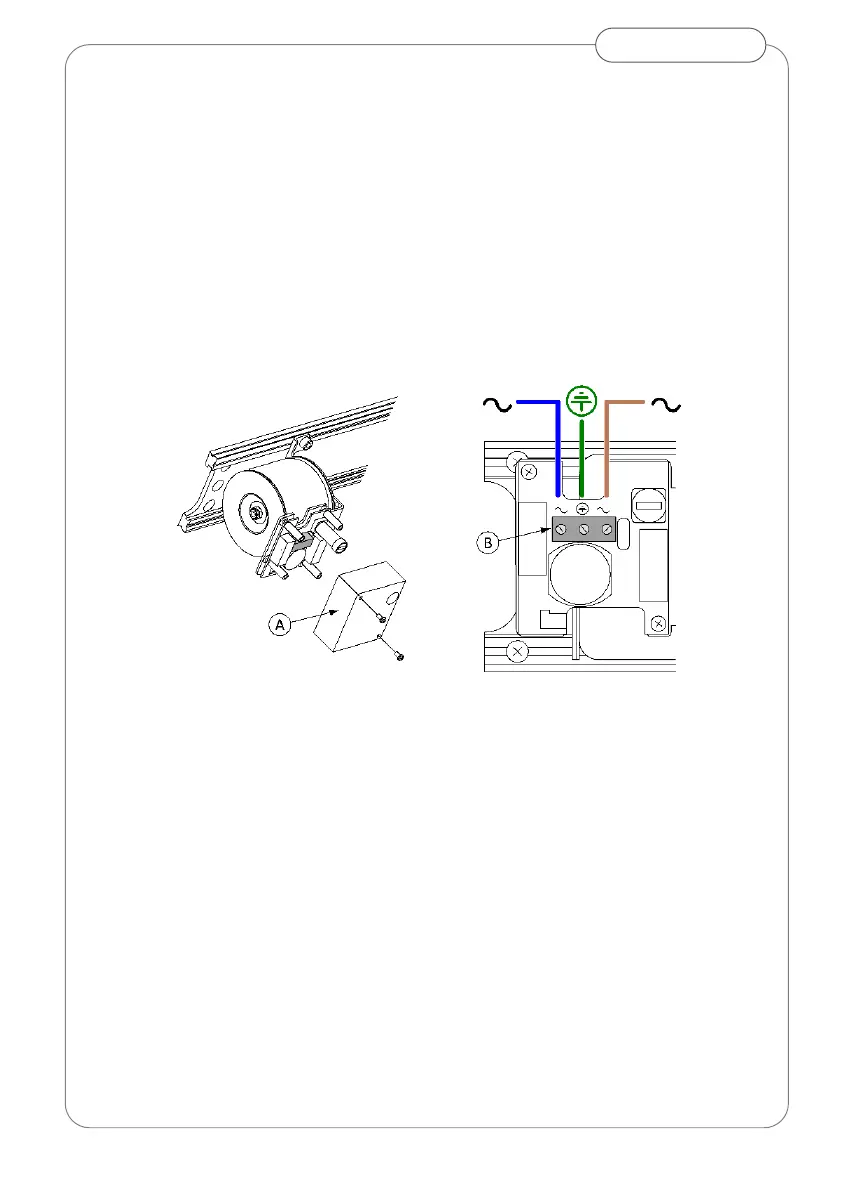
Remove cover (A)
Securely connect the power supply and ground via terminals (B)
Replace and secure cover (A)
Do Not Switch supply on at this stage
Fig.20 Mains supply connection
Internal plug connections
With power off, connect plugs (Fig19) for:
• Logic switch [H]
• ON-OFF switch [G]
• Transformer [E]
• Motor [O]
• Encoder [N]
ATTENTION:
To avoid irreversible damage to control ensure power supply is off
whenever connecting/disconnecting plugs or peripheral device wiring.


 To Next Page