EasyManua.ls Logo

Horton 4100-PLUS - Set-Up Safety Sensors

Horton 4100-PLUS
94 pages
Print Icon
To Next Page IconTo Next Page
To Previous Page IconTo Previous Page
Loading...
31
8. Set-up Safety Sensors
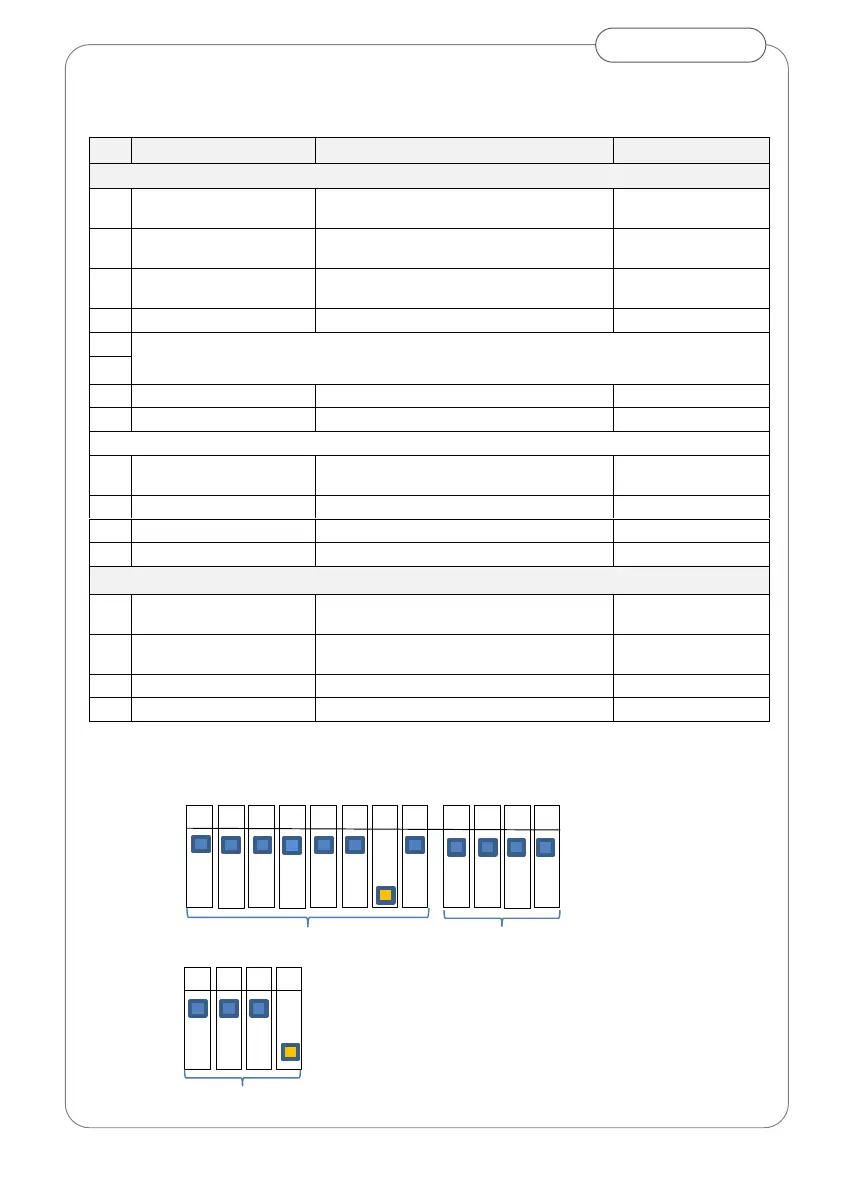
Set DIP switches*
ID
Parameter
Range
Setting
Master
A1
Non-detection zone (h)
Off =15cm, On =35cm
Off
or to suit
A2
Frequency setting
On =1, Off =2
Off
or to suit
A3
Immunity
Standard = Off, High = On
Off
or to suit
A4
Presence timer
Detection time Off=60sec , On= infinite
Off
A5
Not Used
A6
A7
Test input
Test type = test ‘Low’
ON
A8
Test input delay
Test response = 10ms
Off
B1
Non detection zone (h)
In addition to A1 Off = 0cm, On = +10cm
Off
or to suit
B2
Detection zone width
Wide (4 spots) Off, Narrow (2 spots) On
Off
B3
Disable Self-monitoring
On =disable, Off = enable
Off
B4
Mounting side
Off=Closing face, On = opening face
Off
Slave
B1
Non detection zone (h)
In addition to A1 Off = 0cm, On = +10cm
Off
or to suit
B2
Detection zone width
Wide (4 spots) = Off, Narrow (2 spots) =
On
Off
B3
Disable Self-monitoring
On =disable, Off = enable
Off
B4
Side of door installed
Off= Closing face, On = opening face
ON
Master
Slave
*Based on master sensor installed on closing face.

1
2
3
4
5
6
7
8
1
2
3
4
OFF
ON
B
A
1
2
3
4
OFF
ON
B