‘able
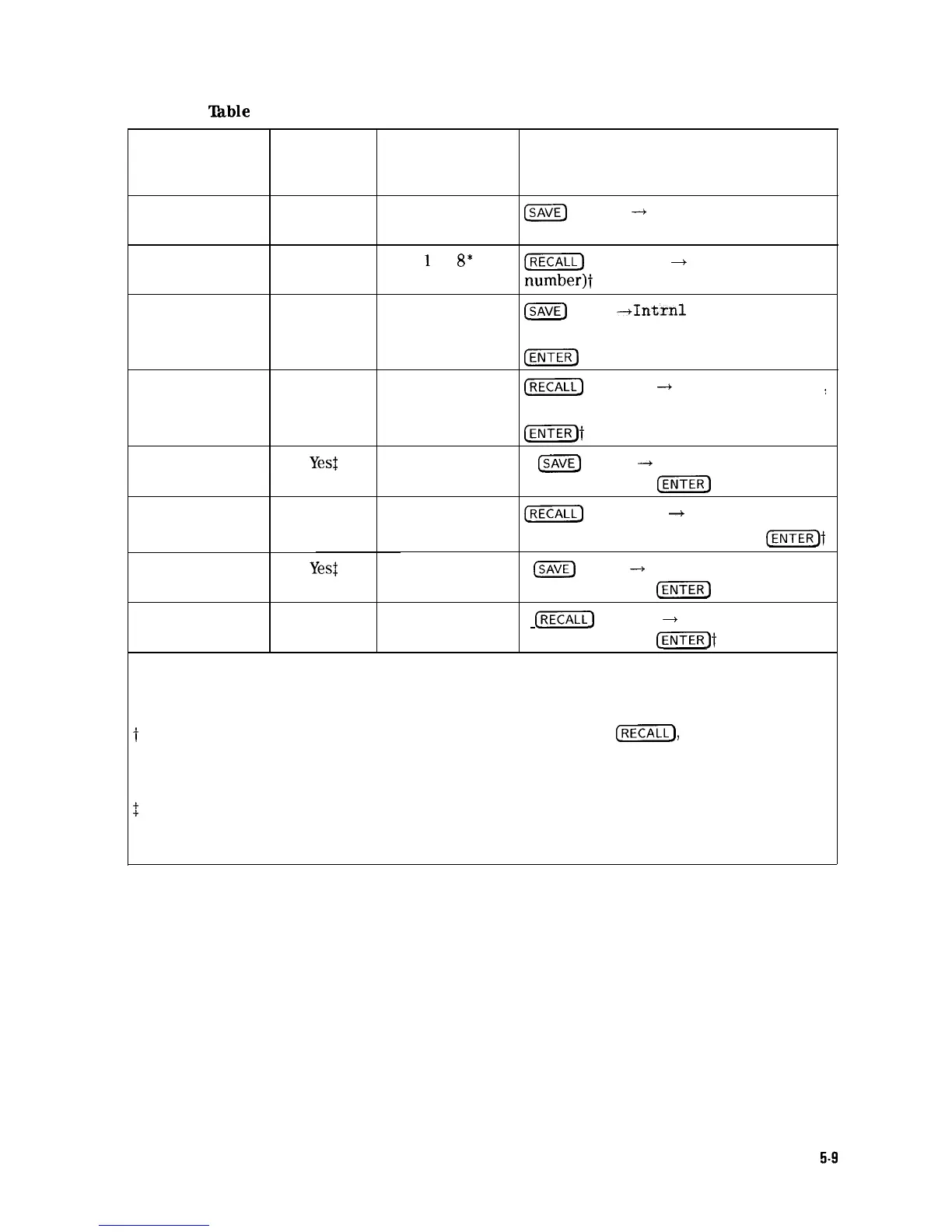
5-l. Summary of Save and Recall Operations, Analyzer Memory
Operation Screen
Title
Available?
Register
Range
Key Sequence
save state
No
1 to 8
m
STATE
-+
INTRNL (register
number)
recall state
No
1
to
8*
I-1
INTERNAL
+
STATE (register
number)t
save trace
Yes
0 to MAX REG #
B
Trace
--+Intrnl
(TRACE A ,
TRACE B , or TRACE C ) (register number
@GiTE]
recall trace
Yes
0 to MAX REG #
(-1
Internal
-+
Trace (TRACE A
:
TRACE B , or TRACE C ) (register number
@iEqt
save limit-line
Yes$
0 to MAX REG #
m
Trace
-+
Intrnl LIMIT LINES
table
(register number)
CENTER)
recall limit-line
No
0 to MAX REG #
[RECALL)
Internal
+
Trace
table
LIMIT LINES (register number)
IENTER_)t
save amplitude
Yes:
0 to MAX REG #
ISAVE)
Trace
-+
Intrnl AMP COR
correction factors
(register number)
CENTER)
recall amplitude
No
0 to MAX REG #
[RECALL)
Internal
+
Trace AMP COR
correction factors
(register number)
l,ENTER)t
* Registers 1 through 8 are available for the user to save a state. State register 0 contains
the current state of the analyzer, state register 9 contains the previous state of the
spectrum analyzer.
t The alternate method for recalling data uses the key sequence:
fjj),
Catalog Internal,
CATALOG REGISTER , use the step keys or knob to highlight the item
to be recalled, LOAD FILE.
$
The screen title is displayed when cataloging the trace registers with
CATALOG REGISTER. The screen title is not recalled with the limit-line tables or
amplitude correction factors.
Using Analyzer Features
5-9



 To Next Page