Appendix A Parameters Shenzhen Hpmont Technology Co., Ltd
―130― HD30 Series Inverters User Manual
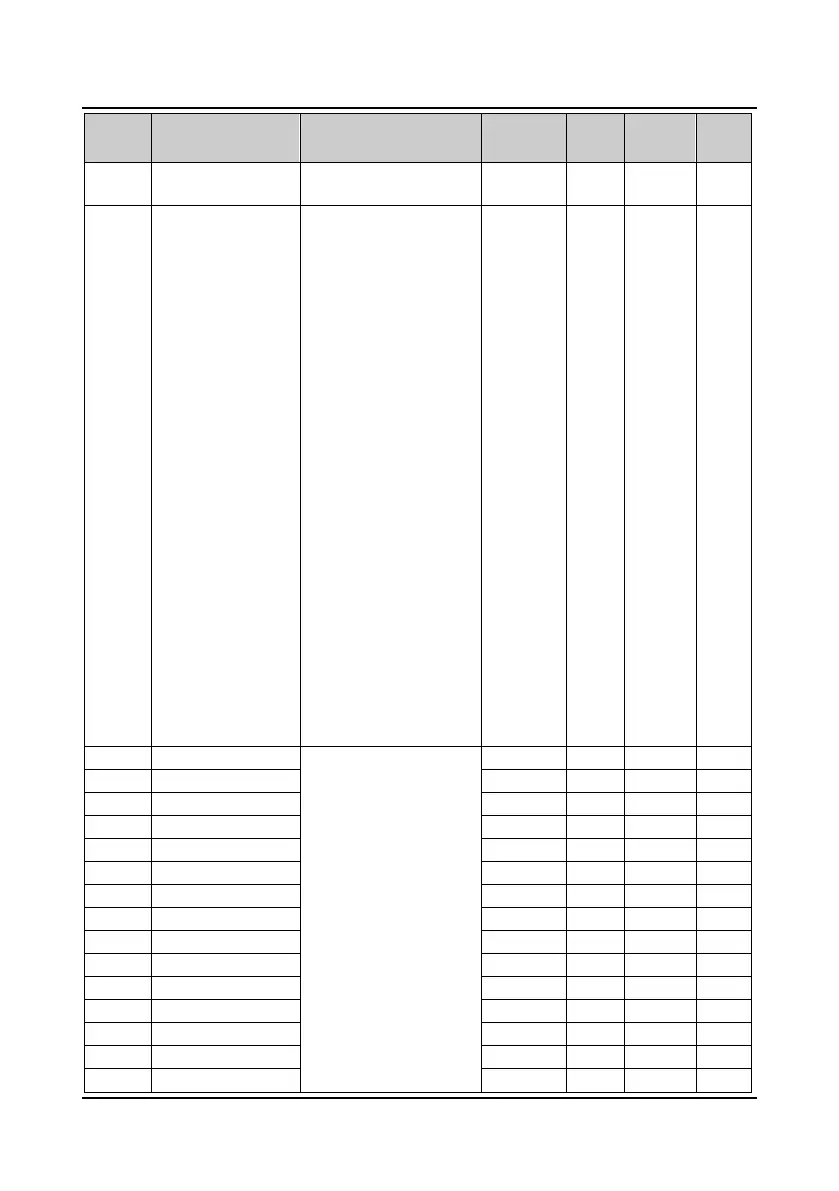
No. Name Range
Factory
Default
Unit
Modified
attributes
Setting
F06.15
Simple PLC control
selection
0: No PLC operation
1: Enabling PLC operation
0 1 ×
F06.16
Simple PLC operation
mode selection
Units: PLC operation mode
selection
0: Stop after single cycle
operation
1: Maintain the final value
after single cycle of PLC
operation
2: Cycle operation
Tens: PLC operation restart
mode selection after pause
0: Start from step 1
1: Continue to operate from
the step where the inverter
pauses
2: Continue to operate at the
frequency when the inverter
pauses
Hundreds: Save the PLC
status after power failure
0: Not be saved
1: Saved
Thousands: time unit
selection of the PLC step
0: Second (s)
1: Minute (m)
0000 1 ×
F06.17 Setting of PLC step 1
Units: PLC running
frequency selection
0: Multi- step frequency
command
1: Depend on F00.10
Tens: Operation direction
selection of PLC at different
step
0: Forward
1: Reverse
2: Depend on run command
Hundreds: Acc./Dec. time
selection of PLC at different
steps
0: Acc./Dec. time 1
000 1 ○
F06.19 Setting of PLC step 2 000 1 ○
F06.21 Setting of PLC step 3 000 1 ○
F06.23 Setting of PLC step 4 000 1 ○
F06.25 Setting of PLC step 5 000 1 ○
F06.27 Setting of PLC step 6 000 1 ○
F06.29 Setting of PLC step 7 000 1 ○
F06.31 Setting of PLC step 8 000 1 ○
F06.33 Setting of PLC step 9 000 1 ○
F06.35 Setting of PLC step 10 000 1 ○
F06.37 Setting of PLC step 11 000 1 ○
F06.39 Setting of PLC step 12 000 1 ○
F06.41 Setting of PLC step 13 000 1 ○
F06.43 Setting of PLC step 14 000 1 ○
F06.45 Setting of PLC step 15 000 1 ○


 To Next Page
 Loading...