Phone Basics 44
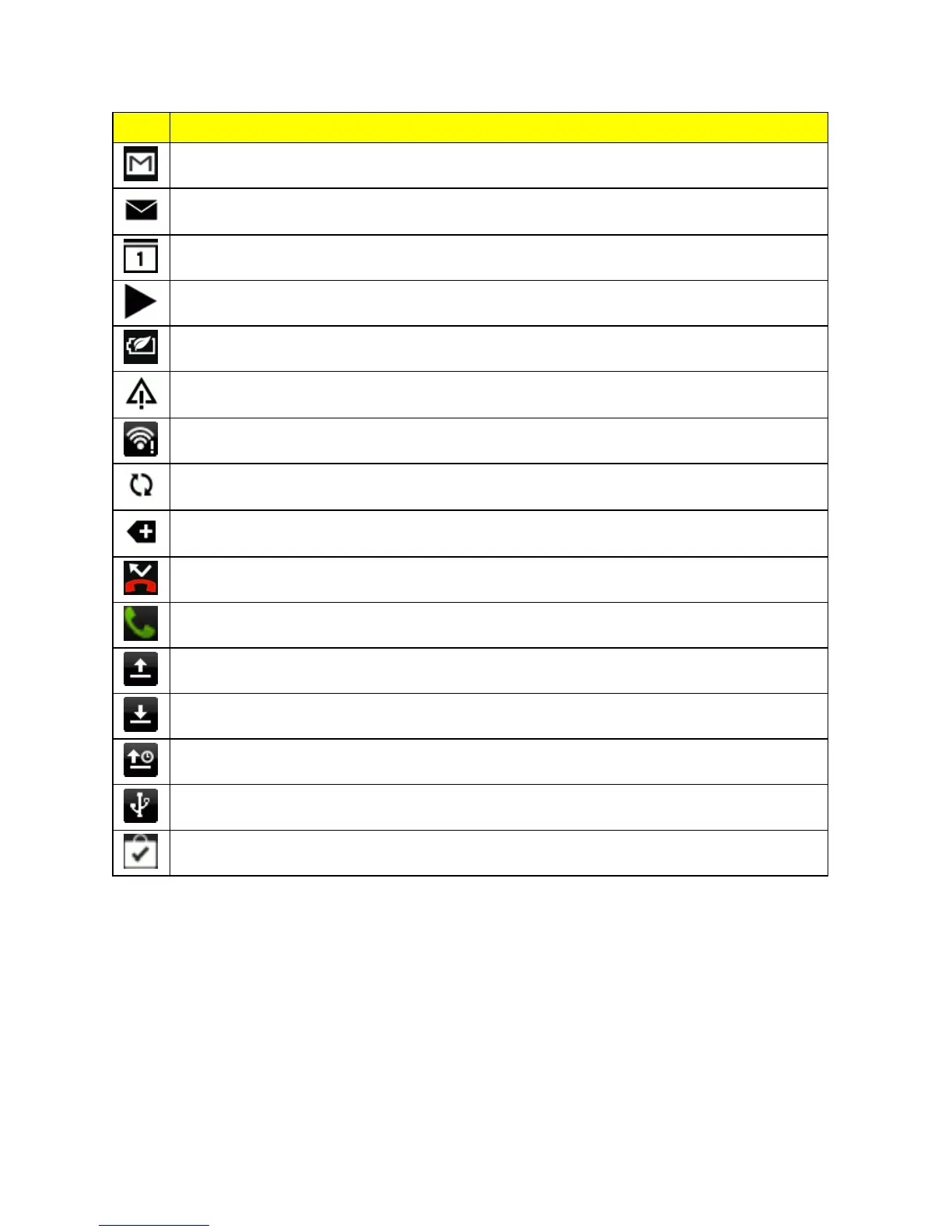
Icon Description
NewGmailmessage
NewMicrosoftExchangeActiveSyncorPOP3/IMAPemailmessage
Upcomingevent
Musicisplaying
Powersavermodeison
Generalnotification(forexample,syncerror)
Wi-Fiisonandwirelessnetworksareavailable
Datasynchronizing–connectedtoHTCSync
More(undisplayed)notifications
Missedcall
Callinprogress
Uploadingdata(animated)
Downloadingdata(animated)
Waitingtoupload
PhoneconnectedtocomputerviaUSBcable
DownloadedGooglePlayappinstalledsuccessfully
Notifications Panel
Whenyouseenotificationicons,opentheNotificationspaneltocheckoutdetailsofthenotifications
thatyou’vereceived.YoucanalsoquicklyaccesssettingsfromtheNotificationspanel.
1. Slidedownfromthetopofthescreentoopenthenotificationspanel.



 To Next Page