Camera and Video 154
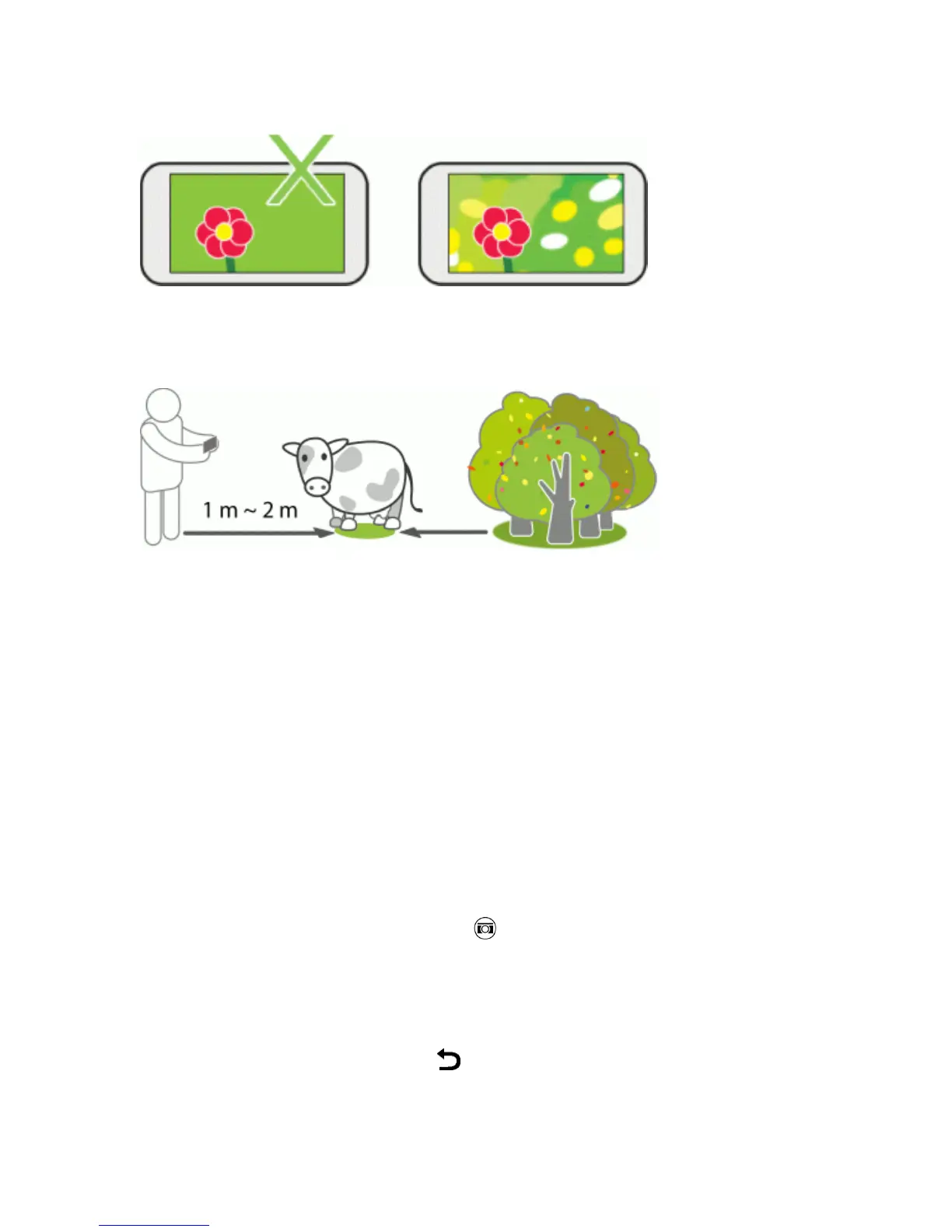
n Post-processingeffectsforDuocameramaynotworkifyoursubjectandbackgroundaretoo
closeorwhenyou'retakingaclose-upshot.So,mindthedistancebetweenyoursubjectand
yourbackground,aswellasthedistancebetweenthecameraandyoursubject.
Tip:StilllifephotographylooksgreatwithDimensionPlus™postprocessing.Ifyou'lluseDimension
Plus,however,youcanarrangeyoursubjectandbackgroundtobeclosertogetherandthedistance
betweenyourcameraandsubjectcanbeatleast25centimeters(10inches).
Tip:Duocameradoesn'tsupportzooming.
Take Continuous Camera Shots
Takephotosofmovingsubjects.Whetherit’syourkid’sfootballgameoracarrace,youcancapture
theaction.
Note:Makesurethatyou’reinAutoscenetousethisfeature.
1. OpenCamerafromthelockscreenorHomescreen.
2. SwitchtoCameramode.
3.
OntheViewfinderscreen,justtouchandhold .Thecameratakesupto20consecutiveshots
ofyoursubject.
4. Aftertakingtheshots,doanyofthefollowing:
l Tokeepjustonephoto,selectthephotothatyoulikethemost,andthentouchBEST SHOT.
l
Tosavethephotosasabatch,touch .


 To Next Page