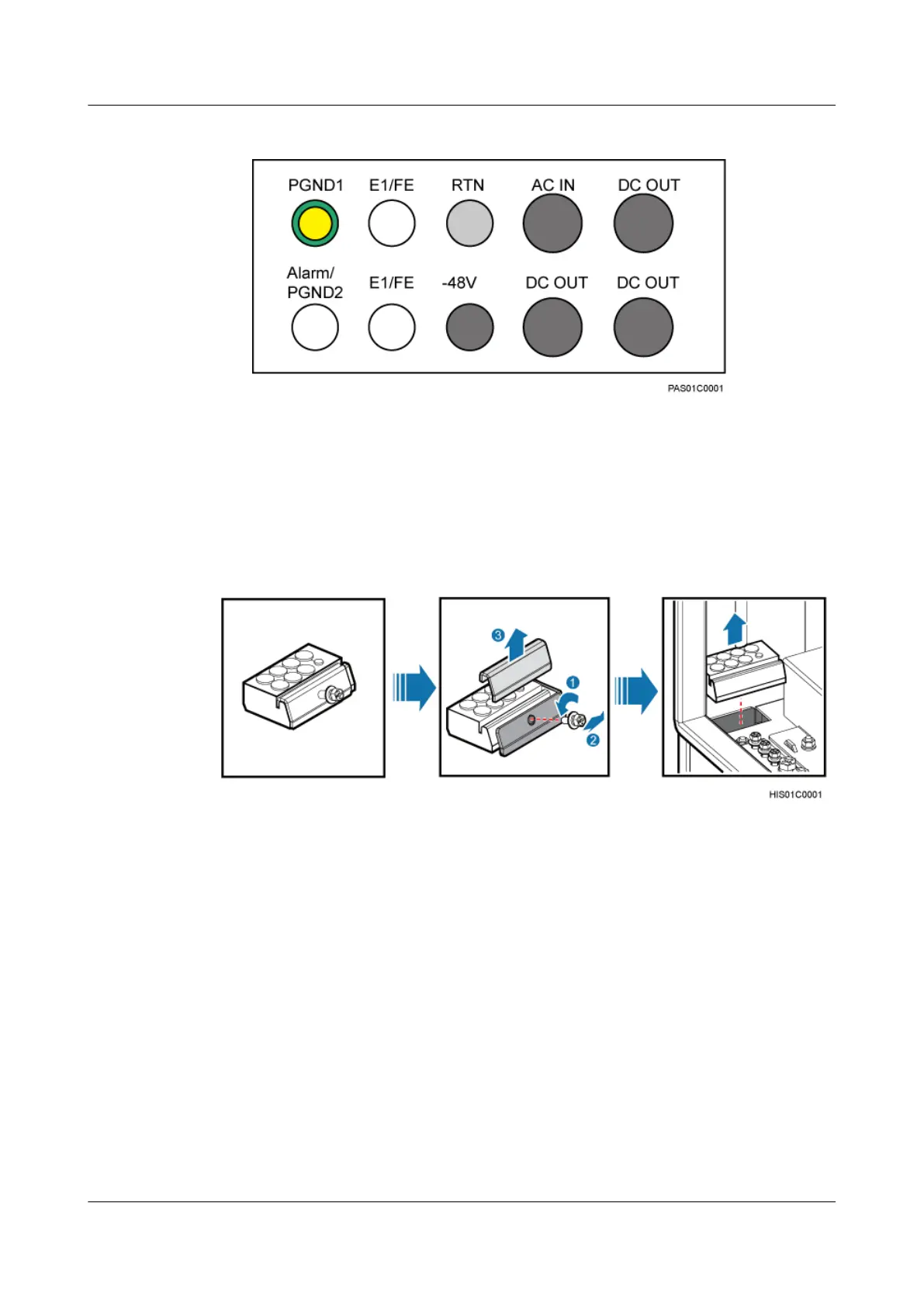
Figure 10-16 Cable holes in the right cable outlet module
Procedure
Step 1 Remove baffle plate and bolts from a cable outlet module, and then remove the cable outlet
module from the cable trough at the bottom of an OMB, as shown in Figure 10-17.
Figure 10-17 Removing a cable outlet module
Step 2 According to the labels near the cable holes in the cable outlet module, remove rubber caps from
cable holes, and then lead each cable through a corresponding cable hole.
Step 3 Place the cable outlet module in the cable through at the bottom, and then install the baffle plate
and bolts, as shown in Figure 10-18.
DBS3900 (Ver.B)
Installation Guide
10 Outdoor Scenario with AC Power Supply (BBU Installed
in an OMB)
Issue 06 (2011-09-15) Huawei Proprietary and Confidential
Copyright © Huawei Technologies Co., Ltd.
342



 To Next Page