Table 6-3 SLPU-related cables
Cable One End The Other End Remarks
Surge protection
transfer cable for
monitoring signals
RJ45 connector RJ45 connector Grey shielded
straight-through
cable
External dry-contact
monitoring signal
cable
Bare wire Depending on the
external equipment
-
Procedure
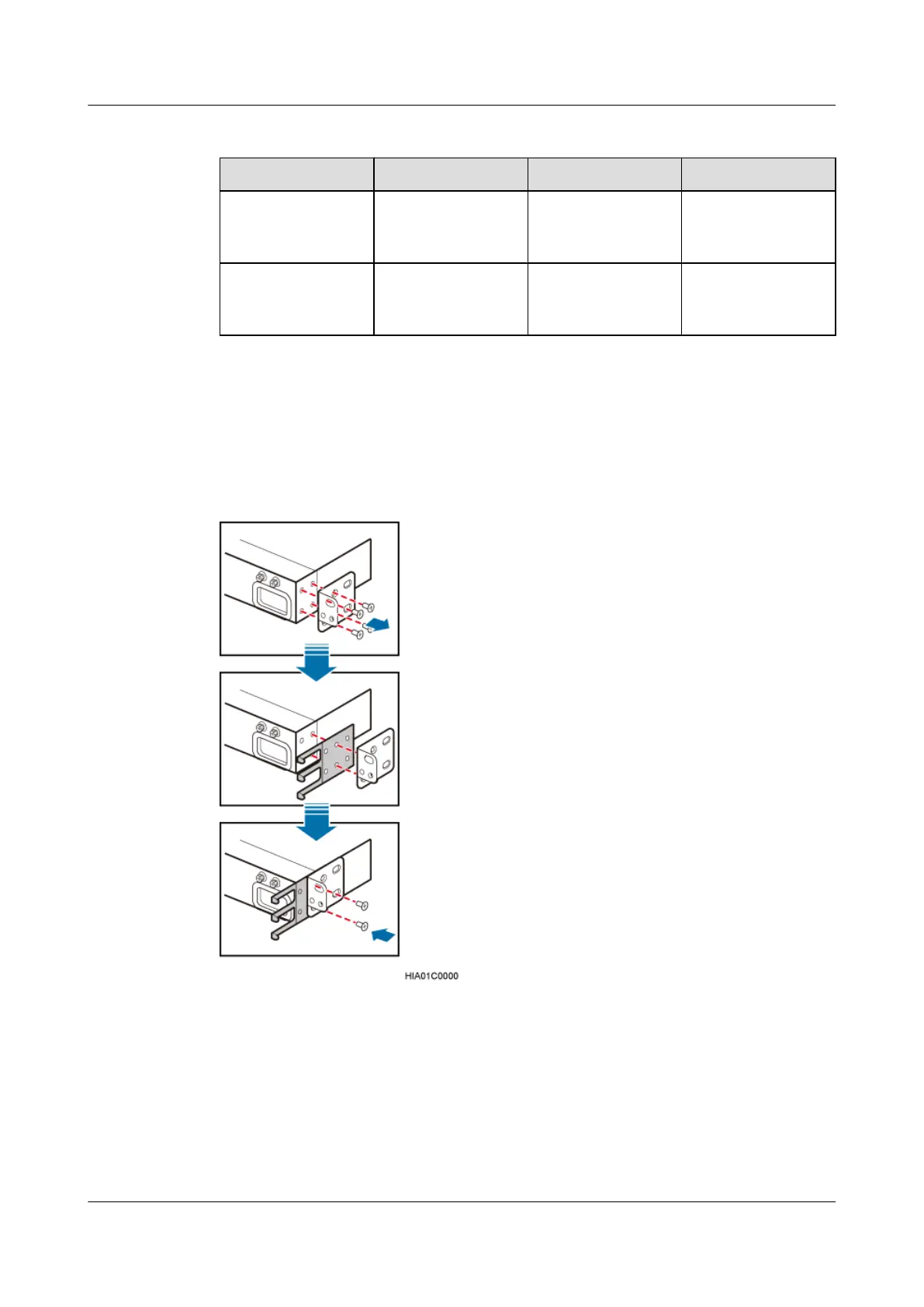
Step 1 Install cable racks on both sides of the SLPU and ensure that the mounting ears are on the same
plane as the SLPU panel, as shown in Figure 6-43.
Figure 6-43 Installing cable racks
Step 2 Slide the SLPU into the cabinet, and then use the screwdriver to tighten the two screws on the
mounting ears of the SLPU, as shown in Figure 6-44.
DBS3900 (Ver.B)
Installation Guide
6 Outdoor Scenario with AC Power Supply (BBU Installed
in an APM30H)
Issue 06 (2011-09-15) Huawei Proprietary and Confidential
Copyright © Huawei Technologies Co., Ltd.
56



 To Next Page