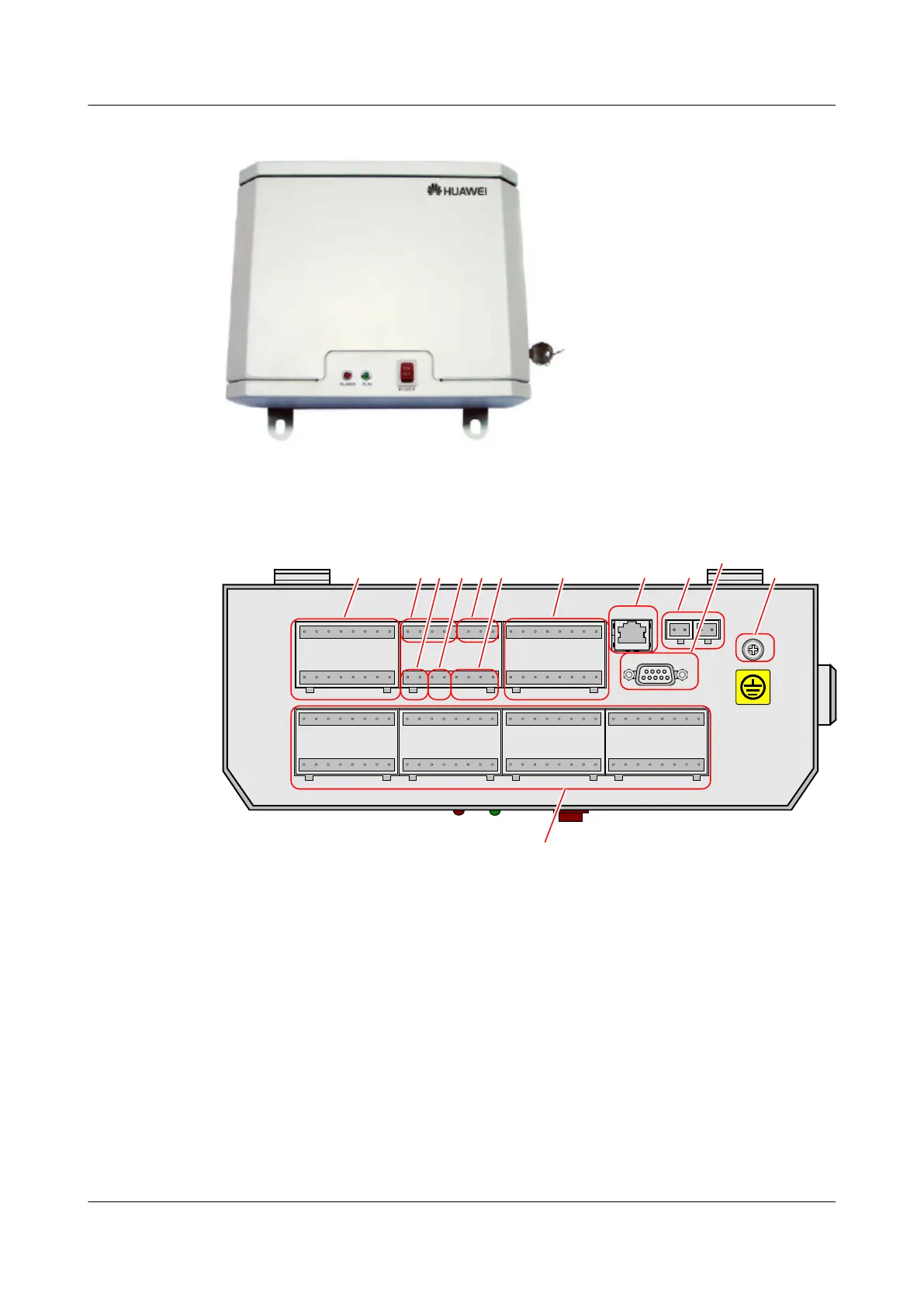
Figure 2-1 Exterior of EMU model A
Figure 2-2 Front panel of EMU model A
OFF
RE2- RE2+ RE1- RE1+RE4- RE4+ RE3- RE3+
GND Water12VW 24VW Humi 24VH Temp 24VT
12V2 12V1GND324V2GND2 ANA2 24V1ANA1
12V4 24V4GND4 ANA4 12V3 24V3GND3 ANA3Gate 12VD Smoke 24VS GND OPTI 24VI 12VIRE6- RE6+ RE5- RE5+NC NC NC NC
S32- S32+ S31- S31+ S30- S30+ S29- S29+ S24- S24+ S23- S23+ S22- S22+ S21- S21+S28- S28+ S27- S27+ S26- S26+ S25- S35+
S17- S17+S20- S20+ S19- S19+ S18- S18+
S16- S16+ S15- S15+ S14- S14+ S13- S13+ S8- S8+ S7- S7+ S6- S6+ S5- S5+ S1- S1+S4- S4+ S3- S3+ S2- S2+S12- S12+ S11- S11+ S10- S10+ S9- S9+
1 7 8 94 112
RS232
RS485
PWR1- PWR1+PWR2- PWR2+
3 5 6
12
10
(1) Six ports for Boolean signal output
(2) Port for water sensors
(3) Port for door status sensors (4) Port for smoke sensors
(5) Port for humidity/temperature sensors (6) Port for infrared sensors
(7) Four ports for analog signal sensors (8) RS-232 port
(9) Active/standby power port (10) Two RS-485 ports
(11) Grounding screw (12) Thirty-two ports for Boolean signal sensors
Exterior of EMU model B
Figure 2-3 and Figure 2-4 show the exterior of the EMU model B and its front panel respectively.
EMU
User Guide 2 Overview of the EMU
Issue 13 (2009-12-30) Huawei Proprietary and Confidential
Copyright © Huawei Technologies Co., Ltd.
2-3



 To Next Page