NOTE
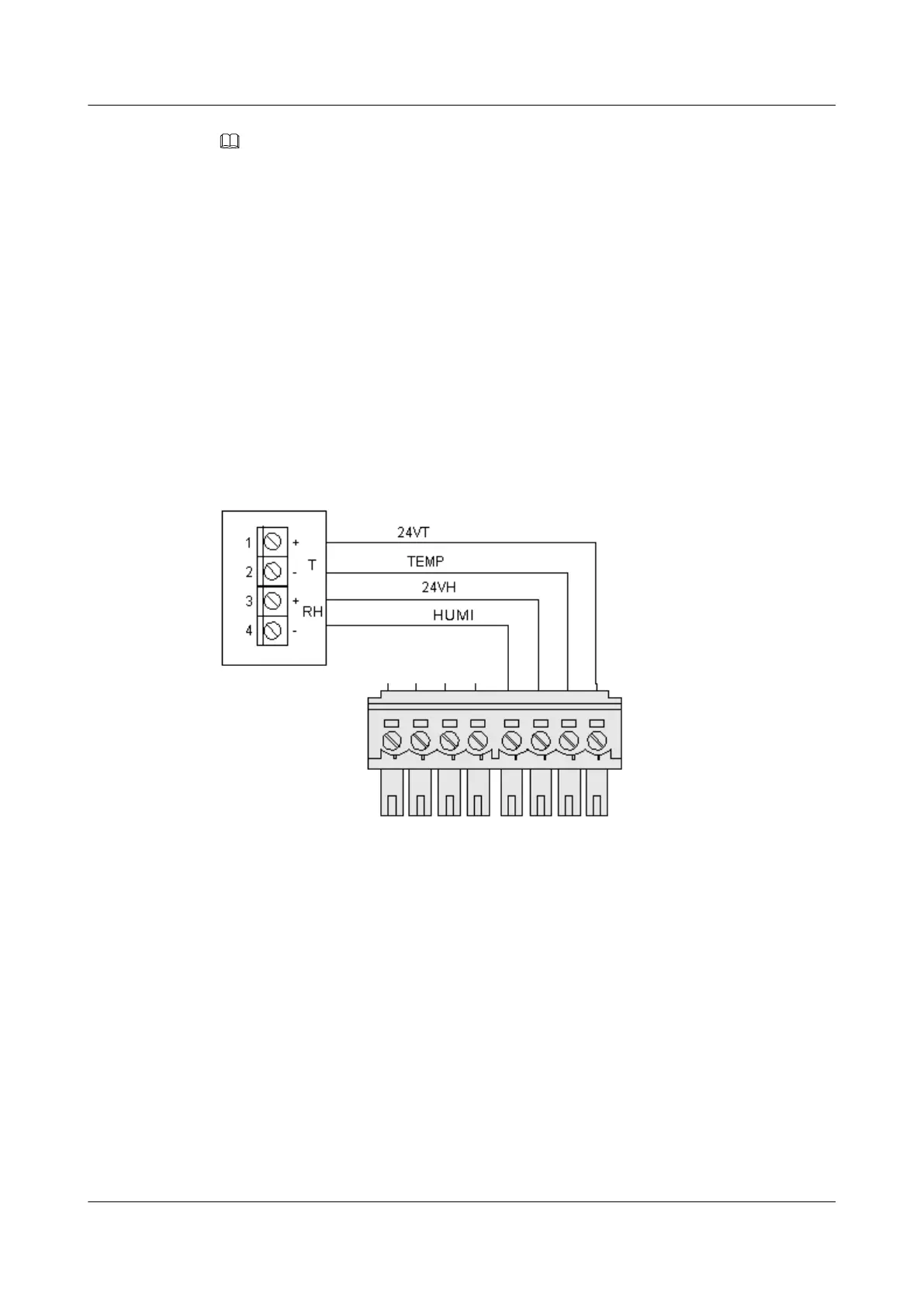
The humidity/temperature sensor can be connected only to the terminals marked
"TEMP&24VT&HUMI&24VH".
Procedure
Step 1 Remove the backplane of the humidity/temperature sensor, and then mark on the wall the
positions of the three installation holes in the backplane.
Step 2 Use the percussion drill to drill holes according to the marks.
Step 3 Insert the plastic expansion tubes into the installation holes.
Step 4 Use the tapping screws to fix the backplane to the wall.
Step 5 Fix the humidity/temperature sensor to the backplane.
Step 6 Connect the humidity/temperature sensor, as shown in Figure 5-9.
Figure 5-9 Connecting the humidity/temperature sensor
----End
EMU
User Guide 5 Installing the Sensors
Issue 13 (2009-12-30) Huawei Proprietary and Confidential
Copyright © Huawei Technologies Co., Ltd.
5-11



 To Next Page