No. Description
14 Earpiece
15 Speaker
16 Battery cover
2.3.4 Inserting/Removing the Battery from the Cordless Handset
(Sold Separately)
Use the battery provided with the cordless handset.
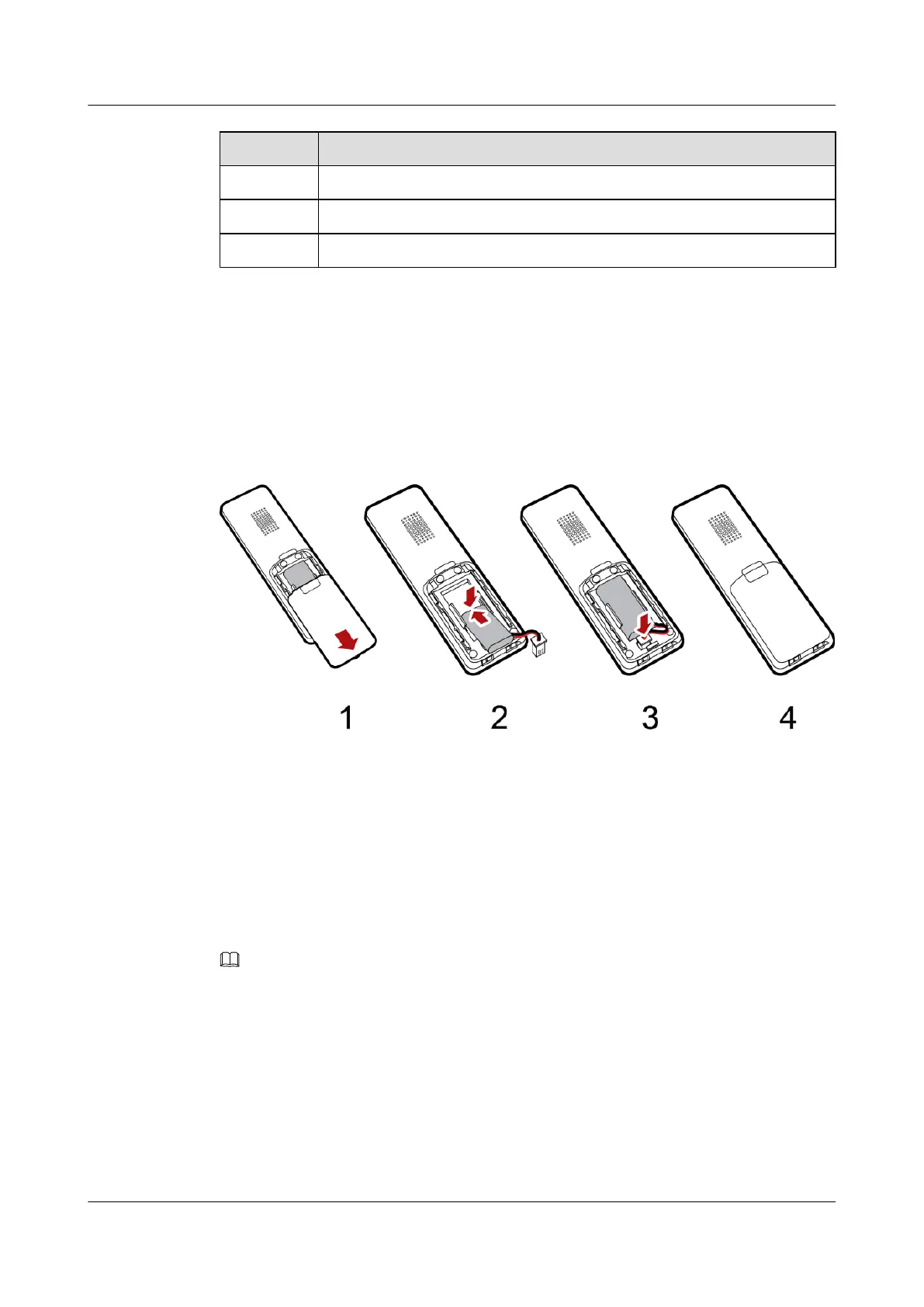
Figure 2-5 Inserting the battery into the cordless handset
1. Remove the battery cover by sliding the cover down.
2. Insert the battery provided in box into the battery compartment according to the preceding
figure.
3. Plug the battery connector into the receptacle in the battery compartment along the direction
indicated by the relevant arrow.
4. Replace the battery cover by sliding the cover up until it snaps in place.
NOTE
If the cordless handset is not to be used for a long time, remove the battery and store it carefully.
eSpace 8850 Video Phone
User Guide
2 Product Description
Issue 08 (2014-08-25) Huawei Proprietary and Confidential
Copyright © Huawei Technologies Co., Ltd.
13



 To Next Page