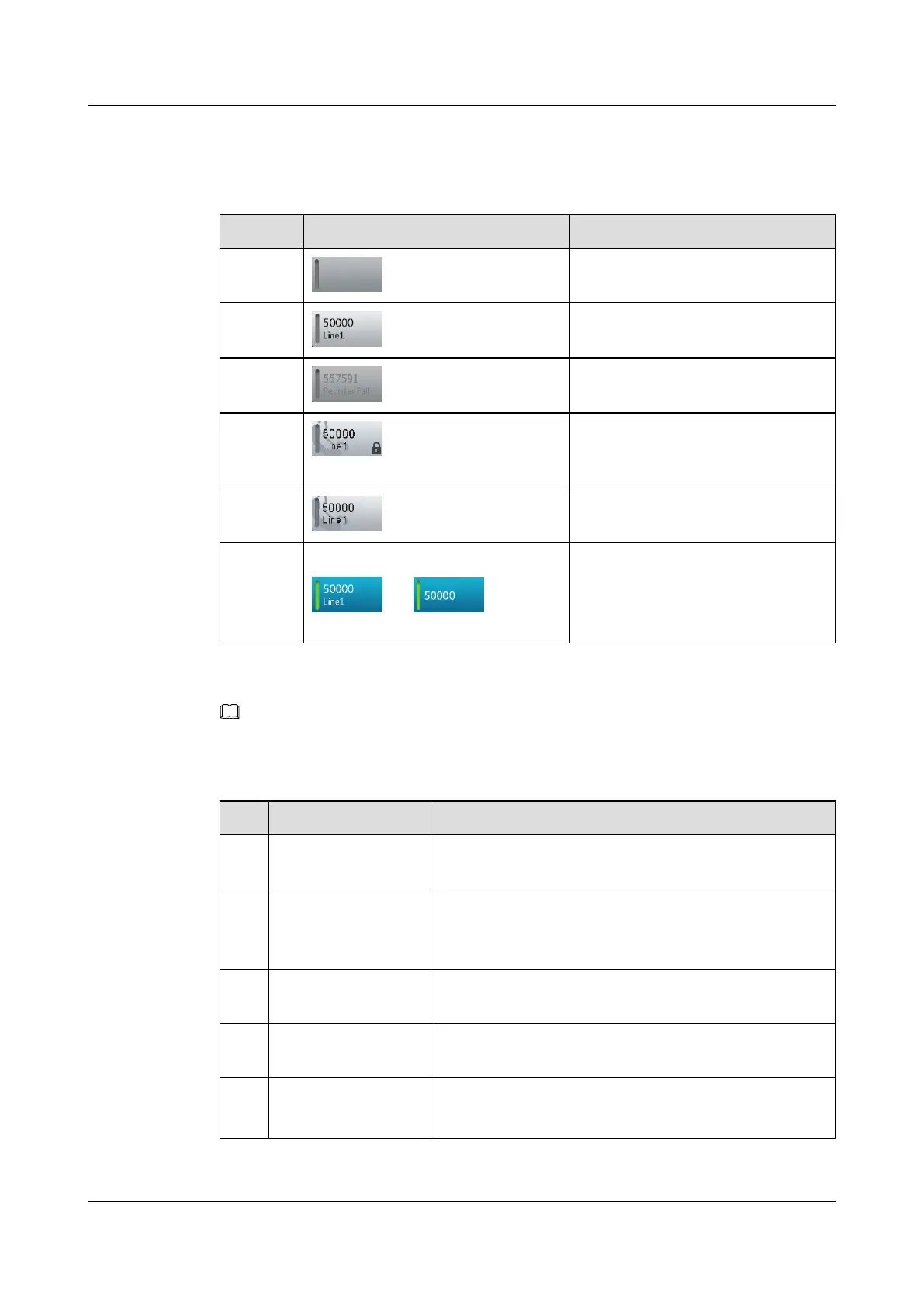
Line Status
Table 4-1 Line button status description
No. Status Description
1 No account is configured for this line.
2 The account configured for this line is
registered.
3 The account configured for this line is
not registered.
4 The line has been set to a shared line
and enabled with the private call
function.
4 This line has been configured as a
shared line.
5 Change to blue, such as
and
l This line is occupied because the
phone is picked up or in hands-free
mode.
l The line is in talking state.
NOTE
The number 50000 in the line button icon is used as an example.
Table 4-2 Line button LED description
No. Status Description
1 The line button LED is
gray.
The line is idle.
2 The line button LED is
green.
l This line is occupied because the phone is picked up or
in hands-free mode.
l The line is in talking state.
3 The line button LED
blinks in green.
The line is in call hold state.
4 The line button LED is
red.
The line is a shred line and is in talking or call hold state.
5 The line button LED
blinks in red.
l The line is in ringing state.
l The line is a shared line and is in call hold state.
eSpace 8850 Video Phone
User Guide
4 Phone Features
Issue 08 (2014-08-25) Huawei Proprietary and Confidential
Copyright © Huawei Technologies Co., Ltd.
26



 To Next Page