Tools and Accessories
l ESD wrist strap or ESD gloves
l Phillips screwdriver
l Flat-head screwdriver
l Floating nuts (four per switch, purchased separately)
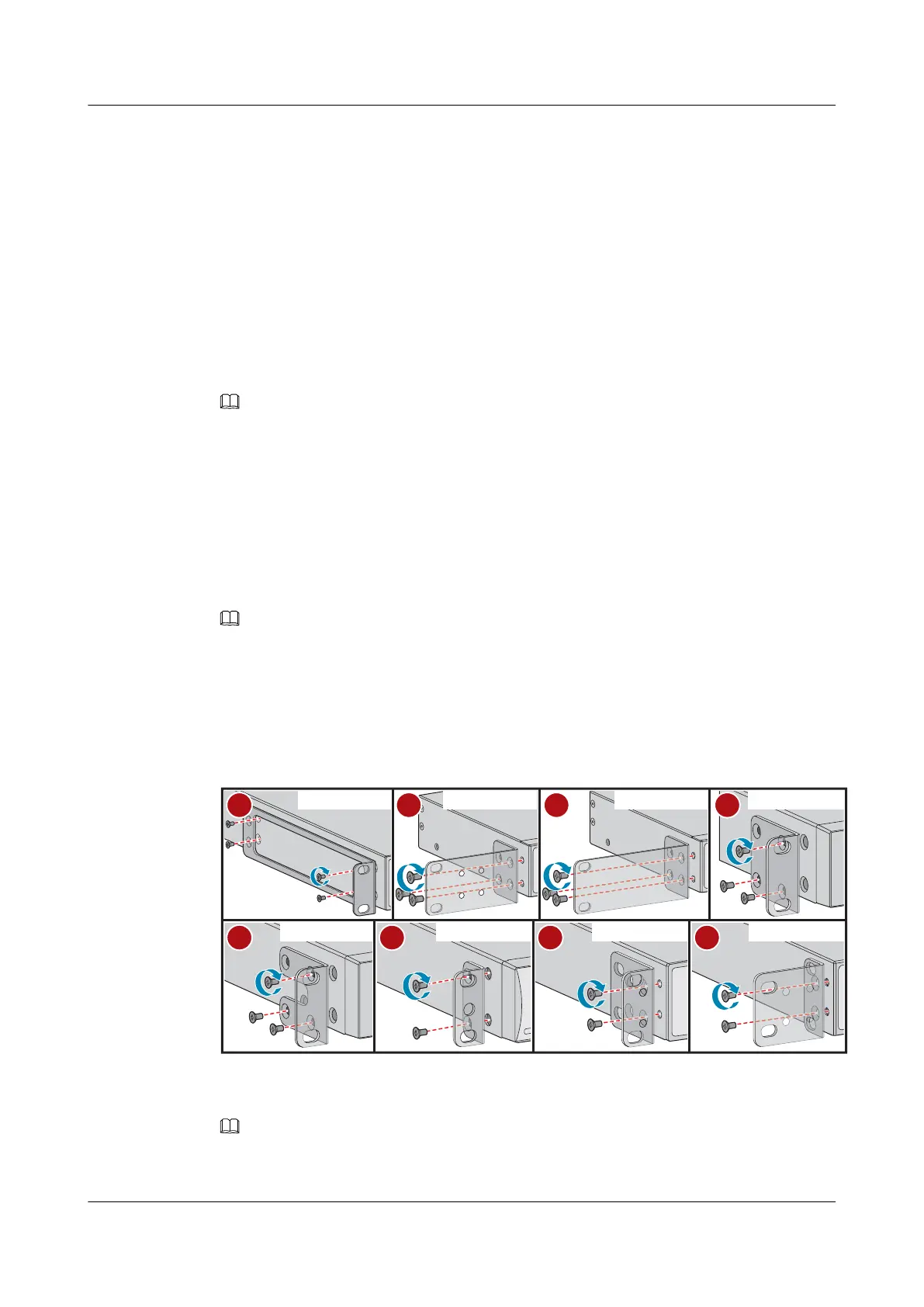
l M4 screws (The quantity depends on the switch. See Figure 5-1.)
l M6 screws (four per switch, purchased separately)
l Front mounting brackets (two per switch)
l Ground cable
l Guide rails (optional)
NOTE
The M4 screws and front mounting brackets are included in the installation accessory package.
Procedure
Step 1 Wear an ESD wrist strap or ESD gloves. When wearing an ESD wrist strap, ensure that it is in
close contact with your wrist and grounded properly.
Step 2 Use M4 screws to attach a front mounting bracket to each side of the switch. Figure 5-1
shows the front mounting brackets delivered with different switch models and associated
installation methods.
NOTE
l To install a 250 mm x 180 mm (9.8 in. x 7.1 in. W x D) switch in a 19-inch cabinet, use the front
mounting brackets shown in c of Figure 5-1 (purchased separately, part number of 21240477).
l To install a 220 mm (8.7 in.) deep switch in a 21-inch cabinet, install the front mounting brackets
according to h of Figure 5-1.
l See Figure 5-1 for the number of screws required for each mounting bracket.
Figure 5-1 Installing front mounting brackets
19-inch cabinet
19-inch cabinet
19-inch cabinet 19-inch cabinet19-inch cabinet
19-inch cabinet 19-inch cabinet 21-inch cabinet
a
e
d
f
g
h
b
c
Step 3 (Optional) Connect the ground cable to the switch. For details, see step 2 and step 3 in 5.6
Connecting the Ground Cable.
NOTE
For switch models with the ground point at the left or right side of the chassis, connect the ground cable
before mounting the switch in the cabinet or rack.
S2700&S3700&S5700&S6700 Switch
Hardware Installation and Maintenance Guide
5 Installing a Switch
Issue 13 (2017-11-20) Huawei Proprietary and Confidential
Copyright © Huawei Technologies Co., Ltd.
24





 To Next Page