OPERATION
22
UltraGlide
®
Shadings
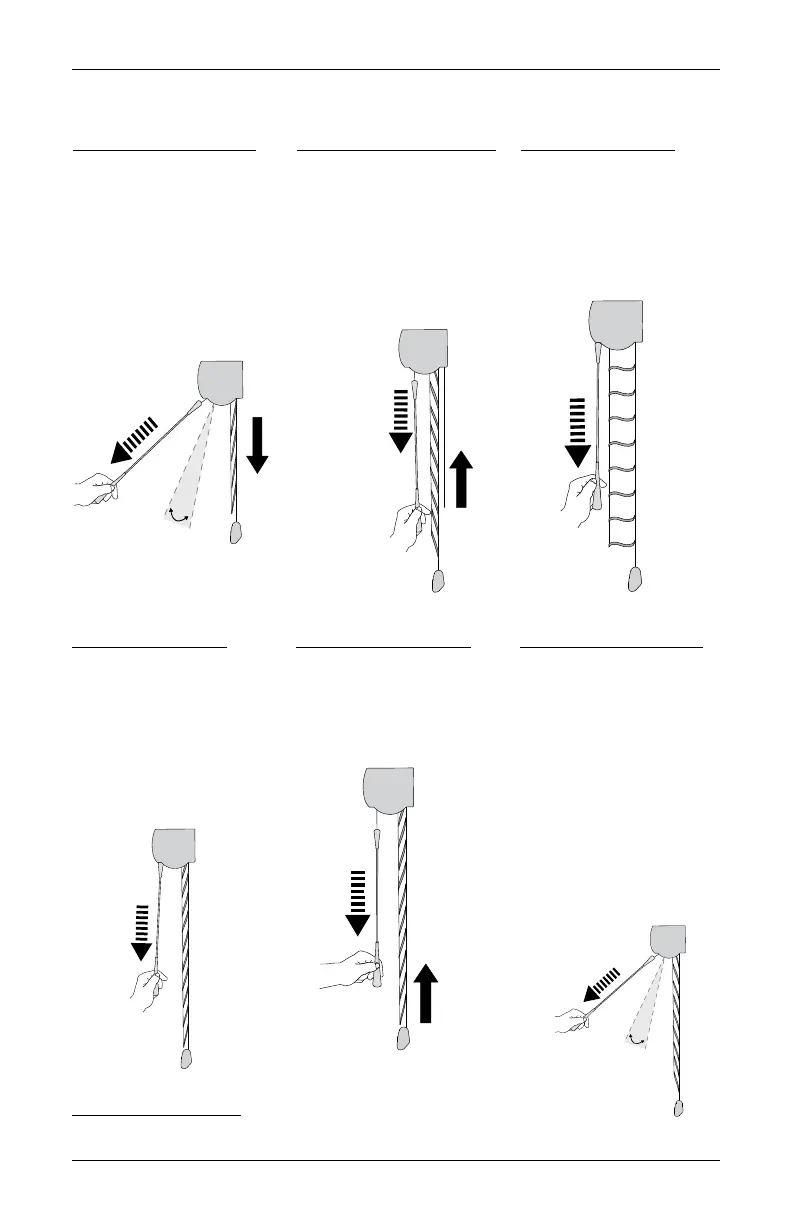
Stop the Shading
■
While the shading is in motion, simply pull the wand straight down.
Close the Vanes
■
With the shading fully
lowered and vanes
open, hold the wand
close to the fabric and
pull straight down using
small strokes, closing the
vanes.
Raise the Shading
■
Hold the wand close
to the fabric and pull
straight down using
small strokes.
Over-Rotate Vanes
■
With the shading fully
raised into the headrail,
pull the wand straight
out from the fabric at an
angle greater than 25
degrees.
■
Pull straight down on the
wand when the vanes
reach the over-rotated
position to stop the
shade from deploying the
black panel.
Non-
Operable
Zone
*click*
Lower the Shading
■
Pull the wand straight
out from the fabric at an
angle greater than 25
degrees.
■
The shading lowers, the
vanes adjust to the over-
rotated position, and the
back panel lowers.
Raise the back panel
■
With the shading over-
rotated and the back
panel fully lowered, hold
the wand close to the
fabric and pull straight
down using small
strokes, raising the back
panel.
Open the Vanes
■
With the shading over-
rotated, hold the wand
close to the fabric and
pull straight down using
small strokes, opening
the vanes.
Non-
Operable
Zone
To Lower Shading
To Open Vanes
To Raise Shading
To Over Rotate Vanes
*click*
To Close Vanes
Raise back shade to
Over-rotated vanes








 To Next Page