2.10
Before switching to AUTO MODE, position both the material for a trim cut as well as the head up limit switch so that no
damage is caused by the shuttle moving the material into the blade (see “ONE CUT MODE”).
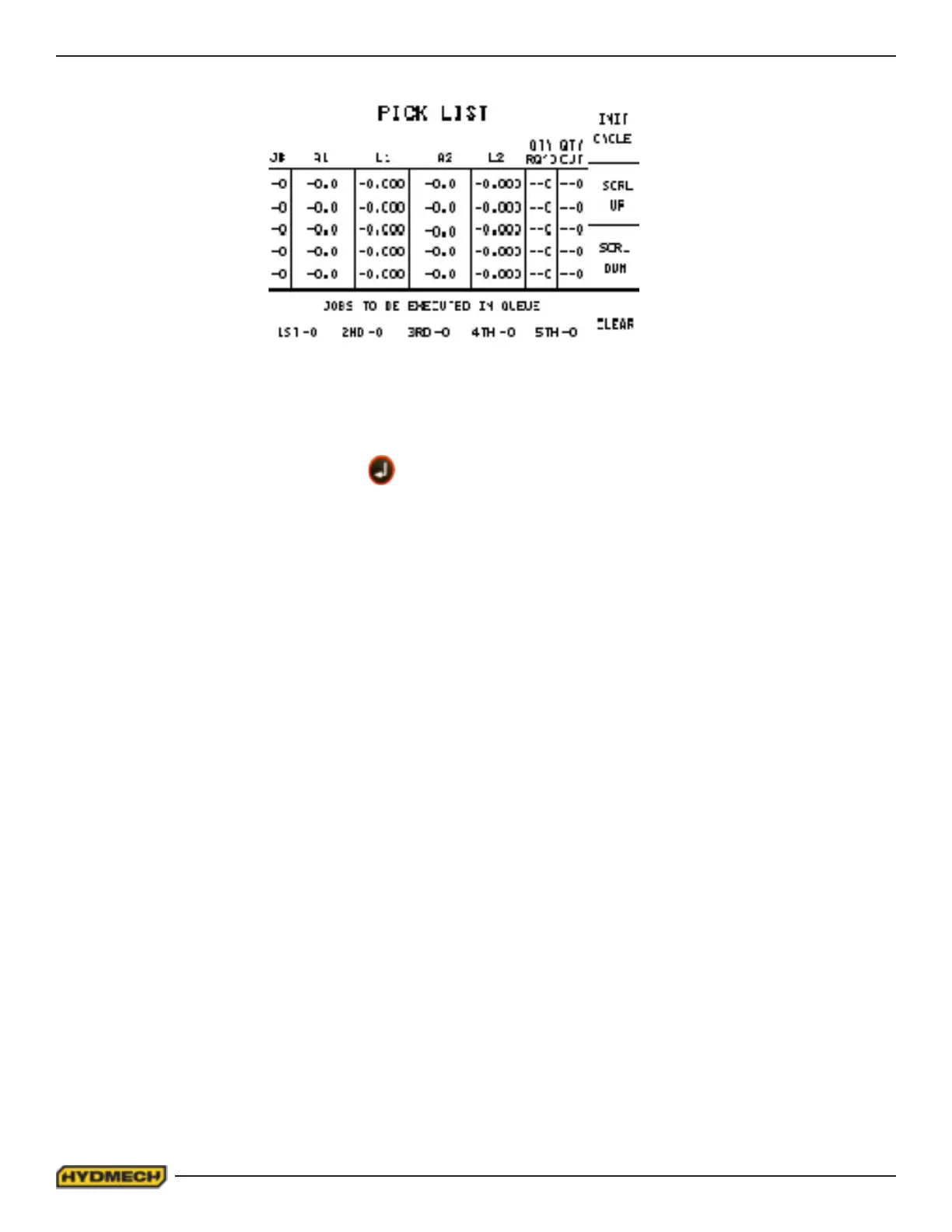
1. Immediately after entering the AUTO mode, the PICK LIST screen will be displayed with the cursor located at “A1
of JOB #1”. Both the ENTER button or the cursor key can be used to move through this screen.
2. Enter angle 1 “A1” value, press ENTER and the cursor will move to “L1”
3. Enter length 1 value, press ENTER and the cursor will move to “A2”.
4. Enter angle 2 “A2” value, press ENTER and the cursor will move to “L2”
5. Enter length 2 value, press ENTER and the cursor will move to “QTY REQ’D”.
6. Enter required quantity. The cursor will move to “QTY CUT”
7. When starting a NEW JOB or PIECE COUNT, zero out “QTY CUT” by entering “0”.
Assuming that the material is positioned for a trim cut, the job is now ready to start (up to ve jobs can be in the queue) or
jobs can be programmed at this time. A job or queue can be deleted by pressing F8. The desired job or queue must be
selected using the cursor key in order for the item to be deleted. To start the cycle, Move the cursor to the 1st JOB and
key in the desired JOB # and press ENTER followed by F5 “INIT (initiate) CYCLE”. You will then be prompted to enter
“MATERIAL WIDTH” and press ENTER. The display will then read “PRESS CYCLE START TO INITIATE JOB QUEUE”.
If the blade is not running, the cycle will not continue. Press the BLADE START button and the cycle will begin.
When the last cut has been made, the machine will shut down.
PICK LIST SCREEN
When the AUTO cycle commences, the screen will change to the “AUTO MODE STATUS” screen and the following
events will take place:
1. If the head has not tripped the head up limit switch, the cycle will stop when the head should descend. In this
case, the machine should be switched to MAN MODE and the head height should be set as described on pg. 2.24
or by raising the head until the limt switch is tripped.
2. The head will swing to “A1” to perform the rst cut (trim cut).
3. After the trim cut, the shuttle will advance the material to the “L1” value.
4. The head will swing to the “A2” value to make the second cut and complete the rst part.
5. The shuttle vise will advance to the “L2” value after the “A2” cut is done.
At completion of the “JOB”, the machine will shut off.


 To Next Page