2.9
AUTOMATIC OPERATION
To enter AUTO MODE, the front vise switch must be in the closed position. When the AUTO/MAN button is pressed, the
red indicator above it will come on, the screen will change to the PICK LIST display as shown on the following page and
be ready for editing or starting a new job. The VISE and HEAD switches on the control panel will be disabled.
PROCEDURE FOR EDITING OR STARTING A NEW JOB IN AUTO MODE
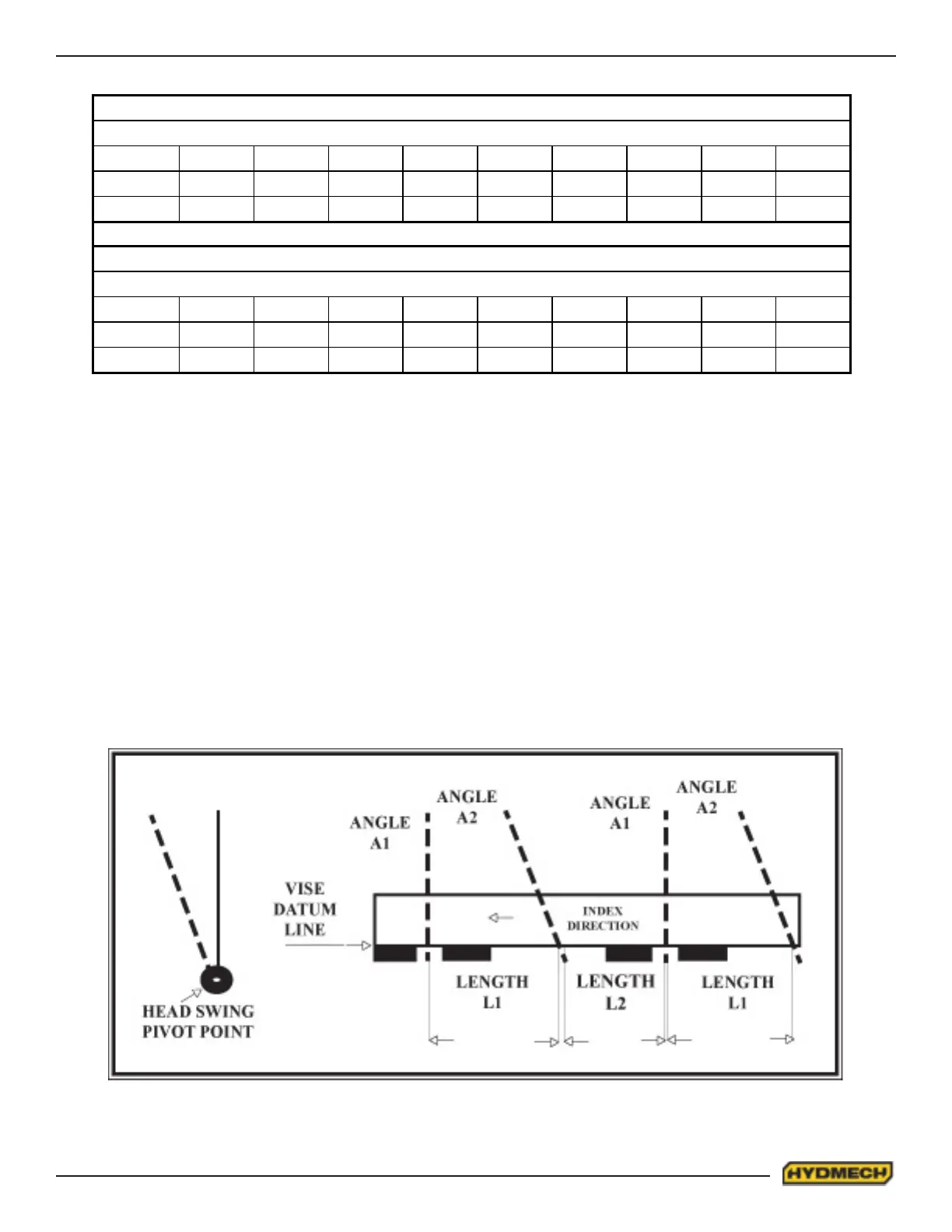
Each job is dened by two angles and two lengths. Angle 1 (A1) is the rst angle to be cut (this will be the trim cut). Length
1 (L1) is the length of the material to be cut as measured between the two intersection points of the blade axis and the
saw table datum line. Angle 2 (A2) is the second angle to be cut and length 2 (L2) again is the length of material as
measured between the two intersection points of the blade axis and the vise datum line.
IMPERIAL
STANDARD KERF @ XX DEGREES
BLADE SIZE 90° 75° 60° 55° 50° 45° 40° 35° 30°
1 1/4” 0.066 0.068 0.076 0.081 0.086 0.093 0.103 0.115 0.132
1 1/2” 0.074 0.077 0.085 0.09 0.097 0.105 0.115 0.139 0.148
METRIC
STANDARD KERF @ XX DEGREES
BLADE SIZE 90° 75° 60° 55° 50° 45° 40° 35° 30°
31.7mm 1.67 1.72 1.93 2.05 2.18 2.36 2.61 2.91 3.35
38.1mm 1.87 1.95 2.16 2.25 2.46 2.66 2.92 3.53 3.76


 To Next Page