94
9
MEMORY/CALL CHANNELS
q Push [V/MHz] to select VFO mode.
w Set the desired frequency:
± Select the desired band with [BAND].
± Set the desired frequency with [DIAL].
± Or set the desired frequency with keypad directly.
In this case, the band and frequency settings with
[BAND] and [DIAL] as above are not required.
± Set other data (e.g. offset frequency, duplex direction,
tone squelch, current call signs, etc.), if desired.
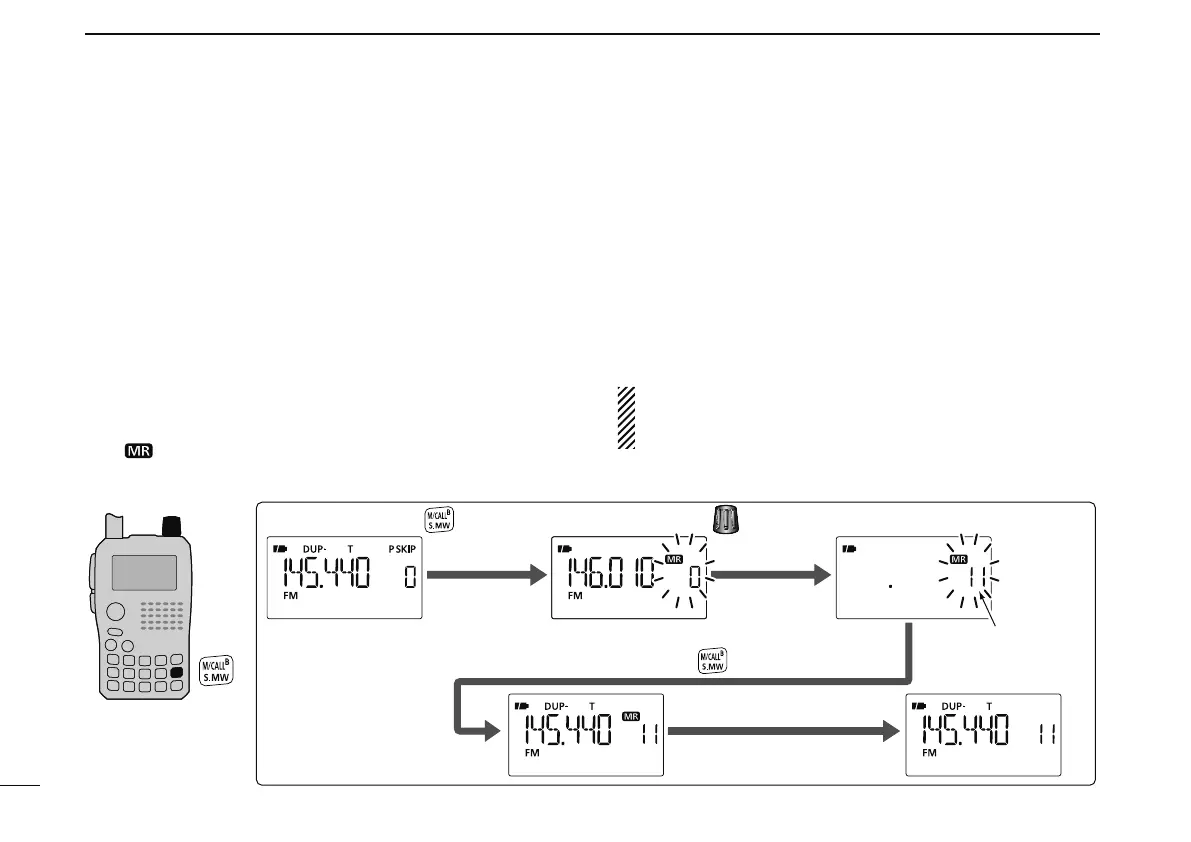
e Push and hold [S.MW](M/CALL) for 1 sec. to enter select
memory write mode.
• 1 short and 1 long beep sound.
• “
” indication and memory channel number blink.
r Rotate [DIAL] to select the desired channel.
• Call channels (C0, C1), VFO and scan edge channels (0A/0B
to 24A/24B), as well as regular memory channels, can be pro-
grammed in this way.
t Push and hold [S.MW](M/CALL) for 1 sec. to program.
• 3 beeps sound.
• Memory channel number automatically increases when continu-
ing to push and hold [S.MW](M/CALL) for 1 sec. after program-
ming.
NOTE: Push [V/MHz] to cancel to program and exit select
memory write mode before memory programming is fin-
ished.
[DIAL]
VFO mode Enter select memory write mode.
to select channel 11.Rotate
Push and hold for 1 sec.
Channel 11
Return to the VFO mode.
Push and hold for 1 sec. to program.
[EXAMPLE]: Programming 145.440 MHz into memory channel 11 (blank channel).
N
Memory channel programming


 To Next Page