37
6
DV MODE PROGRAMMING
1
2
3
4
5
6
7
8
9
10
11
12
13
14
15
16
17
18
19
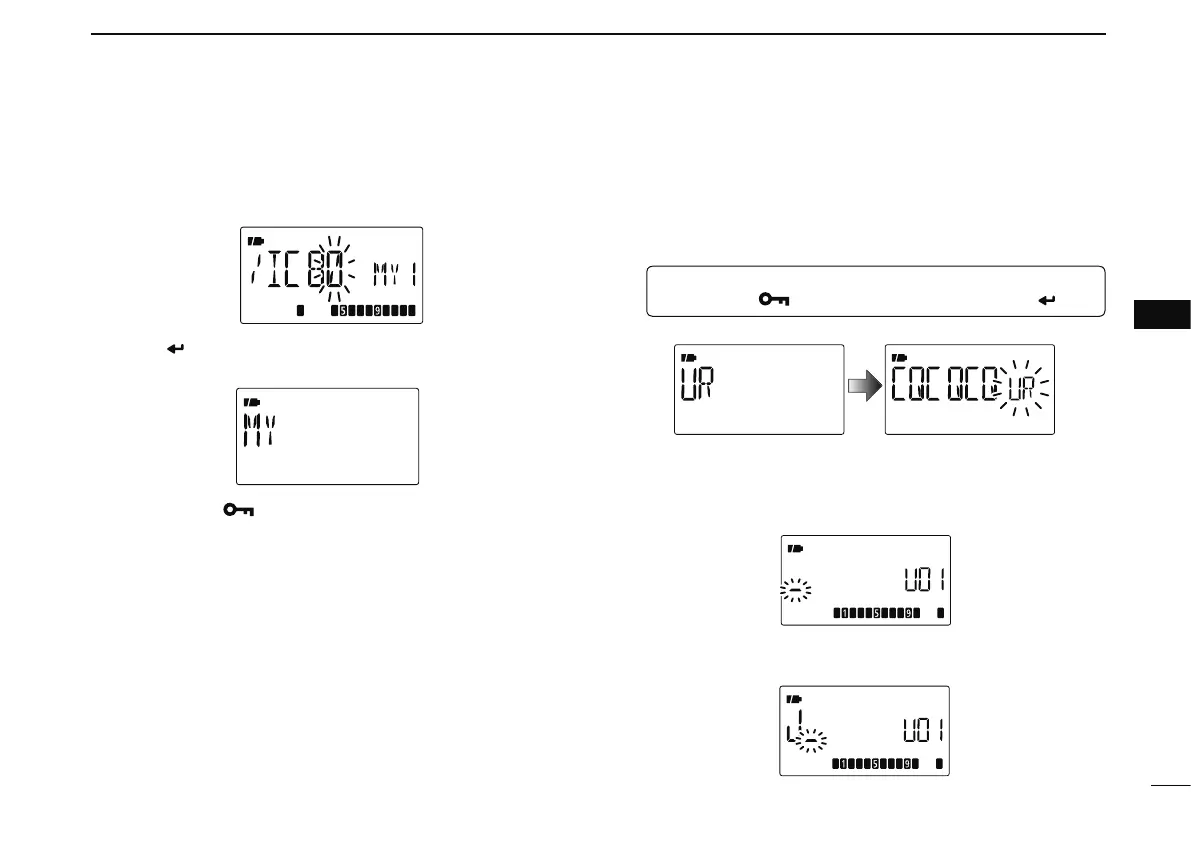
u Repeat step r (at previous page) to program the desired
4 character note.
i Push [ ](5) to store the programmed call sign with note
and return to call sign screen.
o Push [MENU ] to return to frequency indication.
D Station call sign programming
Station call sign must be programmed to call a specific sta-
tion as well as for repeater operation in both digital voice and
low-speed data communications.
q Enter “UR” in call sign screen.
MENU ¶ CALL-S ¶ UR
(Push [MENU ]), (push [](2)/[](8), then push [ ](5).)
• UR call sign screen is displayed.
w Push [](2) or [](8) to select the desired call sign mem-
ory, “U01” to “U60.”
e Push [](6) to enter call sign programming mode.
• The 1st digit blinks.
r Push [](2) or [](8) to select the desired character or code.
• Push [](6) or [](4) to move the cursor right or left, respectively.


 To Next Page