49
7
DV MODE OPERATION
7
1
2
3
4
5
6
8
9
10
11
12
13
14
15
16
17
18
19
N Received call sign
When a call is received in DV mode, the calling station and
the repeater call signs being used can be stored into the re-
ceived call record. The stored call signs are viewable in the
following manner. Up to 20 calls can be recorded.
D Desired call record indication
q Enter RX call sign screen.
MENU ¶ RX CAL
(Push [MENU ]), (Push [](2)/[](8), then push [ ](5).)
• RX call sign screen is displayed.
w Push [](2) or [](8) to select the desired record channel.
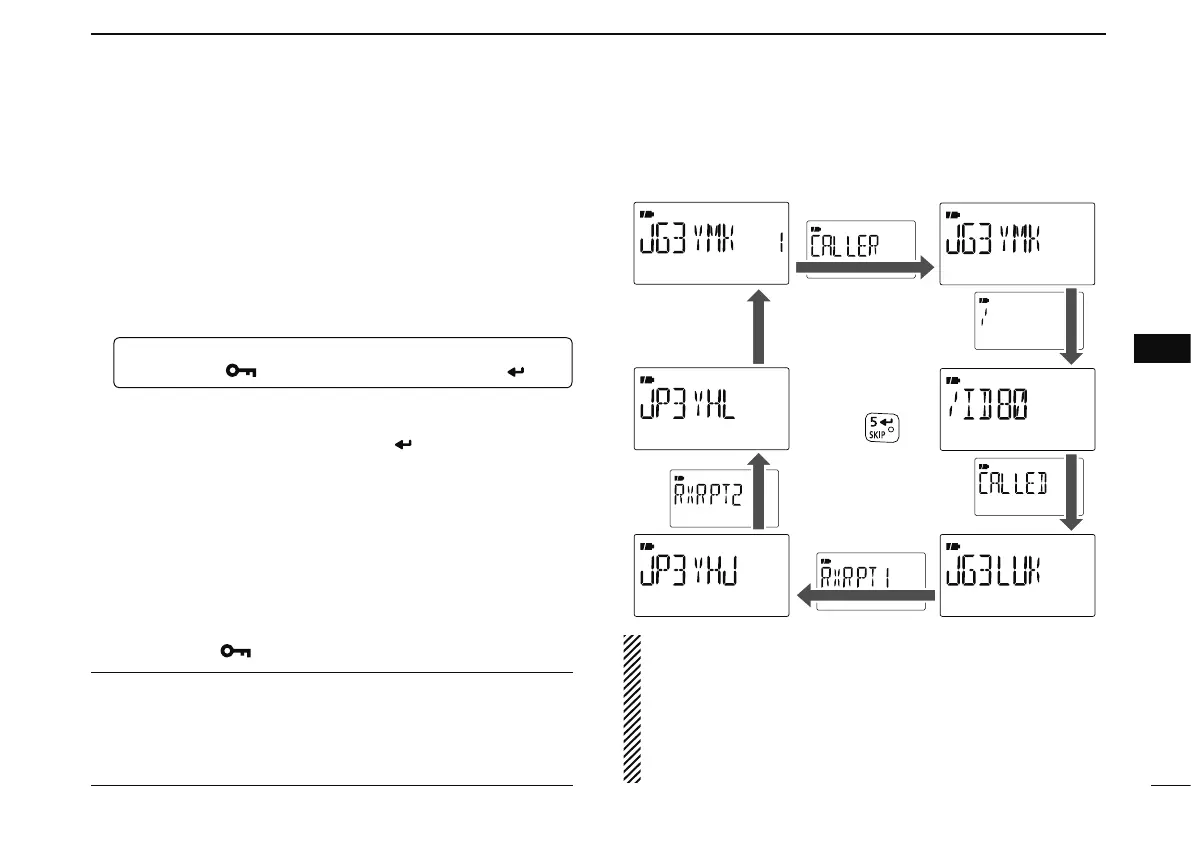
e To confirm the received call, push [ ](5) several times to
select the desired call sign from CALLER, / (CALLER’s
note), CALLED, RXRPT1 and RXRPT2.
CALLER : The station call sign that made the call.
/ : 4 character note with call sign that made the call.
CALLED : The station call sign called by the caller.
RXRPT1 :
The repeater call sign used by the caller station in the
same zone, or gateway repeater call sign of the down link
repeater when the caller station is in a different zone.
RXRPT2 : The repeater call sign for down link repeater.
r Push [MENU ] to return to frequency indication.
For your information
When receiving a call, the received station call sign is au-
tomatically displayed and scrolled in sequence on the fre-
quency display.
This can be turned OFF in DISP set mode.
(p.134)
NOTE: When a call is received in DV mode when the
power save function is activated, the call sign may not be
received correctly.
This is normal, not a malfunction, because the call sign
information cannot be detected during power save.
Turn the power save function OFF
(p. 125) if you want to
receive a call sign correctly even in stand-by operation.


 To Next Page