60
7
DV MODE OPERATION
N Simplex operation in VFO
D Sending CQ
q Set the desired frequency. (p. 23)
• Select output power, if desired. (p. 27)
w Set the current call sign to your own call sign. (p. 47)
e Set the current UR call sign. (p. 47)
UR call sign selection
q Push and hold [UR](.) for 1 sec. to enter UR call sign
selection mode.
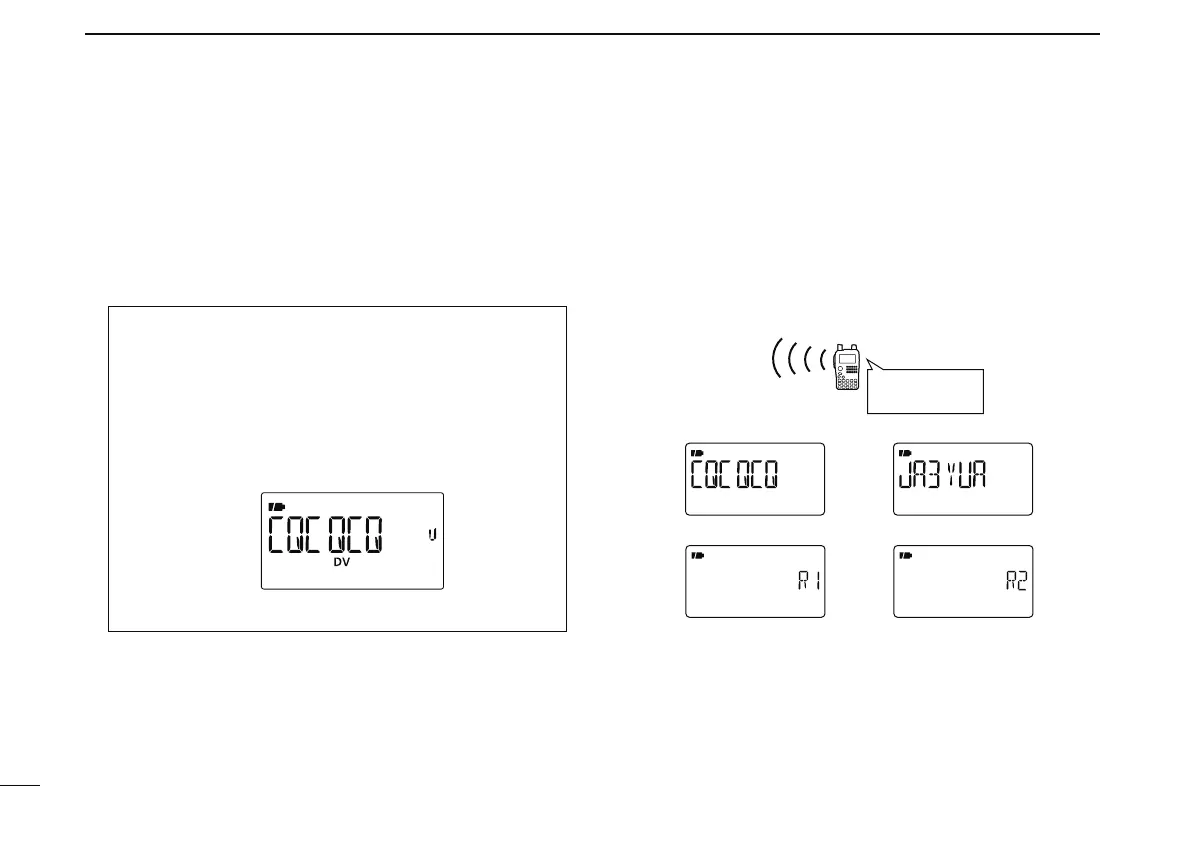
• Push [BAND] several times to select “GRP CQ” (CQCQCQ)
“GRP UR” (UR call sign memories) and “CS” (current call
sign).
• DV mode is automatically selected.
w Rotate [DIAL] to select “CQCQCQ.”
e Push [UR](.) to return to frequency indication mode.
r Push and hold [PTT] to transmit and speak into the micro-
phone at normal voice level.
• Tx/Rx indicator lights red and the RF meter shows the output
power.
• “CQCQCQ” is displayed and scrolled in sequence on the fre-
quency display depending on “TX CS” setting (p. 135).
t Release [PTT] to return to receive.
• The other station’s call sign will be received.
• Received call signs can be stored into the received call record
automatically. See page 49 for details.
• Current call sign setting example (Simplex CQ)
UR MY
R1: (NOT USE) R2: (NOT USE)
My call sign:
JA3YUA
CQ
Confirmation
q Push and hold [CS](9) for 1 sec. to enter the current call
sign mode.
• Current UR call sign is displayed.
w Push [](2) or [](8) to select and confirm the other cur-
rent call sign.
• (“UR”), “R1,” “R2” and “MY” appears in sequence.


 To Next Page