New2001
58
7
DV MODE OPERATION
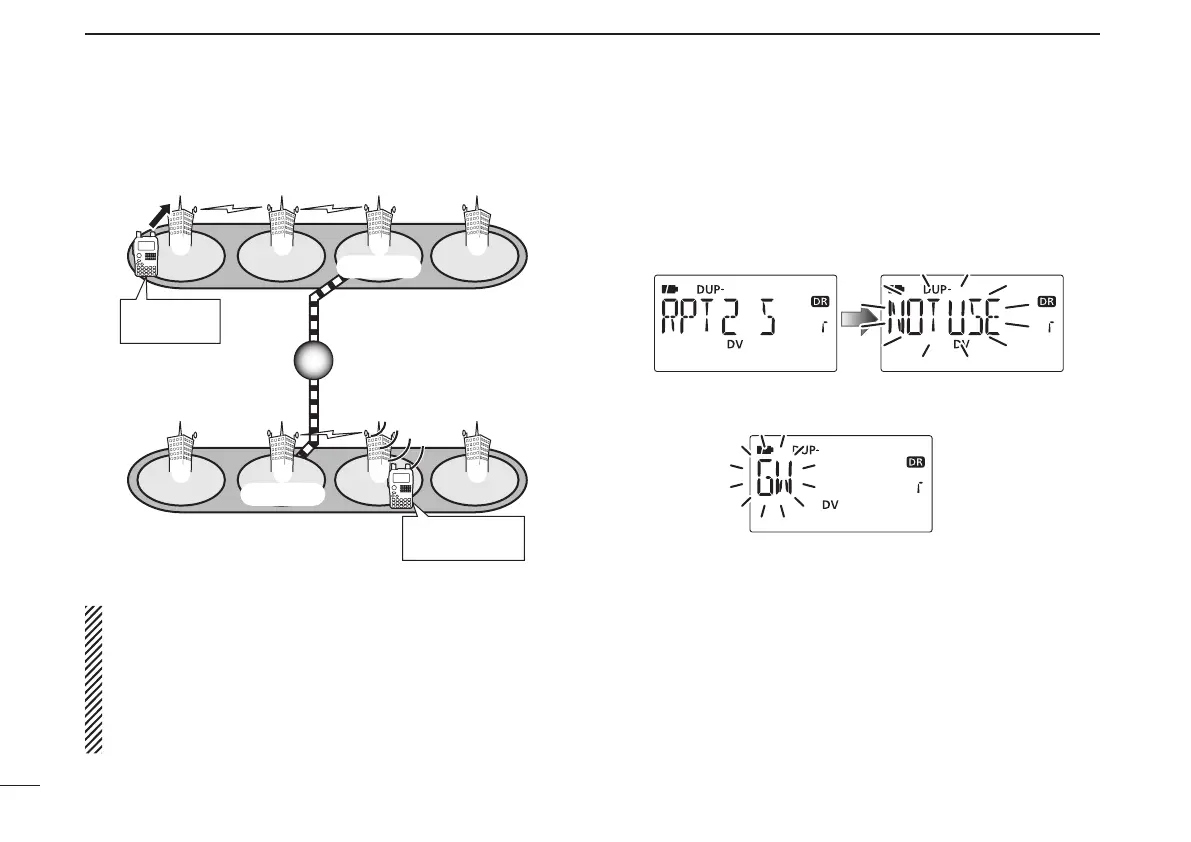
New2001
Repeater q :
Repeater e :
Repeater u :
NARA43
(JP3YHL)
HIRANO43
(JP3YHH G)
HAMA43
(JP1YIU)
Gateway
Gateway
Area
Zone A
Zone B
q w e r
t y u i
MY call sign:
JA3YUA
Station call sign:
JM1ZLK
NOTE: If the other station has accessed the repeater at
once, the D-STAR system will connect to the repeater au-
tomatically even you don’t know where the station is (pos-
sible in the same area as you, or in the same zone or a
different zone). In this case, you select “GW” as the RPT2
selection. The Auto gateway setting “GW SET” is helpful
(p. 134).
Continued instruction from step t on page 56.
• STEP 3 (RPT2 selection)
u Push and hold [UR](.) for 1 sec. to enter the link repeater
(RPT2) selection.
i Rotate [DIAL] to select the preset gateway repeater “GW.”
• Only the repeaters that have gateway capability appear.
o Push [UR](.) to exit the link repeater selection.
!0
Push [PTT] to transmit; release to receive.
D Calling a specic station in another zone (Different zone call)


 To Next Page