OTHER FUNCTION
5
11
D Priority channel
The priority channel is used to store your most often-used
channel for quick recall. In addition, the priority channel is
monitored during priority scan modes. The default setting for
the priority channel will differ, depending on pre-program-
ming.
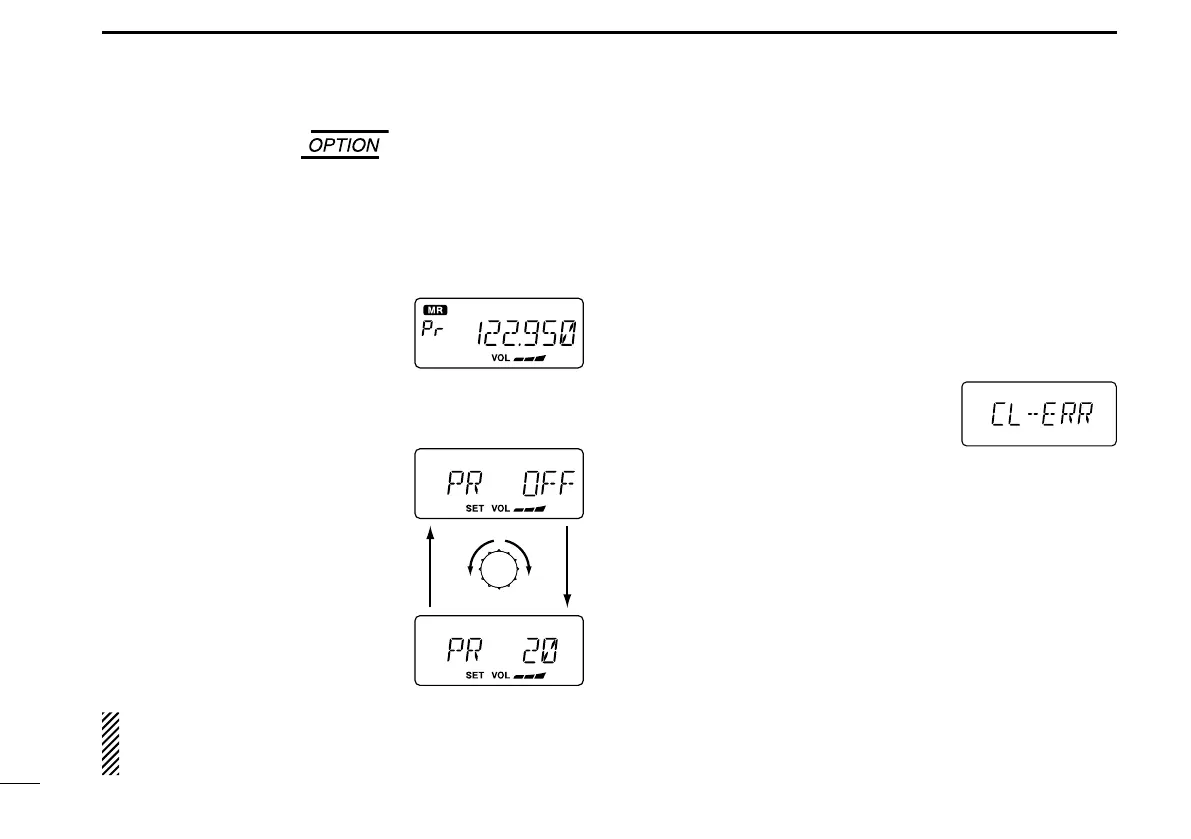
➥ Push [PRI] to toggle the prior-
ity channel mode or the previous
mode.
• Setting the priority channel
q While holding down [V/M] and [TS](DIAL), push [POWER]
to turn ON the power.
•ThetransceiverenterstheInitialSet
mode.
w Push [TS](DIAL) to select the pri-
ority channel Set mode.
e Rotate [DIAL] to select the desired
channel number as a priority chan-
nel or OFF.
r Hold down [POWER] to turn OFF
the power.
NEVER select the blank memory channel as the priority
channel. In such a case the priority function is automati-
cally set to the OFF position.
■ Cloning
D Data cloning
Data can be cloned to and from a PC using the optional CS-
A110EURO
CLONING SOFTWARE and the optional OPC-478 CLON-
ING CABLE
+ OPC-592 CLONING CABLE ADAPTER.
Consult the CS-A110EURO
CLONING SOFTWARE HELP message
for details.
D Cloning error
When the display to the right appears,
a cloning error has occurred.
In this case, transceiver automatically
return to the clone standby mode and
cloning must be repeated.


 To Next Page