New2001
7
2
PANEL DESCRIPTION
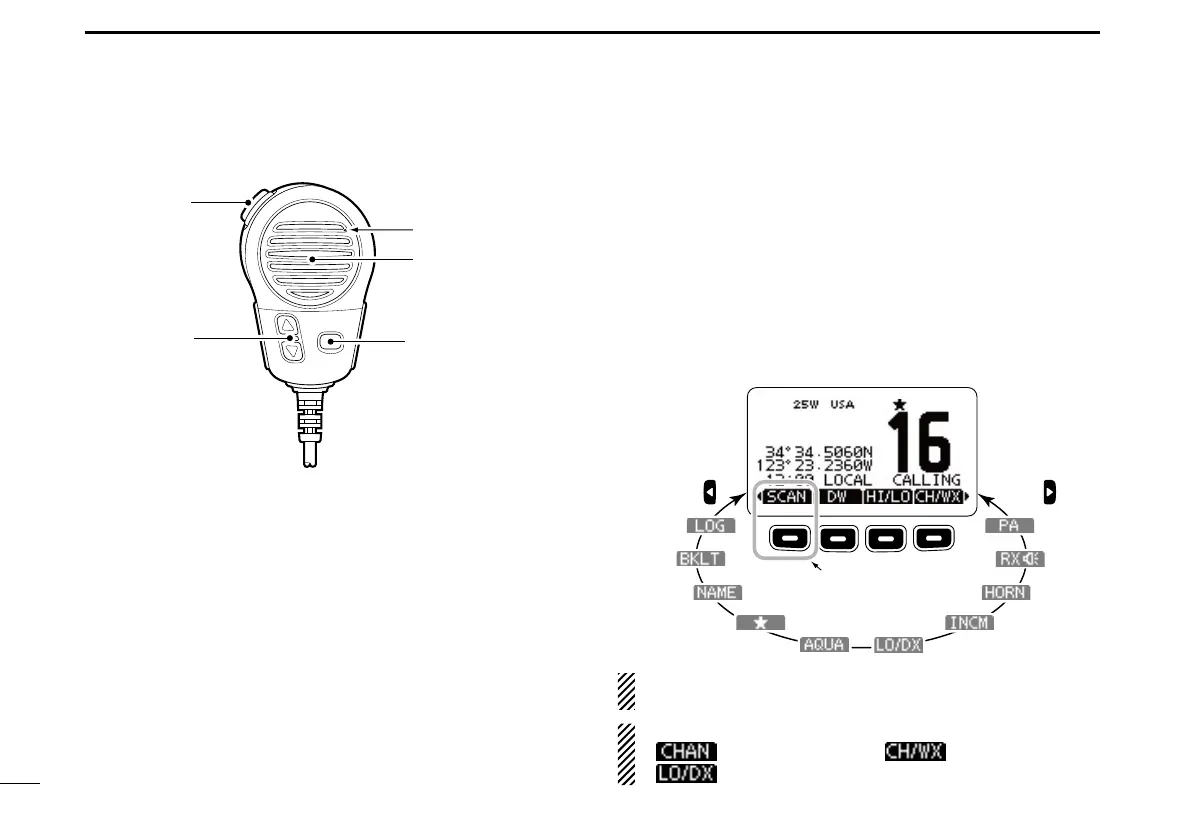
Speaker Microphone ■
q PTT SWITCH [PTT]
Hold down to transmit, release to receive. (p. 11)
w CHANNEL UP/DOWN KEYS [Y]/[Z]
Push either key to check Favorite channels, change scan-
ning direction or manually resumes a scan. (pp. 11, 18)
e TRANSMIT POWER KEY [HI/LO]
Push to toggle the power high or low. (p. 11) ➥
•Somechannelsaresettoonlylowpower.
While holding down [HI/LO], turn ON the power to turn ➥
the Microphone Lock function ON or OFF. (p. 14)
Softkey function ■
Various functions can be assigned to the softkeys. When a key
function is assigned, the key icon is displayed above the soft-
key, as shown below. Consult your Icom dealer for details con-
cerning which functions are preprogrammed into the keys.
Softkey function selection D
When “ ➥ Ω” or “≈” is displayed beside the key icon, push-
ing [Ω] or [≈] sequentially shows the previous or next key
function that is assigned to the softkey.
Push Push
*
*Push this key to start
and stop scan.
The order of the key icons may differ, depending on the
preprogramming.
For Chinese version transceiver:
•[
] appears instead of [ ].
•[
] does not appear.



 To Next Page