33
7
DSC OPERATION
Transmitting a Group call (continued) D
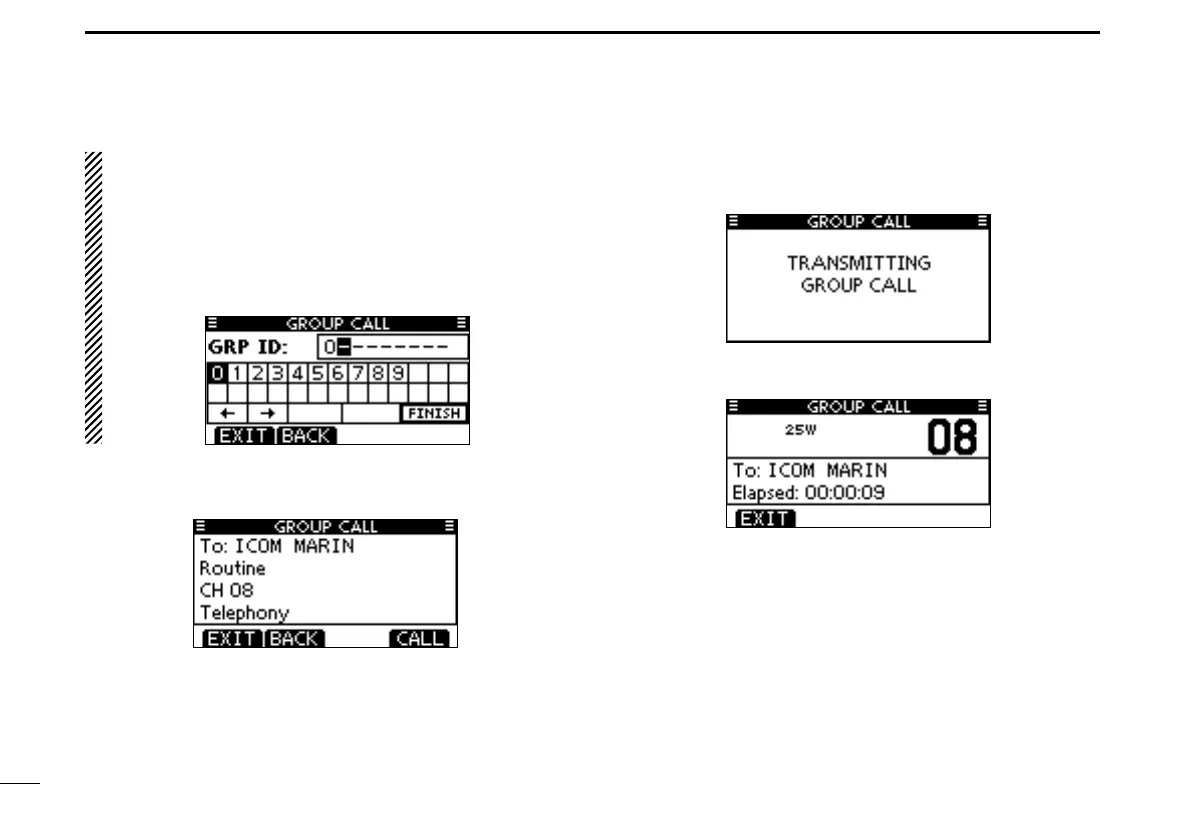
About Manual Inputting:
Enter a desired group ID in the following way:
•SelectadesirednumberusingDial,or[Y]/[Z]/[Ω]/[≈].
•Push[ENT]orDialtosetit.
•Tomovethecursor,selecteitherarrow,“←” or “→,” then push
[ENT] or Dial.
•Therstdigitisspeciedas‘0’foraGroupID.
•Thersttwodigitsare‘0’foranyCoaststationID.
A confirmation screen appears. r
•Conrmthecallcontents.
Push [CALL] to transmit the Group call. t
•IfChannel70isbusy,thetransceiverstandsbyuntilthechannel
becomes clear.
After the Group call has been transmitted, the following y
screen is displayed.
Announce the information using the microphone. u
After the announcement, push [EXIT] to return to the nor- i
mal operating mode.



 To Next Page