37
7
DSC OPERATION
Transmitting a Position Report Call D
(U.S.A. and Australian version transceiver only)
Transmit a Position Report Call when you want to announce
your own position to a specific ship and receive an answer
back.
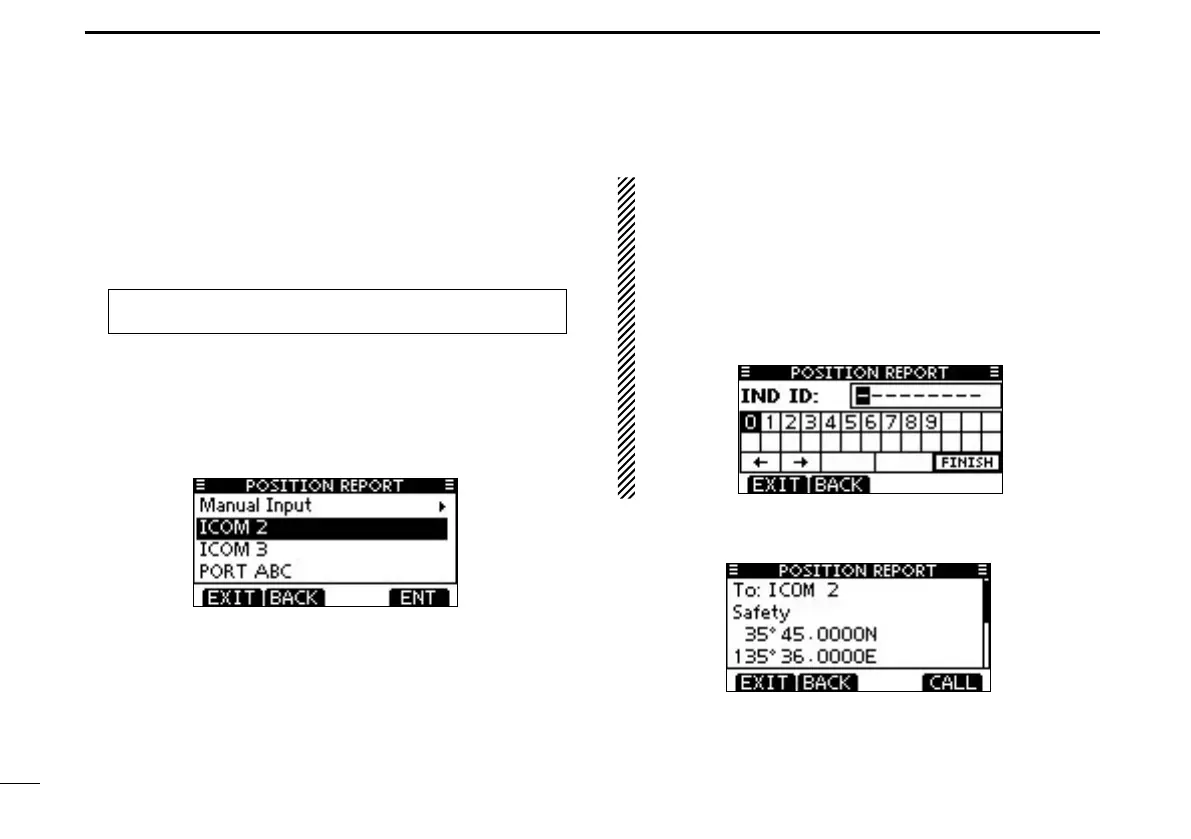
Enter “POSITION REPORT” in the DSC CALLS menu. q
MENU ➪ DSC Calls ➪ Position Report
(Push [MENU])
(Rotate Dial, then push [ENT].)
Select the desired preprogrammed individual address, or w
“Manual Input,” using Dial or [Y]/[Z], then push Dial or
[ENT].
•TheIDcodefortheIndividualcallcanbesetrst.(p.20)
•When“ManualInput”isselected,setadesired9digitMMSIID
code for the individual you wish to call.
About Manual Inputting:
Enter a desired individual ID in the following way:
•SelectadesirednumberusingDial,or[Y]/[Z]/[Ω]/[≈].
•Push[ENT]orDialtosetit.
•Tomovethecursor,selecteitherarrow,“←” or “→,” then push
[ENT] or Dial.
•Therstdigitisspeciedas‘0’foraGroupID.IfaGroupIDis
entered, an error beep sounds after pushing [FINISH].
•Thersttwodigitsare‘0’foranycoaststationID.
A confirmation screen appears. e
•Conrmthecallcontents.



 To Next Page