4
1
7
4
10
15
18
2
8
13
5
11
16
3
9
14
6
12
17
PANEL DESCRIPTION
2
TIME AREA
The current time is displayed when valid
GPS data is received, or manually enter
the time.
Indicator Description
NO TIME
Displayed when a GPS
antenna is not connected
or the time has not been
manually entered.
Local
Displayed when the oset
time is set.
Manual
Displayed when the time was
manually entered.
UTC
Displayed when the RMC,
GGA, GLL, or GNS sentences
are received from the built-in
GPS receiver, an external
NMEA 0183, or external
NMEA 2000 sentence source.
??
Blinks every 2 seconds
instead of the time when the
GPS current time is invalid.
L After 23.5 hours has
passed, “NO TIME” will be
displayed.
Blinks every 2 seconds
instead of the time after 4
hours have passed since you
manually entered the time.
L The manually entered time
is held for only 23.5 hours.
After that, “NO TIME” will
be displayed.
• Position and Time area also displays your
vessel’s SOG (Speed Over Ground) and
COG (Course Over Ground).
L SOG or COG may not be displayed,
depending on the NMEA 0183 or the
NMEA 2000 data.
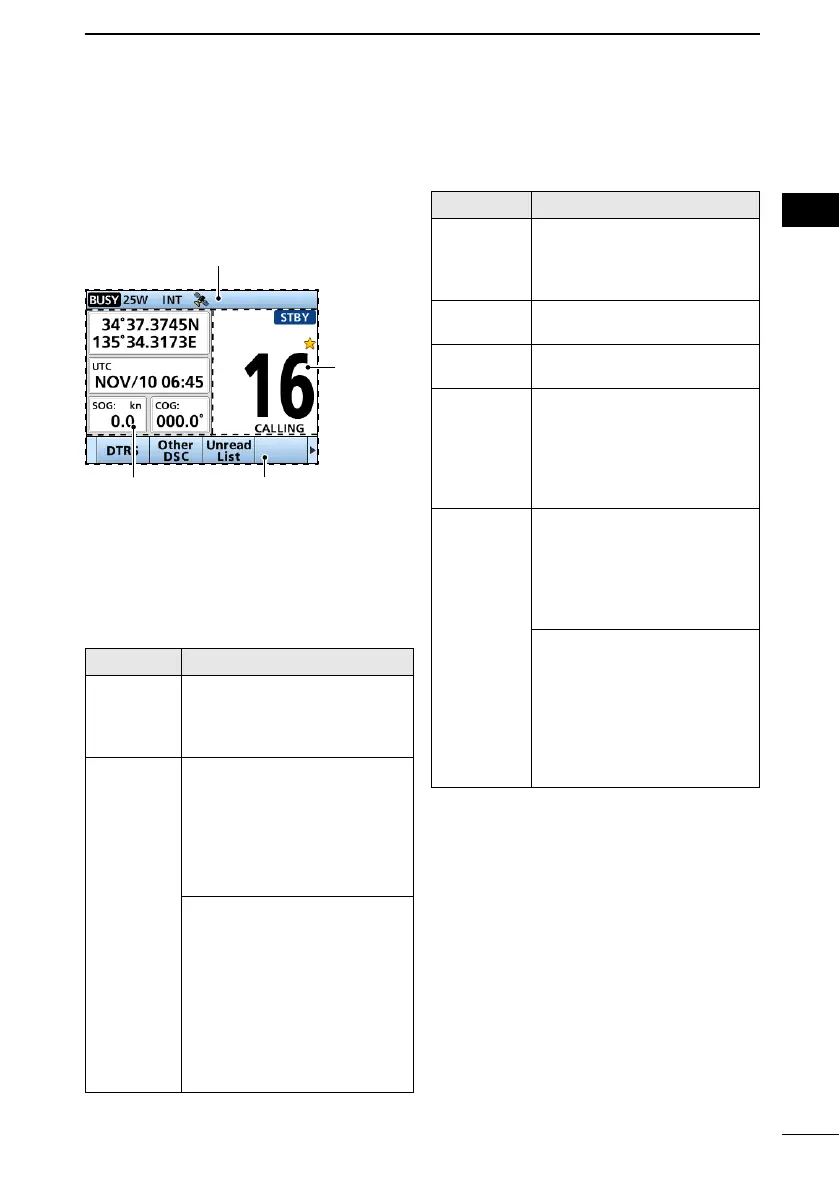
■ Function Display
(INFO screen)
Information area
Position and
Time area
Software Key area
Channel
area
L When you switch the main screen between
the INFO, the Plotter, and the Highway
screens, push [DISP] .
D Position and Time area
POSITION AREA
The current position is displayed when
valid GPS data is received, or you manually
enter your position.
Indicator Description
NO
POSITION
Displayed when a GPS
antenna is not connected or
your position has not been
manually entered.
??
Blinks every 2 seconds instead
of your position when the GPS
position is invalid.
L The last position is held for
only 23.5 hours. After that,
“NO POSITION” will be
displayed.
Blinks every 2 seconds
instead of the position after
4 hours have passed since
you manually entered your
position.
L The manually entered
position is held for only
23.5 hours. After that,
“NO POSITION” will be
displayed.


 To Next Page