21
7
DIGITAL SELECTIVE CALLING (DSC)
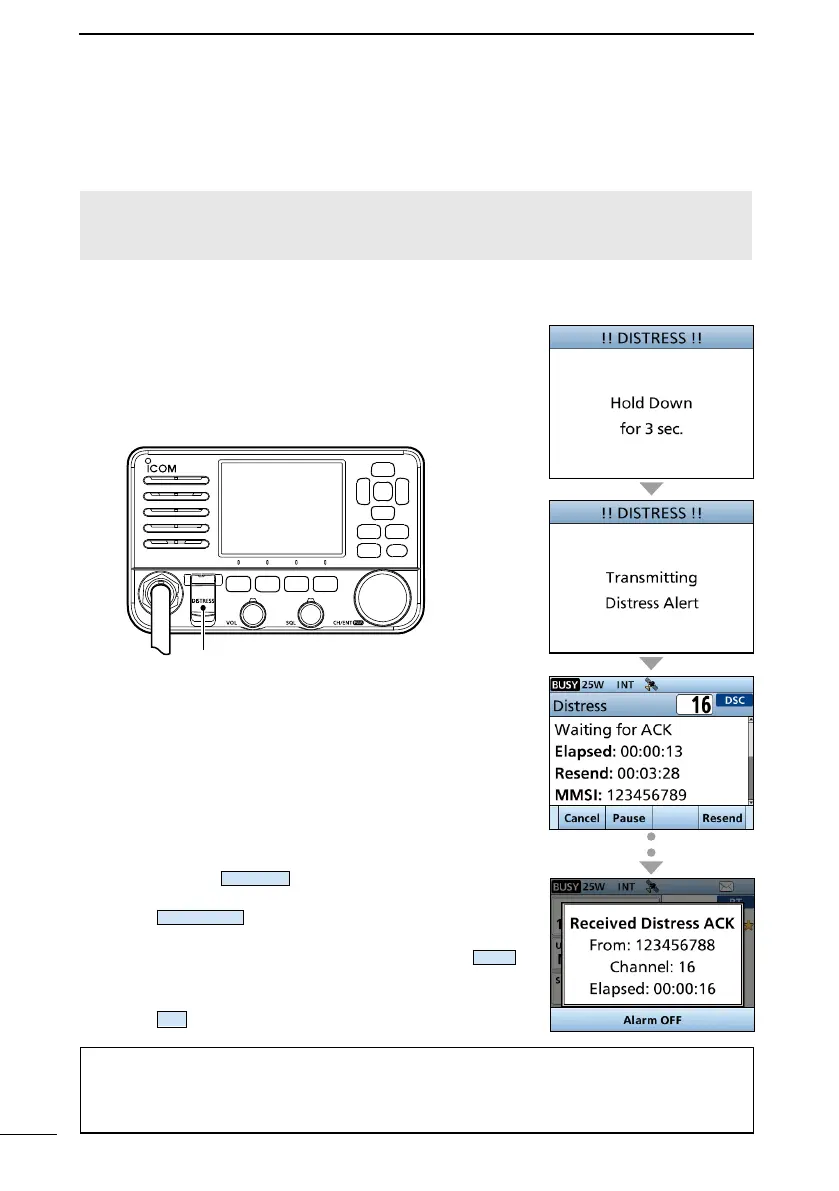
■ Sending DSC calls (Distress)
A Distress call should be sent if, in the opinion of the captain, the ship or a person is in
distress and requires immediate assistance.
NEVER MAKE A DISTRESS CALL IF YOUR SHIP OR A PERSON IS NOT IN AN
EMERGENCY. A DISTRESS CALL SHOULD BE MADE ONLY WHEN IMMEDIATE
HELP IS NEEDED.
D Simple call
1. Confirm that no Distress call is being received.
2.
and a long beep sound.
• The backlight blinks.
P W R
3.
• “Waiting for ACK” is displayed.
• The Distress call is automatically sent every
received, or a Distress Cancel call is sent.
4.
sounds. Push
to turn OFF the alarm.
• Channel 16 is automatically selected.
5. Push
.
6.
7. After you have finished your conversation, push
.
• “Terminate the procedure. Are you sure?” is
displayed.
8. Push
to return to the operating screen.
TIP:
•
•
or until you turn OFF the transceiver.
Key cover



 To Next Page