13
4
BASIC OPERATIONS
■ Setting the Call channel
By default, a Call channel is set in each Channel Group.
You can set your most often-used channel as your Call channel in each Channel Group
for quick recall.
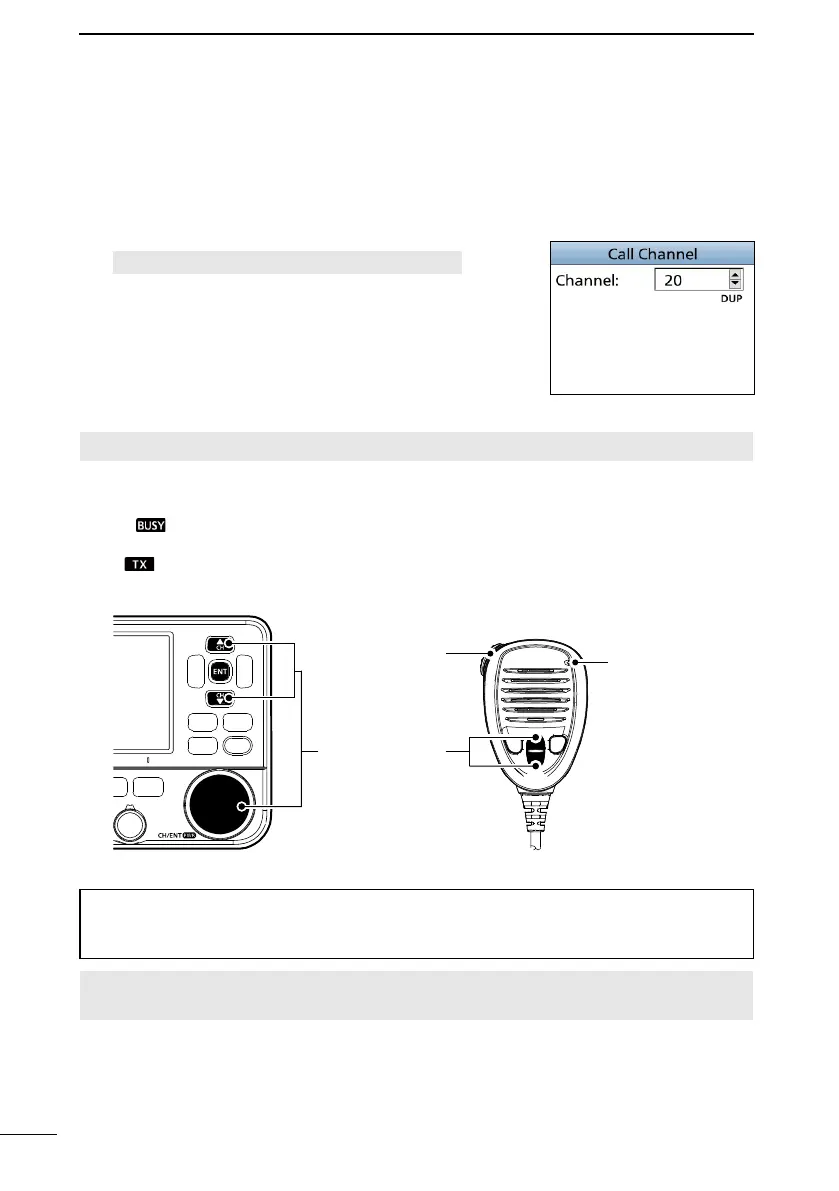
1. Open the “Call Channel” screen.
[MENU] > Settings > Radio > Call Channel
2. Push [▲] or [▼], or rotate [CH/ENT] to select the
channel.
3. Push [ENT] or [CH/ENT] to set the selected channel
as the Call channel.
4. Push [MENU] to exit the Menu screen.
■ Receiving and transmitting
CAUTION: DO NOT transmit without an antenna.
1. Push [▲] or [▼], or rotate [CH/ENT] to select a channel to call on.
• The channel number and name are briefl y displayed.
L
is displayed while receiving a signal.
2. Hold down [PTT] and speak into the microphone at your normal voice level.
• is displayed while transmitting.
3. Release [PTT] to receive.
P W R
Select a channel
Speak to the
Microphone.
Hold down to
transmit.
Release to
receive.
TIP: To maximize the readability of your transmitted signal, pause for a second after
holding down [PTT] and hold the microphone 5 to 10 cm (2 to 4 inches) from your
mouth, and then speak at your normal voice level.
NOTE: The Time-out Timer function cuts OFF transmission after 5 minutes of
continuously transmitting, to prevent prolonged transmission.



 To Next Page