EasyManua.ls Logo

Icom IC-M510E - Receiving DSC Calls (Distress)

Icom IC-M510E
132 pages
Print Icon
To Next Page IconTo Next Page
To Previous Page IconTo Previous Page
Loading...
35
7
DIGITAL SELECTIVE CALLING (DSC)
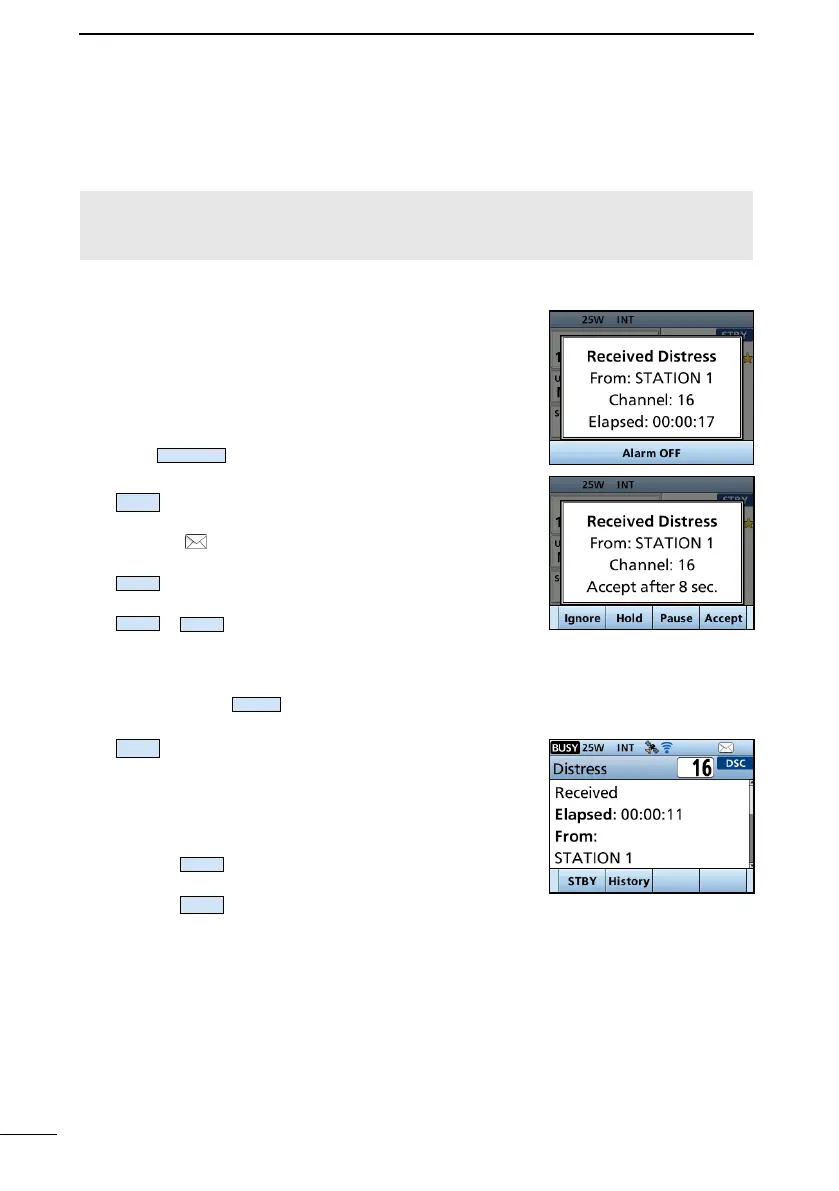
Receiving DSC calls (Distress)

calls. When you receive a call, an emergency alarm sounds.
NOTE:
󰀨

When a Distress call is received:
The emergency alarm sounds until you turn it OFF.

1. Push
Alarm OFF
to turn OFF the alarm.
2. 
Ignore

The call is saved in the DSC Log.
” blinks continuously until you display the
call message.
Hold

Main screen.
Pause
Pause
is not displayed if the “CH Auto


channel is automatically selected.
Select
Resume

The call is saved in the DSC Log.
Accept
Accepts the call. Channel 16 is automatically
selected. Monitor Channel 16 as a coast
station may require assistance. After



STBY
 
returns to the operating screen.
History
 
screen.

Table of Contents

Related product manuals