77
9
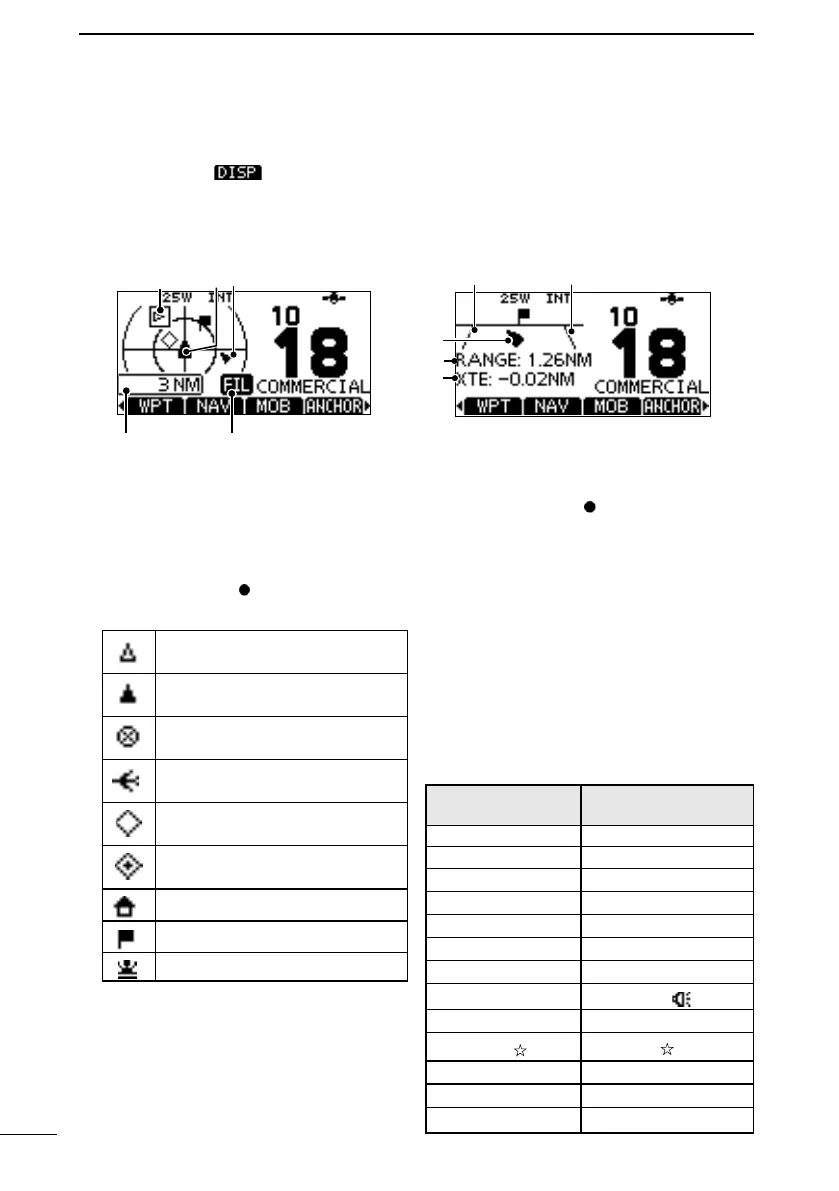
D Highway screen
1
1
2
3
4
1XTE LIMIT LINE
2YOUR VESSEL ICON
L When your vessel moves less than 2
knots per hour,
is displayed.
3RANGE
Displays the range (RNG) from your
vessel to the target.
4XTE
Displays the Cross Track Error.
■ Command microphone operation
to the
transceiver. Push
command microphone screen.
* Not usable for the USA version.
D Plotter screen
3
45
2
1
1TARGET BOX
2YOUR VESSEL ICON
L The vessel icon automatically points in
the direction your vessel is heading, in
45 degree steps.
L When your vessel moves less than 2
knots per hour,
is displayed.
3TARGET ICONS
*
Search and Rescue
(SAR) aircraft
(AtoN)
(AtoN) virtual
*
*
Waypoint: During navigation.
*
MOB
your CPA and TCPA settings (Danger
target).
4DISPLAY FILTER INDICATOR
Displayed when the type of targets on
5DISPLAY RANGE
D The Software Key names
Some Software Key names in the
transceiver and the command microphone
Example:
Transceiver
Command
microphone
Dual Watch DW
Tri Watch TW
DSC Log LOG
Target Details
Voice SBL SCBL
RX
FAV
NAME
Back light BKLT
Disp on Plotter PLOT



 To Next Page