9
SET MODE
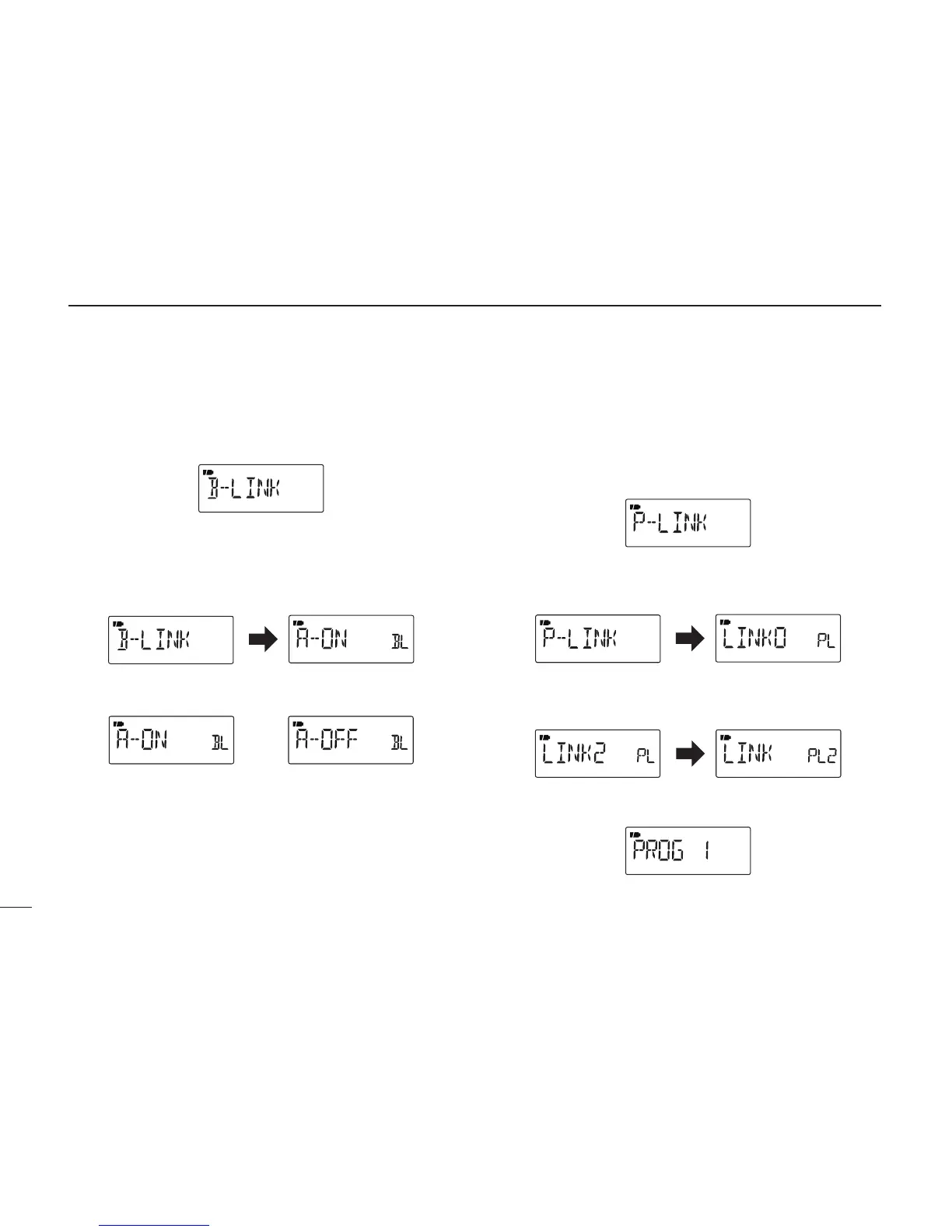
D Memory bank link function (B-LINK)
Turns the memory bank link function ON (default) or OFF.
The link function provides continuous bank scan, scanning
all channels in the selected banks during bank scan.
• Bank link setting
q Push [MODE] to enter the bank link setting mode.
w Rotate [DIAL] to select a bank that you want to change
the link setting.
e While holding down [FUNC], rotate [DIAL] to set the link
setting ON or OFF.
r Repeat steps w and e until the bank link setting is fin-
ished.
t Push [TS] to exit the bank link setting mode.
D Program scan link function (P-LINK)
Sets the program scan link function. During a program scan,
the link function performs a continuous program scan in the
selected program scan number.
Default settings for LINK0 to LINK9;
PROG 1 to PROG 24 are linked, but PROG 0 is not linked.
• Confirming a program scan link
q Push [MODE] to enter the program scan link setting.
w Rotate [DIAL] to select the program scan link number
that you want to confirm, then push [MODE].
• “LINK” appears.
e Push [MODE], then rotate [DIAL] to confirm the linked
program scans.
r Push [TS] three times to exit the program scan link setting.



 To Next Page