iDirect Satellite Router Installation and Commissioning Guide 17
iDX Release 3.3
Retrieving the IP Address using the Console Port
3.3 Retrieving the IP Address using the Console Port
Perform the procedures in the following sections to retrieve an unknown IP address and
subnet mask.
3.3.1 Connecting to the Console Port
Any terminal emulator can be used to connect to the Satellite Router console. The following
section uses PuTTY to illustrate the procedure. Once the IP address is known, telnet can be
used to connect to the console port.
Note: Evolution X1 and e150 Satellite Routers do not have console ports.
One end of the console cable terminates in a DB-9 female co
nnector. An appropriate adapter
must be used (e.g., DB-9 male to USB, DB-9 male to RJ-45) to interface with the local PC.
To Connect Via the Console Port:
1. Connect the console cable (with adapter) to an available COM po
rt of the local PC.
2. Plug the other
end of the cable into the Console port of the Satellite Router.
3. Apply power to th
e Satellite Router.
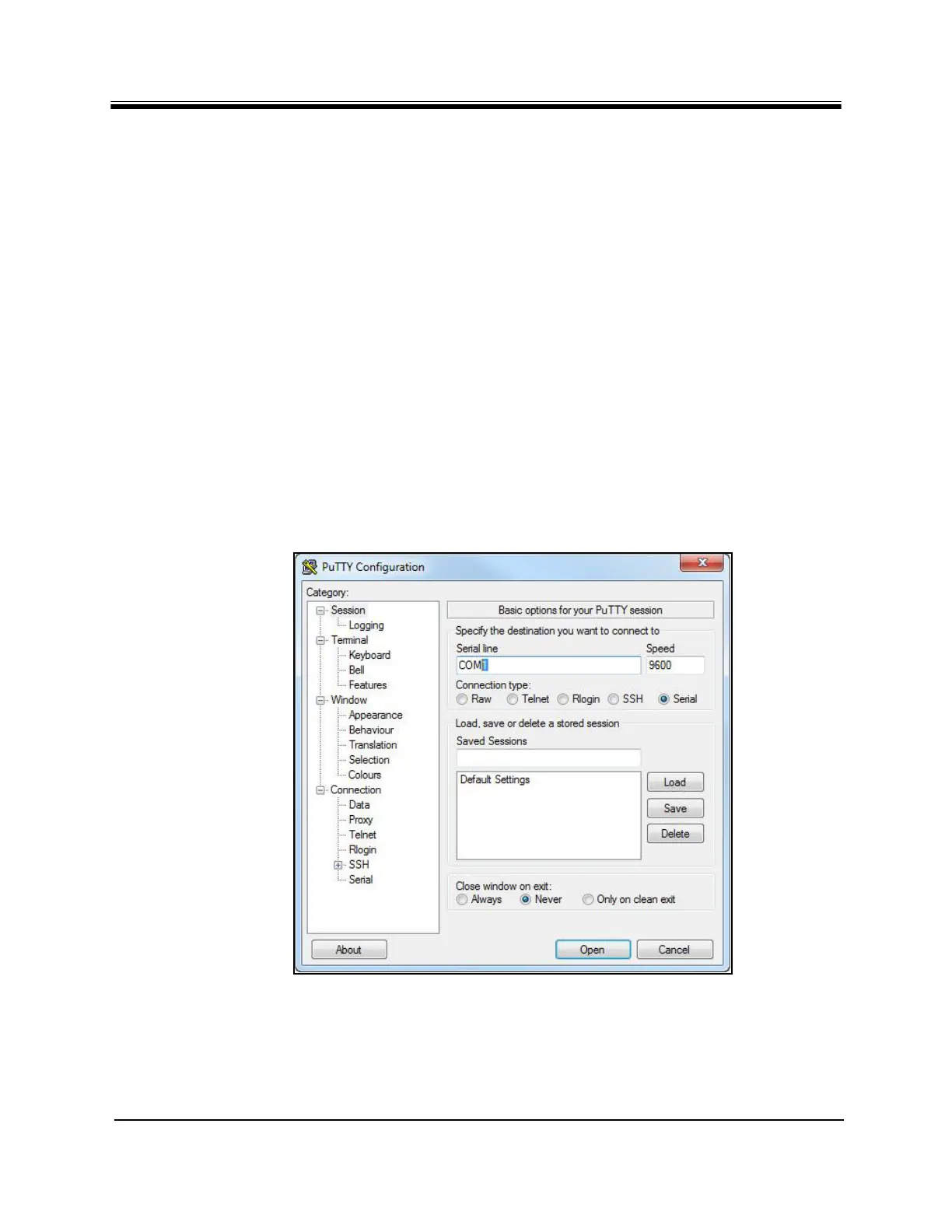
4. Open PuTTY. Co
nfirm that Session is selected in the left-hand Category window.
Figure 7. PuTTY Session Options Dialog Box
5. Under Basic Options
Connection Type, click Serial. Default or last-used values will
appear in the Serial line and Speed fields. See Figure 7.
6. Under Category
Connection, select Serial. The serial options dialog box opens.



 To Next Page