Chapter 4 Installing Software & Clearing Memory
CFInit
The CFInit procedure erases all information stored in NVRAM including all financial history and
system configuration settings. Bonus Pot and Progressive values (if any) are also erased.
When to use CFInit
The CFInit procedure is used when the terminal is unrecoverable with a Master Reset.
Procedure to perform CFInit
Warning: This step will clear ALL memory from the terminal. Once erased it cannot be
retrieved. Before performing the CFInit procedure, collect the bonus pot / progressive
values.
1. Unlock and open the main door, and power OFF the terminal.
2. Open the Brain Box door and insert the Master Reset Dongle into the Secure USB port.
3. Insert the CFInit USB Key in an available USB port on the Cabinet Controller Board.
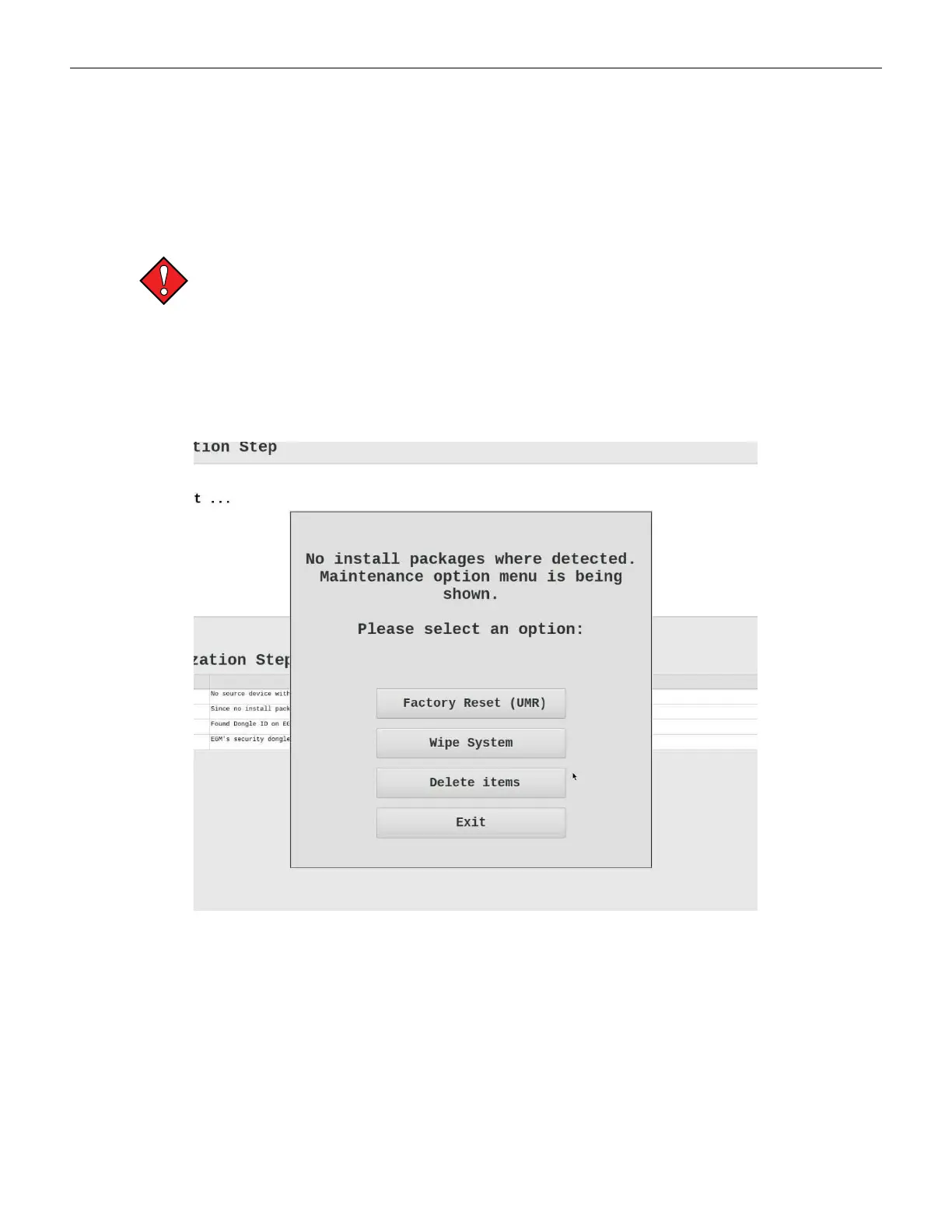
4. Power ON the terminal. The GenCFInit Maintenance Menu displays.
Figure 4-6 Maintenance Menu
Cobalt™ 27 85



 To Next Page