7 PROGRAMMING A ROBOT WITH IRC
7 Programming a Robot with iRC
The iRC - igus Robot Control enables the creation of robot programs. The method of programming is
called "teach-in programming", which works as follows:
1. Move the robot manually to the position you want to record.
2. Record the position and define how this position should be reached (linear/joint movement).
3. Repeat these steps and add digital output commands or program flow commands in between
if needed.
The integrated editor is provided for creating and editing these programs.
7.1 Program Editor
Each command of the robot program consists of one line, e.g. "Joint" or "Wait". Only commands that
control the program flow are divided into several lines, e.g. "Loop" and "EndLoop". The program
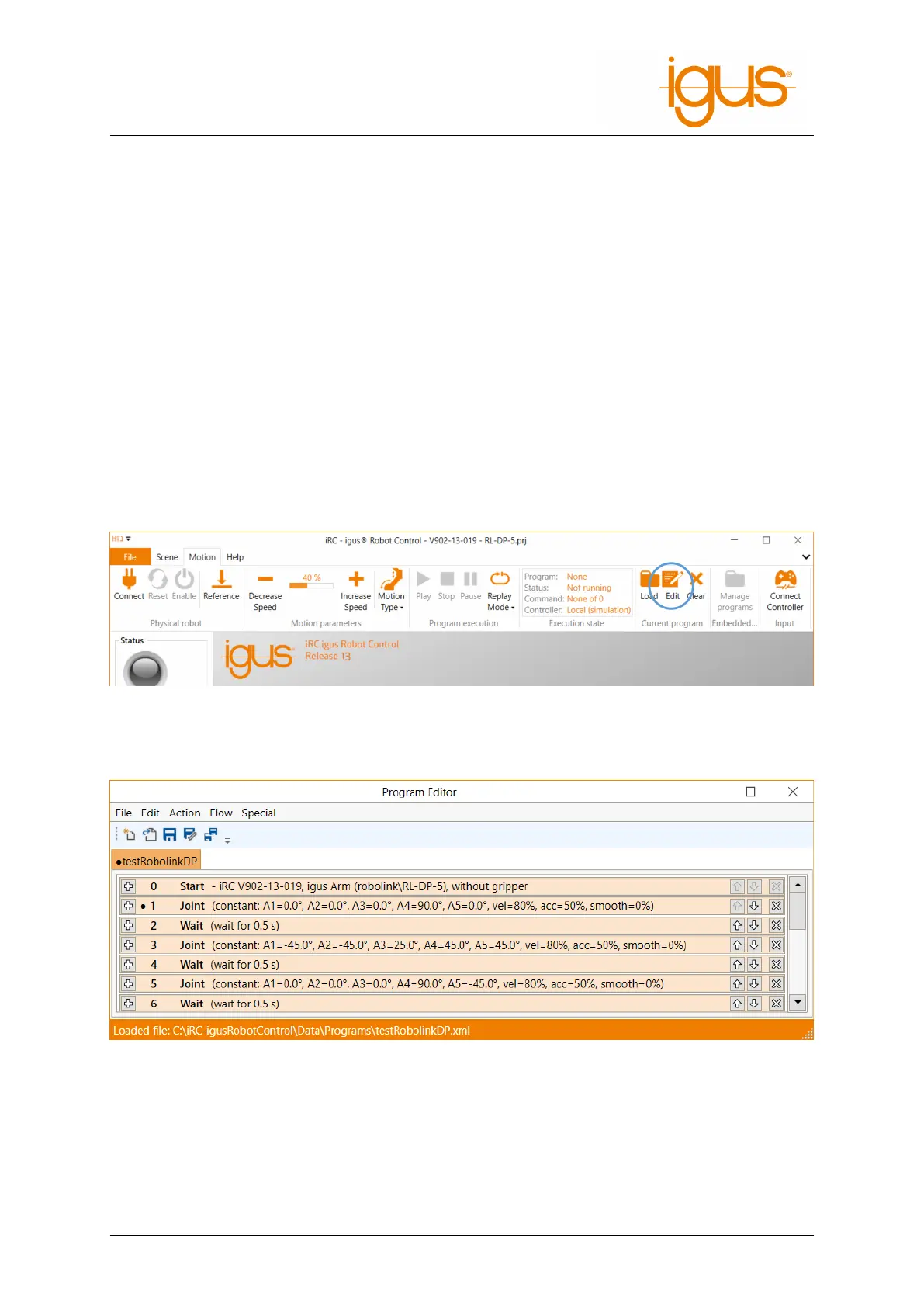
editor is opened with the "Edit" button in the "Motion" tab ofiRC.
Figure 12: The program editor is opened by clicking "Edit".
The following window opens, here with a short program:
Figure 13: Program editor with a shord programm
The following sections show how to create a program with the program editor.
7.1.1 Changing the Command Sequence
To move a command, use the arrows on the right side of the command line. Alternatively, you can
click "Down" or "Up" from the command context menu (see Fig. 14).
©2022 igus® GmbH 22



 To Next Page