MAGIS COMBO V2
22
operating modes available both with external probe and without
in relation to the dierent zones (direct or mixed).
By setting the parameters in the “Temperature control” menu,
you can adjust how the system operates.
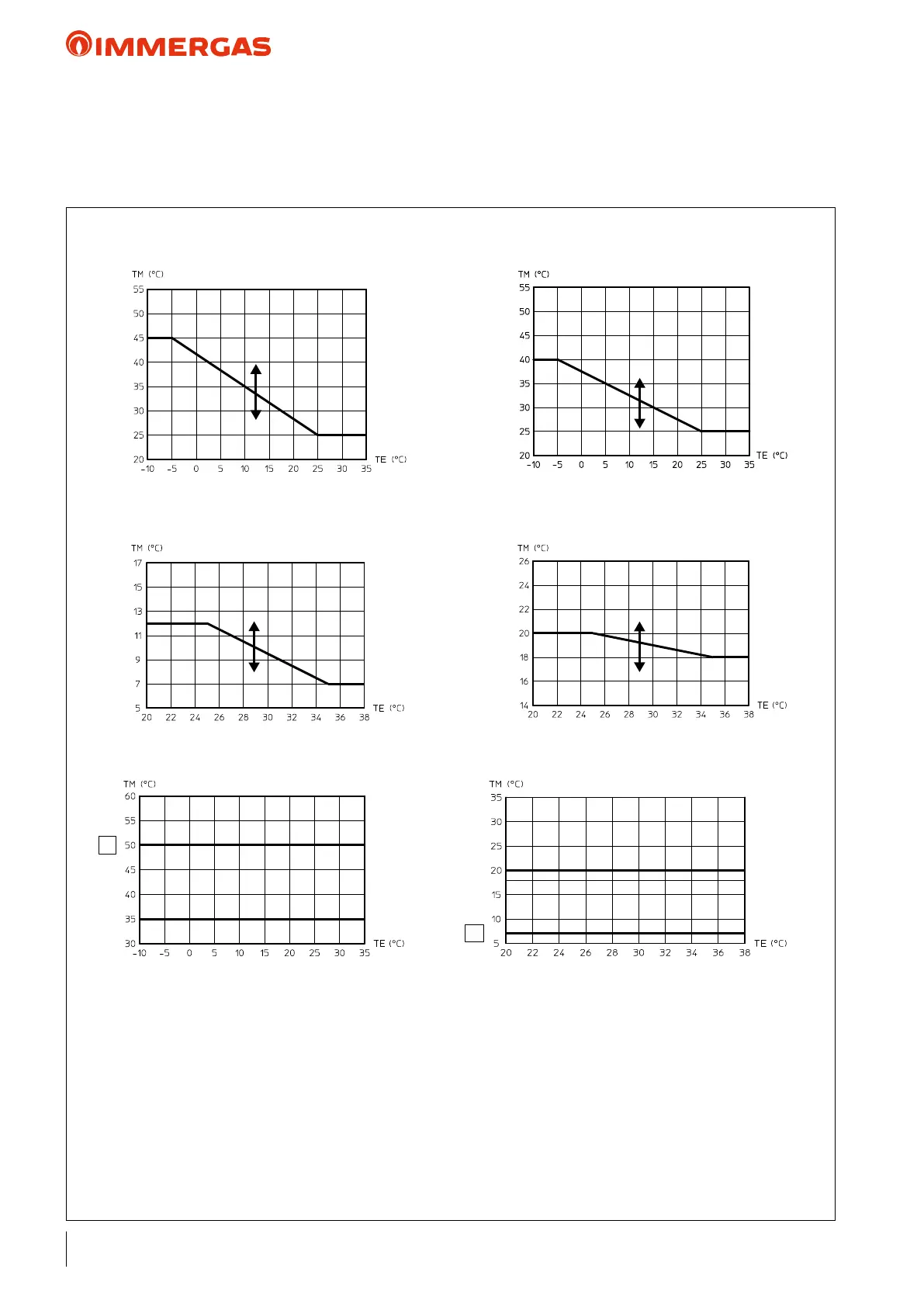
e following graphs show the default settings in the various
external probe on cooling zone 1.
U06 - Oset value compared to the curve set by the
external probe on cooling zone 2.
U14 - Zone 3 ow temperature in "User" menu
central heating mode.
U15 - Zone 3 ow temperature in "User" menu
cooling mode.
U16 - Oset value compared to the curve set by the
external probe on central heating zone 3.
U17 - Oset value compared to the curve set by the
external probe on cooling zone 3.
Zx - Heating system zone
KEY:
Rxx - "Temperature control" menu parameter
TE - Outside temperature
TM - Flow temperature
U01 - Zone 2 ow temperature in "User" menu central
heating mode
U02 - Zone 2 ow temperature in "User" menu cool-
ing mode
U03 - Oset value compared to the curve set by the
external probe on central heating zone 1.
U04 - Oset value compared to the curve set by the
external probe on central heating zone 2.
U05 - Oset value compared to the curve set by the
Zone 2 and 3 mixed ow temperature in cooling
mode, with external probe
Zone 2 and 3 mixed ow temperature in central
heating mode, with external probe
Flow temperature in cooling mode without
external probe
Flow temperature in central heating mode
without external probe
Zone 1 ow temperature in cooling mode,
with external probe
Zone 1 ow temperature in central heating
mode, with external probe
U03
R08
R09
(U16)
U04
U05
R17
R16
(U17)
U06



 To Next Page