24
English
User Controls
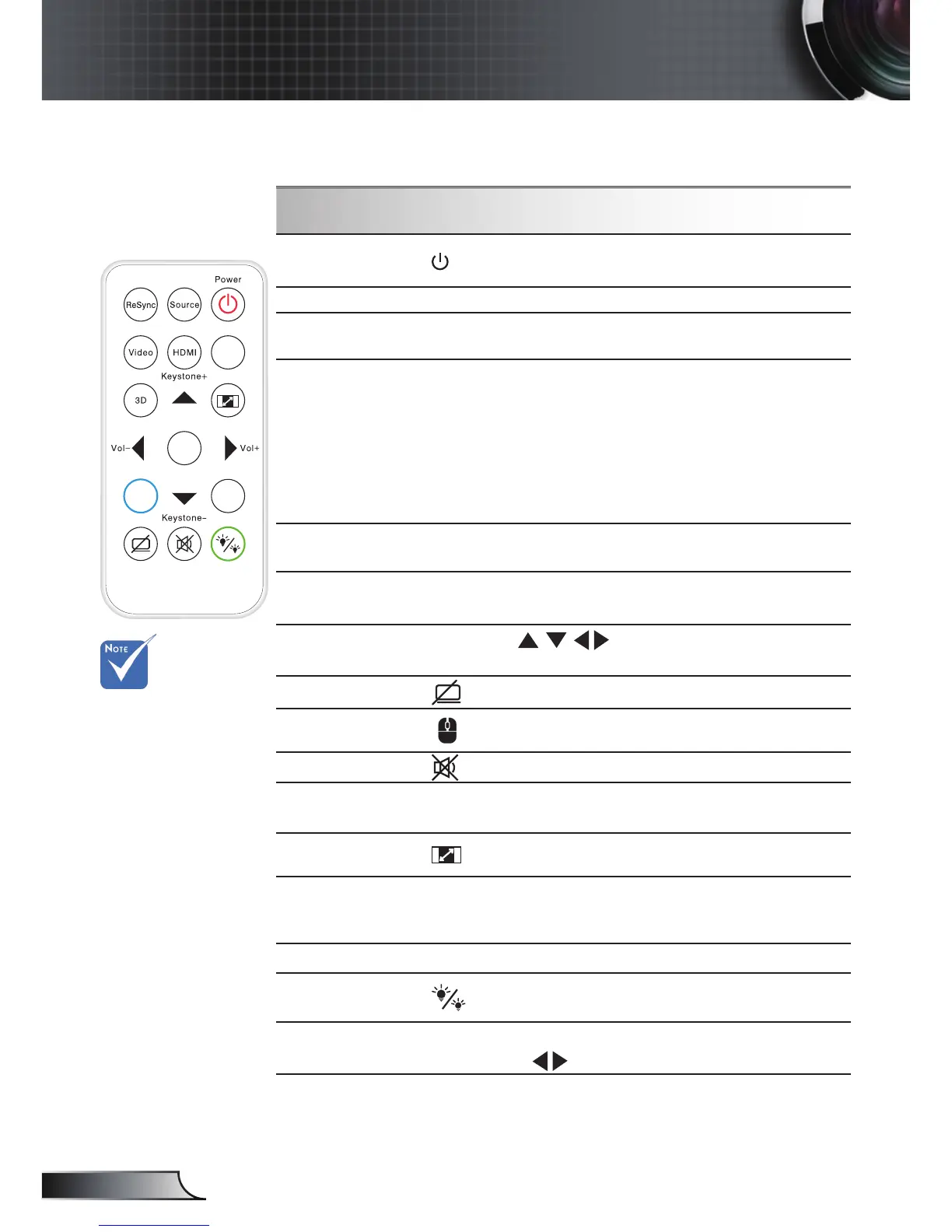
Remote Control
The interface
is subject
to model’s
speci cations.
Using the Remote Control
Power
Refer to the “Power On/O the Projector”
section on pages 13-14.
Source
Press “Source” to select an input signal.
Re-Sync
Automatically synchronizes the projector to
the input source.
Video Video Not Available
HDMI
Press “HDMI” to choose HDMI source. (For
certain model)
3D
Press the “3D” to turn the 3D OSD menu
on/o .
Four Directional
Select Keys
Use to select items or make
adjustments to your selection.
AV Mute
Momentarily turns o /on the audio and video.
Enter
Con rm your item selection and Enables
Remote Mouse function.
Mute
Momentarily turns o /on the audio.
Keystone +/-
Adjust image distortion caused by tilting the
projector.
Aspect
Use this function to choose your desired
aspect ratio.
Menu
Press “Menu” to launch the on-screen
display (OSD) menu. To exit OSD, press
“Menu” again.
Volume +/-
Adjust to increase / decrease the volume.
Brightness
Mode
Change the brightness mode: Bright->Eco-
>Dynamic. (refer to page 43)
Zoom
Zoom in on an image.
Press
buttons to alter zoom.
VGA
Ent er
Men u
Zoo m



 To Next Page