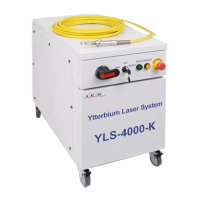
USING YOUR DEVICE | IPG PHOTONICS
Turning on the device in Local mode
8. Turn the front panel Keyswitch clockwise to the “ON” position.
9. Wait until the message “Safety Circuit Open” is displayed once the electronics initialize the laser.
10. Press the START button to turn the main power supply on.
11. Wait until the laser becomes active (The power output will be displayed as „Low‟ indicating the laser
is ready.).
12. The laser is now ready for operation. You may now select proper operation mode.
Turning on the device in Remote mode
8. Turn the front panel Keyswitch counterclockwise to the “REM” position.
9. Close contact pins eight and nine to provide remote keyswitch function.
10. Wait until the message “Safety Circuit Open” is displayed once the electronics initialize the laser.
11. Make momentary closure of pins 10 and 11 to activate the main power supply.
12. Turn Emission on (refer to Table 6: Local and Remote Control Modes).
13. Wait until the laser becomes active (The power output will be displayed as „Low‟ indicating the laser
is ready.).
14. The laser is now ready for operation. You may now select proper operation mode.


 To Next Page