IPG PHOTONICS | PULSE SHAPING SOFTWARE OPTION
Session:
Ethernet: Starts a connection to the laser over a network via a specific IP
Serial Port: Starts a connection to the laser over RS-232 serial cable via a specific port on the host machine
Offline: Starts an offline session, the user has to enter correct configuration data, or recall automatically saved
configuration from a previous laser connection
Reset: Disconnects the active session and clear all the window controls
Laser Operations:
Profile List: Obtains a list of stored pulses from the laser, list query is a semi-passive; the user must typically click
Refresh in the Profile List window to get the up-to-date list.
Write Profile: Saves current pulse to the laser, this option only saves the effective pulse, and ignores unused time
segments and LB and RB buffers.
Read Profile: Loads and display a pulse profile from the laser.
Delete Profile: Deletes a pulse that is stored in the laser
Sequence Editor: Starts the Sequence Editor
Remote Control: Starts the Remote Control
About PSG: Displays version information
Table 14: PSG Pulse Editor Sub-Menu Screens
S
S
U
U
B
B
M
M
E
E
N
N
U
U
P
P
A
A
N
N
E
E
L
L
S
S
e
e
s
s
s
s
i
i
o
o
n
n
P
P
a
a
n
n
e
e
l
l
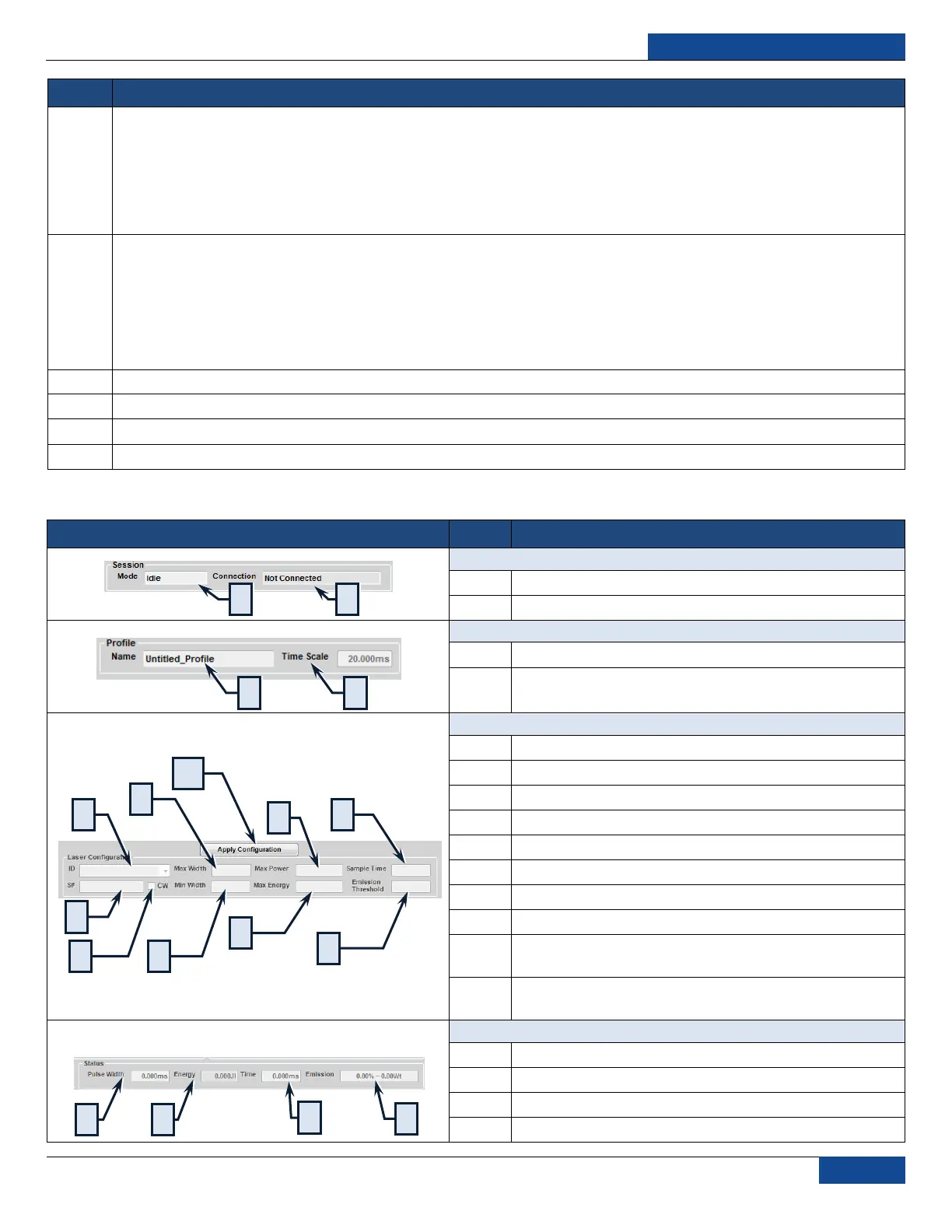
Mode: Displays the active session type
Connection: Displays the connection status
P
P
r
r
o
o
f
f
i
i
l
l
e
e
P
P
a
a
n
n
e
e
l
l
Name: Displays the name of the current pulse
Time Scale: Displays the current time scale of the chart
(0.20 – 50ms)
L
L
a
a
s
s
e
e
r
r
C
C
o
o
n
n
f
f
i
i
g
g
u
u
r
r
a
a
t
t
i
i
o
o
n
n
P
P
a
a
n
n
e
e
l
l
ID: The identification for the laser
S#: The serial number of the laser
CW: Indicates if CW Mode is active.
Max Width: Maximum allowed pulse width
Min Width: Minimum allowed pulse width
Max Power: Maximum allowed pulse power
Max Energy: Maximum allowed pulse energy
Sample Time: The minimum interval for pulse points
Emission Threshold: Emission (current) effective zero
level
Apply Configuration: Accepts change in configuration
(e.g. Switching to an Offline Mode Session)
Pulse Width: Current pulse width of the pulse in the chart
Energy: Current pulse energy for the pulse in the chart
Time: Current time coordinate of the mouse pointer
Emission: Current time coordinate of the mouse pointer



 To Next Page