IPG PHOTONICS | PULSE SHAPING SOFTWARE OPTION
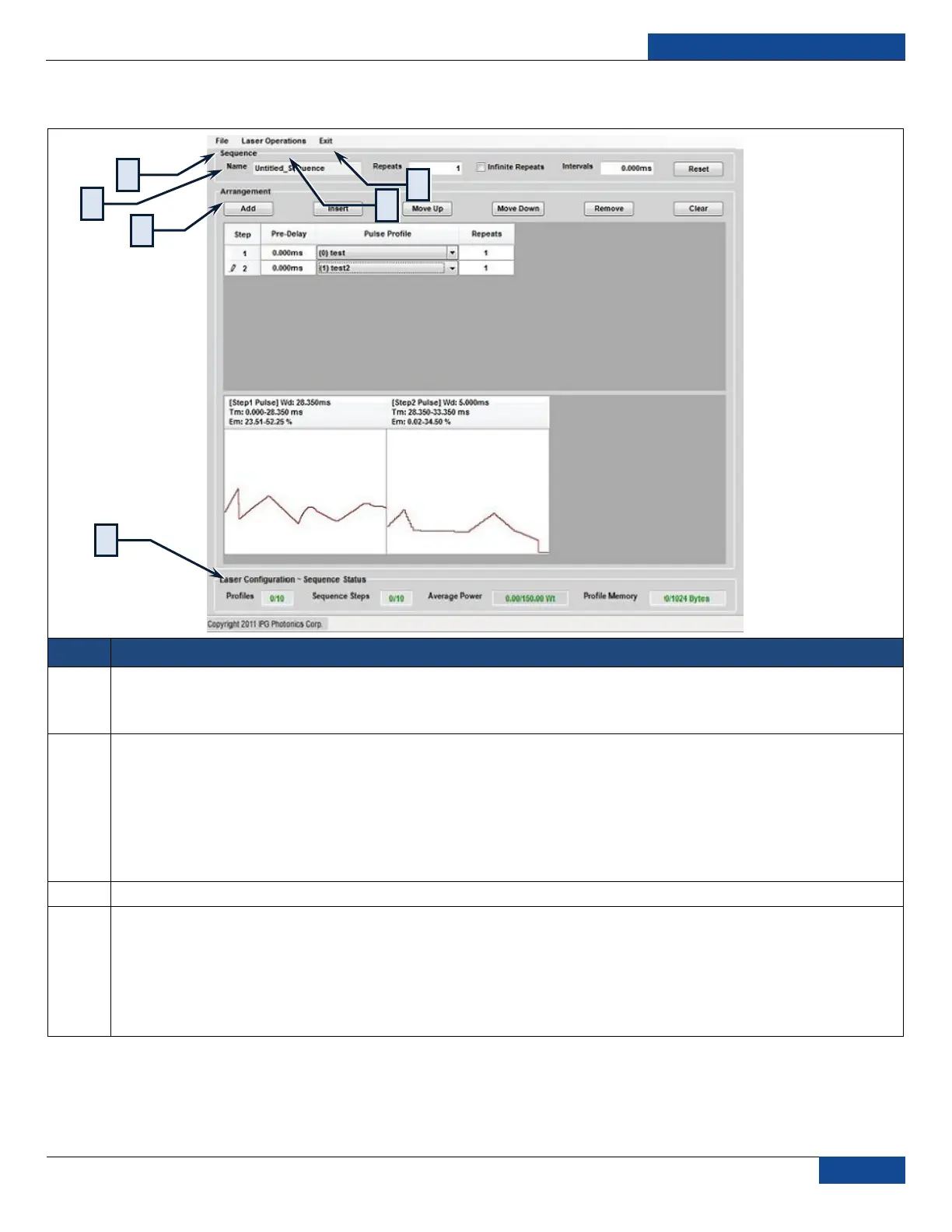
Table 15: Sequence Editor Menu Screen
File Command:
Load Sequence: Loads and display a sequence from the host machine.
Save Sequence: Saves a sequence to the host machine.
Laser Operations:
Sequence List: Obtains a list of stored sequence from the laser, list query is a semi-passive; the user must typically
click Refresh in the Sequence List window to get the up-to-date list.
Write Sequence: Saves a sequence to the laser
Read Sequence: Loads and display a sequence from the laser
Delete Sequence: Deletes a sequence from the laser
Exit: Quits the Sequence Editor and go back to the Pulse Editor
Exit Command: Quits the Sequence Editor and go back to the Pulse Editor
Sequence Panel
Name: Names of the current sequence
Repeats: The number of repeats for the current sequence
Infinite Repeats: Toggles infinite number of sequence repeats
Intervals: Sets the time interval between each global repeat
Reset: Resets all controls


 To Next Page