USING YOUR DEVICE | IPG PHOTONICS
Touch-screen Display
The touch-screen display is used for manual control from the front panel of the device and for the
indication of information about the state and settings of the device. In addition, activating certain
commands from the main window will invoke additional submenu windows. In remote mode, the touch-
screen display function is disabled and can only be used for display purposes.
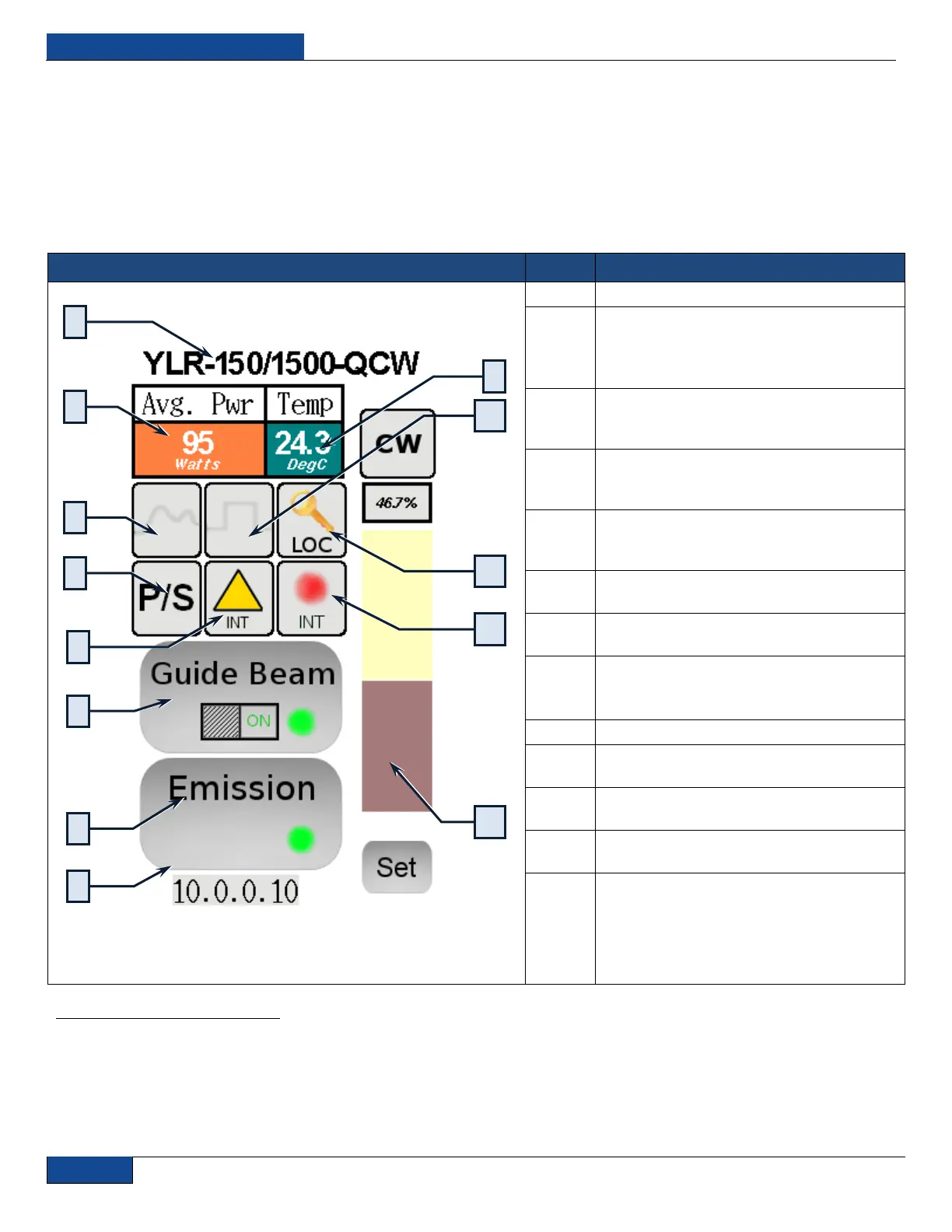
Figure 13: Main Menu Screen
Power Indication / Setting:
Touching this field will call “Setpoint” window
where you can type in the required setpoint
value
When active (inactive shown) - indicates that
the analog (external) power control is
enabled or in Pulse Waveform Mode.
When active - shows that the main supply
voltage is applied to the laser module inside
the device.
Indicates the state of the emission control:
“Internal” (hardware control disabled) or
“External” (hardware control enabled)
Touching this button will turn the guide laser
ON or OFF.
Touch this button to activate / deactivate the
emission.
IP address indication / setting.
Touching this field will call the window where
you assign an IP address to the device.
Internal Temperature Display
When active - indicates that the Modulation
or Gate Mode enabled.
Indicates the current regime of operation:
“Local” or “Remote”
Indicates the state of the guide laser control:
“Internal” or “External
Setpoint Bar: Touch “Set”, drag your finger
up or down to set the required value. Press
“Lock” when finished
1
Function described lower in table.


 To Next Page